Internal links in HTML (anchor link)
Let’s imagine a paper consisting of several chapters, presented electronically on a single web page. No matter how beautifully the text is formatted, to find the chapters, you’ll have to use the scroll bar and scroll down the page to find the desired chapter.
In this case, a table of contents consisting of hyperlinks is usually created at the very beginning of the page. In HTML, such links, which organize navigation within a single page, are called internal or anchor links.
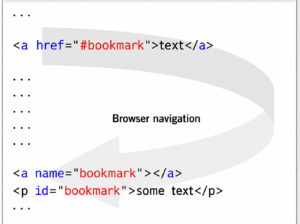
Let’s look at the mechanism for creating internal links in HTML. It consists of two steps:
- Creating bookmarks or anchors (which need to be followed by links):
Method 1:
The anchor is a tag
awith an attributename– the name of the anchor (bookmark)Method 2:
To designate an anchor
id, the attribute is added to the tag (tags can be almost anything: div, span, p, h…)
- Creating links to anchors (bookmarks):
The sharp or hash sign (
#) must be placed before the anchor name.
Solution:
1 2 3 4 5 6 7 8 9 10 11 12 13 | < ol > <!-- creating links --> < li >< a href = "#glava1" > Chapter 1 < / a >< / li > < li >< a href = "#glava2" > Chapter 2 < / a >< / li > < / ol > <!-- creating an anchor --> < h1 id = "glava1" > Chapter 1. "HTML Language - History" < / h1 > < p > Chapter text < / p > ... <!-- creating an anchor --> < h1 id = "chlava2" > Chapter 2. "HTML Page Structure" < / h1 > < p > Chapter Text < / p > ... |
Lab #0: Copy the code below. Create a new document in Notepad++, paste the code into the created page, and save it as HTML. Complete the task.
Task:
1. Change the external link to an internal one: change the attribute value hrefto "#footer", and the link text from “Cat photo” to “Go down. “
2. Remove the attribute target="_blank"from the link, as it is used to open the link in a new tab or window.
3. Add an attribute id="footer"to the element <footer>at the bottom of the page.
Code:
< h2 > CatPhotoApp < / h2 > <main> <а href = "http://cats.com/cat1.jpg" target = "_blank" rel = "noopener noreferrer" > Photo of a cat < / a> < img src = "https://bit.ly/fcc-relaxing-cat" alt = "Cute orange cat." > < p > A cat, or domestic cat (Latin: Félis silvéstris cátus), is a domestic animal, one of the most popular[1] (along with the dog) "companion animals"[2][3][4]. < / p > < p > From the point of view of scientific taxonomy, the domestic cat is a mammal of the Felidae family of the order Carnivora. Previously, the domestic cat was often considered a separate biological species. From the point of view of modern biological taxonomy, the domestic cat (Felis silvestris catus) is a subspecies of the wildcat (Felis silvestris). < / p > < p > A solitary hunter of rodents and other small animals, the cat is a social animal, using a wide range of sound signals, as well as pheromones and body movements, for communication. < / p > < p > Currently, there are about 600 million domestic cats in the world [8], about 200 breeds have been bred, from long-haired (Persian cat) to hairless (Sphynx), recognized and registered by various felinological organizations. < / p > < / main> <footer> Copyright Site about cats and kittens < / footer> |
h3.)Formatting HTML links to navigate to other documents
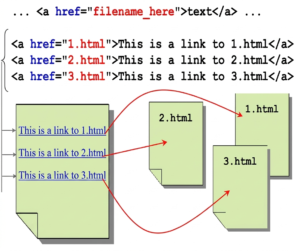
transition to another document with an anchor
Sometimes it is necessary to organize a link not just to another document, but to a specific location—an anchor—in another document.
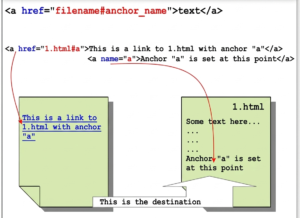
Syntax:
Execution:
File with link:
... <a href = "1.html#a" > Link < / a > ... |
File 1.html:
... < p id = "a" > Anchor < / p > ... |
Absolute HTML links
Syntax:
Let’s look at some examples:
Link to HTML file via HTTP protocol:
<a href = "http://www.365education.org/doc1.html" > text < / a > |
Link to zip file via HTTP:
<a href = "http://www.365education.org.zip" > text < / a > |
Link to e-mail via mailto protocol:
<a href = "mailto://info@365education.org" > text < / a > |
Relative path of HTML links
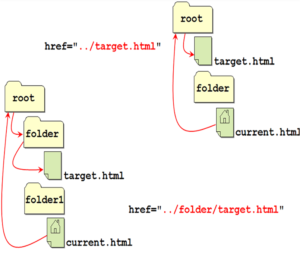
Let’s look at examples of how to format relative links correctly. In the image, the file for the link is target.html. The link itself is formatted in current.html. The hyperlink attribute must have the following value (as shown in the image) for the specified file locations.
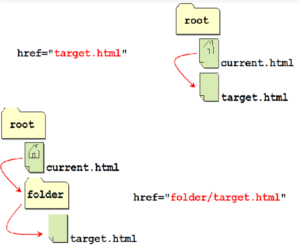
href
Let’s consider a more complex file arrangement:
In which window should I open the link?
The hyperlink tag attribute is responsible for this — target.
Let’s consider the possible values of the attribute:
_blank – opens the document in a new window
_self– opens the document in the same window
_parent– opens the document in the parent window
_top– opens the document in full screen
Changing the color of a hyperlink
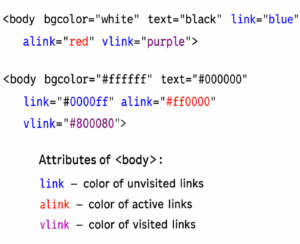
The hyperlink’s color is determined by its attributes: link, alink,vlink