
Free Online C++ Compiler
Free Online C++ Compiler
The Free Online C++ Compiler by 365education.org is a lightweight, zero-installation web platform. It allows students, developers, and educators to write, compile, run, and debug C++ code directly within any standard web browser.
Key Features & Capabilities
Zero Installation Required: Eliminates the complexity of installing compilers (like GCC, Clang, or MSVC) or heavy IDEs (like Visual Studio or Code::Blocks).
Modern C++ Standard Support: Supports modern C++ features (C++11 through C++20), enabling standard features like
autolambda functions, smart pointers, and range-based loops.Full Standard Template Library (STL): Offers full support for standard headers like
<vector>,<map>,<iostream>,<algorithm>, and<string>.Interactive Terminal Input/Output: Supports standard input (
std::cin) and standard output (std::cout) for interactive user programs.Code Editor Tooling: Features syntax highlighting, line numbers, customizable themes (light/dark mode), and basic auto-indentation.
Cross-Platform & Mobile Friendly: Accessible on Windows, macOS, Linux, ChromeOS, tablets, and mobile devices.
How to Use the 365education C++ Compiler
Using the compiler involves a straightforward process:
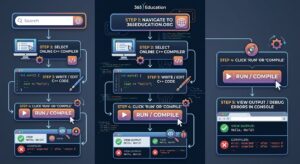
Access the Tool: Open your browser and navigate to the online compiler section on
365education.org.Write or Paste Code: Enter your C++ code directly into the main editor window.
Provide Input (If Applicable): If your program uses
std::cinor requires user input, enter the values into the provided input box/stdin field before running.Compile and Execute: Click the Run or Compile button. The compiler will process your source code in the backend sandbox and display the result in the output console below or alongside the editor.
Debug Errors: If there are syntax or runtime errors, the compiler prints standard error logs with line numbers to help identify and fix bugs.
Importance & Benefits
| Benefit | Explanation |
| Instant Accessibility | Enables immediate coding on restricted hardware, such as school computers, Chromebooks, or mobile devices. |
| Bypasses Toolchain Setup | Removes path setup, library linking, and build system configuration (CMake/Makefiles), letting beginners focus on learning logic. |
| Sandboxed Environment | Code runs in an isolated container, preventing accidental file corruption or security issues on the user’s host OS. |
| Fast Prototyping | Allows quick testing of algorithm logic, data structures, or code snippets without opening or setting up local projects. |
Practical C++ Example
To test the editor, paste this example demonstrating basic input, string manipulation, and vectors:
C++
#include <iostream>
#include <vector>
#include <string>

using namespace std;

int main() {
    string platform = "365education.org";
    vector<string> features = {"Zero Setup", "Fast Execution", "Modern C++"};

    cout << "Welcome to " << platform << " C++ Compiler!" << endl;
    cout << "Key Benefits:" << endl;

    for (const auto& feature : features) {
        cout << " - " << feature << endl;
    }

    return 0;
}
Frequently Asked Questions (FAQs)
1. Is the 365education.org C++ compiler free to use?
Yes, it is 100% free and accessible directly from your browser without mandatory subscriptions.
2. Do I need to create an account to run code?
No account registration is required to write, compile, and execute standard C++ programs.
3. Can I take user input (std::cin) in this online compiler?
Yes. You can provide interactive input via the console terminal or pre-define input strings in the editor’s stdin/input panel before pressing Run.
4. Does the compiler support third-party libraries (like Boost or OpenCV)?
Online compilers generally support all standard C++ libraries (STL). Heavy external third-party libraries (like OpenCV or Boost) are typically not included unless natively provided by the server environment.
5. Why am I getting an execution timeout error?
To protect backend server infrastructure from hanging forever, online execution environments enforce time limits (typically 5 to 10 seconds). Check your code for infinite loops (while(true) without a break condition).
6. Can I use this for competitive programming practice?
Yes. It is well-suited for practicing algorithmic challenges (from platforms like LeetCode or HackerRank), testing custom sorting/tree logic, and practicing STL operations without project overhead.