Text formatting elements
Headlines
- To place headings, there is a tag
<h>with a heading level number.
- To place headings, there is a tag
- The largest heading corresponds to the tag
<h1>, and the lowest level heading (the smallest font size) corresponds to the tag<h6>. - The base font size on the page corresponds to the heading.
<h3>:
| Heading 1 Heading 2 Heading 3 Heading 4 Heading 5 Heading 6 |
Block quote
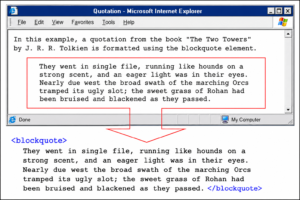
To place a quote in the text, use the tag <blockquote>:
Preformatted text
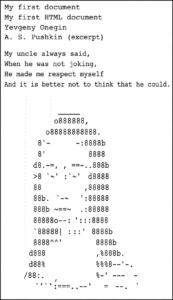
To preserve all whitespace characters in the text, you must use the <a href=”http://www.css.org/”>tag <pre>. However, please note that you cannot set a font style for the contents of this tag:
| Here I come, overseas ostrich, in the feathers of stanzas, sizes and rhymes. Hide your head, silly, trying, a burst into the ringing plumage. |
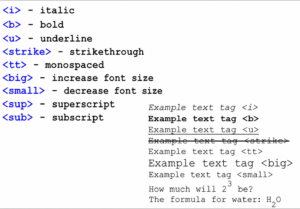
Italic, bold, underline, and other tags
Horizontal line
This element serves to separate certain structural elements of the text from each other. It can also be used simply as an aesthetic element in the document’s design:
| Horizontal lineLorem ipsum dolor sit amet. |
Tag attributes
- To clarify the action of some tags, they are supplemented with attributes.
- So, the horizontal line tag under consideration has additional properties expressed in attributes
- size — line width,
- width — line length,
- align — line alignment
and others.
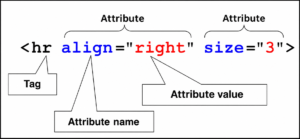
- Attributes are specified in the opening tag in the form attribute=value.
- There may be several attributes, in which case they are specified separated by spaces, and their order is practically unimportant.

Body tag attributes
Let’s start by looking at the two main attributes of the tag. body:
- bgcolor — page background and
- text — the color of the text on the entire page.
To specify a color, you can use the color names in English or the color code in hexadecimal notation.
< body text = "#00ff00" > |
or
< body text = "green" > |
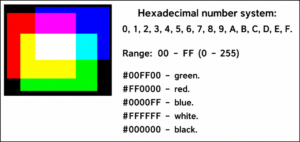
Before specifying a color in the 16-point system, the “sharp” symbol must be included. #
To select a suitable color, go to the online color palette page.
Logical text formatting tags
HTML contains tags that serve a logical or semantic purpose rather than an aesthetic purpose. This means that most of them visually affect the content, highlighting it or emphasizing it in some other way. However, these logical formatting tags were created to emphasize the semantic characteristics of the content :
For example, the del tag makes the content strikethrough, while indicating the purpose of deleting the text primarily.
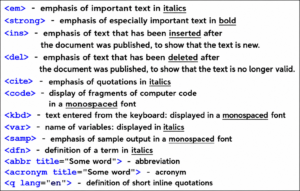
Paragraph formatting elements
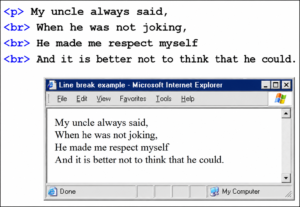
- To move to another line of text, use the empty <br> element.
- To highlight a paragraph within text, the <p> element is used, the content of which is the paragraph itself. Indents are added before and after the paragraph, but there is no indentation.
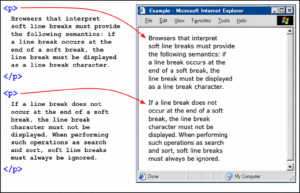
Example of using <br> and <p> tags together:
Download the text from the link below. Using an editor or Notepad, format the document properly, adding any tags you deem necessary (headings, font formatting tags, and paragraph tags).Desired result: