
Free Online Python Interpreter (Compiler)
Free Online Python Interpreter (Compiler)
The Free Online Python Interpreter (Compiler) by 365education.org is a web-based tool designed to let users write, edit, and run Python code directly in a web browser without installing Python, setting up virtual environments, or configuring local Integrated Development Environments (IDEs) like VS Code or PyCharm.
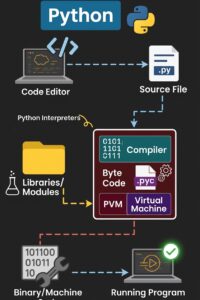
Key Features & Capabilities
Zero Installation Required: Access a complete Python runtime directly through your web browser on desktop, tablet, or mobile.
Dual-Pane Interface: A side-by-side or stacked layout featuring a code editor on one side and an interactive execution terminal/console on the other.
Standard Input (
stdin) Support: Supports programs usinginput(), allowing users to test interactive console applications seamlessly.Syntax Highlighting & Formatting: Helps identify keywords, strings, integers, and syntax errors in real time.
Embed & Share Support: Powered by lightweight embedding tech (frequently using platforms like Coddy or Pyodide under the hood), making it suitable for integrating into educational content, blogs, and tutorials.
How to Use the Interpreter
Why Online Interpreters Are Important
Ideal Use Cases vs. Limitations
Best Used For:
Learning basic Python syntax (variables, loops, functions, data structures).
Rapidly testing isolated logic, algorithms, or snippets.
Solving coding challenges and homework assignments on restricted devices (e.g., Chromebooks).
Not Suitable For:
Heavy Data Science: Memory-heavy tasks using large datasets (e.g., complex Pandas/PyTorch workloads).
GUI & Game Development: Developing applications requiring local graphical windows (e.g., Pygame, Tkinter).
Local System Administration: Scripts designed to interact directly with your local machine’s file system or OS automation routines.
Frequently Asked Questions (FAQs)
1. Do I need an account or subscription to use the interpreter?
No. The interpreter is completely free to use with no account creation, sign-up, or credit card required. You can simply load the page and begin typing code right away.
2. Does this online compiler support the input() function?
Yes. The editor includes a designated Standard Input (stdin) area. You can enter any expected inputs (one line per input) before running your program so that calls to input() read them sequentially during execution.
3. Can I run data science packages like Pandas or NumPy?
It depends on the specific runtime build. Basic data structures, math functions, and standard Python libraries (like math, random, datetime) work out of the box. For heavy external libraries like pandas, numpy, or matplotlib, standard WebAssembly-based runners (like Pyodide) support them, but resource-heavy tasks may perform slower compared to a local machine.
4. Will my code run on mobile devices or Chromebooks?
Yes. Because the entire execution environment runs inside standard modern browsers (Chrome, Safari, Firefox, Edge), it is fully functional on Chromebooks, iPads, tablets, and smartphones without needing terminal access or admin rights.
5. Is my code stored or saved automatically?
No. Online sandboxes operate temporarily in your active browser session. Once you refresh or close the tab, unsaved code may be lost unless you copy and paste your script locally or use any provided export/share links.
6. What version of Python does the interpreter run?
It runs on Python 3 (typically Python 3.10 or newer). Python 2 code using older syntax (such as print "Hello") will result in syntax errors.
7. Why am I getting an execution timeout error?
To keep server and browser resources stable, online interpreters place safety limits on program execution time. If your script contains an infinite loop (e.g., while True: without a break) or a very heavy calculation, the system will automatically terminate the process after a few seconds.
For a foundational understanding of how Python executes code line-by-line using a REPL or interpreter environment, this walkthrough provides a clear visual explanation: