Cache
A cache is a layer of memory within a device or program. It’s a high-speed buffer storage that stores frequently accessed data. Typically, the cache is small and stores temporary information or information that is accessed most frequently.
The process of placing information into a cache is called caching.
Computers and mobile phones have caches, and programs, such as browsers and web applications, also have separate caches. Cache is important because it allows for faster access to frequently used data, optimizes, and speeds up performance.
The hardware cache of a device—a server, computer, or phone—is a dedicated memory area with a specific architecture. Application and service caches are most often software-based: they are stored in regular memory, in folders on the device, or on separate servers. Access speed is optimized using code.
Who uses cache?
Broadly speaking, anyone with a computer or mobile device uses a cache. All these devices have a hardware cache, which is used by the system, and software caches for applications. For example, a browser cache allows you to load pages faster.
In a narrow sense, cache management is the responsibility of developers creating an application or program. They may directly write caching logic and determine the file storage order. Systems or network engineers, architects, designers, and other specialists may also work with cache at various levels.
What is cache for?
The cache stores data that a program or device accesses frequently. Without a cache, this data would have to be read from regular memory or, in the case of the web, downloaded from the network. This results in longer load times and greater memory or network usage. Moreover, there can be a lot of such data: without a cache, the performance of computers and their applications would be significantly slower.
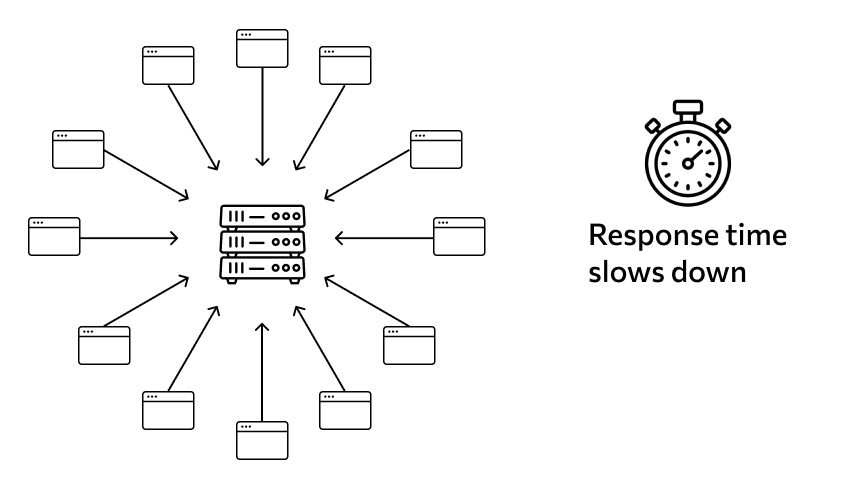
Therefore, most applications that handle large data sets use a cache. These include browsers, various instant messengers, programs that work with the network or information, database management systems, and others.
Hardware cache is present in almost all computer devices: without it, the operating system cannot function properly.
How does a cache work?
The cache’s internal structure resembles a database with a simpler structure and its own unique characteristics. It consists of a list of records containing information. The data in these records is a copy of the data stored in “regular” memory or on servers. Each record has its own identifier, or tag, indicating where in “regular” memory the same information is located.
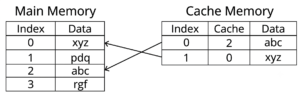
When a system or program needs data, it finds it by identifier. First, it checks the cache: if a record with a matching tag is found in memory, the information is retrieved from there. This is faster. If the cache doesn’t have the data, it then needs to access “regular” memory or the server using the same identifier, and then store the data retrieved from there in the cache. This way, the next time it’s accessed, it’ll be faster.
Caching and eviction algorithms vary across implementations and will be discussed later.
Types of cache
Hardware implementation is used by the processor, the system, and various low-level, i.e., hardware-related processes. Cache memory differs from conventional data storage at the physical level; it is fundamentally different.
A software implementation is used by programs and services. Each application has its own. It’s essentially code that describes how to place, cache, and store data. The information itself resides in standard memory locations: on a hard drive, SSD, or server. At the hardware level, such a cache is practically no different from a simple data storage system.
When discussing caches in the context of web, databases, and other similar systems, we usually mean software caches. Hardware caches are handled by engineers and low-level programmers.
Hardware cache device
Processor cache. A processor has a concept called clock frequency—the speed at which operations are performed at the physical level. Modern technology operates at very high clock frequencies, but constant access to “regular” memory would negate that speed. To improve efficiency, processors incorporate a cache. At this level, it is also called super-random access memory (SRAM) and is designed differently from a physical perspective. We won’t delve into complex technical details, but suffice it to say that accessing any data cell in such memory typically takes the same amount of time.
A unique feature of cache memory is that it’s volatile. This means that this cache is maintained only while the device is powered on. If you turn off the computer, the contents of this memory are cleared, just like RAM. After turning it on again, the cache contents will be unpredictable.
Processor cache is typically divided into levels, from level one, the fastest, to level four. A given processor may have fewer levels, but not more. Most devices have only three levels.
External device cache. External storage devices, such as hard drives, can also have a hardware cache. It also provides faster memory access. Furthermore, when accessing an external drive, the system itself can use part of the computer’s RAM as a “disk cache.”
Software cache device
An application’s software cache is described by code. Cached data is written differently, stored in special data structures, and accessed using specific optimized algorithms.
Data Writing Features. Information is written to the software cache in one of two ways:
- end-to-end – first, the received information appears in the main memory, and then is duplicated from there into the cache;
- deferred – data is first cached, and then, after a certain period of time or when evicted, it is transferred to main memory.
Cache storage structures. Cached data is typically stored using software structures with faster access than standard files or variables. These are most often associative arrays or hash tables—you can read more about them in the relevant articles. In smaller programs, these structures can be defined as variables, but more often they represent a simple database in the device’s memory. They can also be separate files and folders where information is stored.
Associative data structures are used because they allow storing key-value pairs, where the key can be a number, text, a hash, or something else. Access to them is performed using special algorithms, making them faster.
Caching algorithms. One of the characteristics of a cache is that it’s a relatively small area of memory. If it becomes too large, it begins to take up too much space, and performance may degrade. Therefore, the size of the software cache is limited. And if it becomes full, eviction algorithms are triggered—some information is “thrown out,” and new information is written in.
Several algorithms describe insertion and eviction. The four most well-known are:
- MRU – removes the data that was last used;
- LFU – the data that is used least often is evicted;
- LRU – data that has not been accessed for the longest time is evicted;
- ARC is a combination of the two previous types.
There’s a theoretical algorithm that’s impossible to implement in general: the least useful information should be discarded. It’s called the Beladi algorithm. Implementation is impossible because a computer can’t predict which information is more or less useful. Existing algorithms approximate the theoretical algorithm depending on the specific operating conditions of a particular program.
Examples of software cache
These are just a few examples. The scope of cache memory as a concept is much broader; we’ve only provided a few illustrative examples.
Browser cache. The browser opens websites. Simply put, to display a page properly, it downloads information from its server and displays it to you. This process takes time and resources: it needs to access the network, receive a response, download, and display the content. Therefore, to speed up loading, some data is cached.
A browser cache is typically a folder within the directory where its files are stored. The cache stores local copies of certain data from websites you’ve visited. The exact data varies by browser, but it typically stores large, rarely changing information, such as images, video clips, and graphical interface elements. Visiting a website whose data has been cached will allow you to access it more quickly without actively downloading heavy data from the internet.
Sometimes your browser cache needs to be cleared—for example, if it cached a page that contained an error and now consistently shows it as an error. This can be done through your browser’s settings.
Network cache. This is typically used by large resources accessed from different parts of the world. At the lowest level, everything that happens in computing is electrical impulses, and these impulses have a finite speed. Therefore, if a computer in one part of the world wants to access a computer in the opposite hemisphere, the data will travel longer.
To solve this problem, CDNs (content delivery networks) are used. These are distributed systems consisting of a large number of devices located around the world. Essentially, it’s a cache with data stored in different locations.
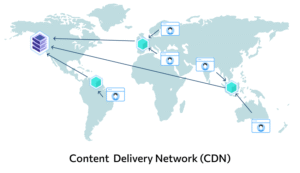
This caching approach allows websites to load quickly from anywhere in the world, even across different countries and continents. CDNs are managed by dedicated specialists, and the average user has no control over their use.
Server-side website caching. In web development, caching isn’t limited to browser-based caching. Website owners themselves have another way to speed up page access. This involves using a dedicated cache server: it caches content that matches the most popular queries. As a result, frequently visited pages will load faster, which is beneficial for many reasons. It makes the website more user-friendly, improves its ranking, and enhances the user experience.
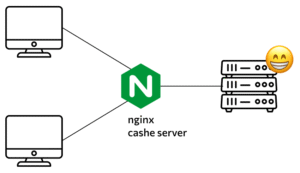
The server cache is not accessible to regular users. It may be accessed by back-end developers and other specialists working directly with the website’s internal components.
Memory-managed program cache. Applications can use a cache as a way to store their internal data that requires quick access. For example, this could be intermediate results of calculations or actions that will be needed later, or parameters that need to be passed to various modules.
An application cache can be a folder with files on the device, or it can exist within the code, in which case it is some kind of variable or data structure.
Advantages of cache
Cache is essential for modern computers, servers, web applications, and other systems. Without it, the internet and IT in general wouldn’t function properly. Here are the benefits of using it.
Improved performance. With a cache, applications run faster and more efficiently: they don’t have to constantly waste time loading data, as they can simply retrieve it from the cache. Otherwise, everything would constantly freeze and require long waits.
Load reduction. Since the cache reduces the number of accesses to the primary storage, the load on it is reduced. This is especially important for servers, as it helps avoid failures and sharp performance drops due to peak loads.
Increased throughput. As a consequence of all of the above, the throughput of operations increases. This is because reading and writing data are time-consuming operations and can only be performed in a limited number at a time. Cache has a much higher throughput than regular memory, so numerous operations can be performed at a single time, much more than when working with a server, database, or other storage.
Optimization. Imagine that some data is accessed more frequently than others. This could be a particularly popular website page, some information from an application, or something else. Storing this data in regular memory would create unnecessary load and reduce access speed. Caching, however, allows you to optimize access and distribute the load more evenly.
Lower costs. This is another advantage that’s important for the web. Using a server-side or network cache means the service needs to pay for fewer resources for the database or servers. While the cache itself isn’t free, it’s still cheaper than without it.
Disadvantages of cache
- Hardware cache is a very expensive structure to manufacture. Moreover, it’s usually volatile: if the device is turned off, all data is lost.
- A software cache won’t solve all memory issues. It’s limited in size, and its specific algorithms don’t allow it to be stored indefinitely. It’s not suitable for long-term storage of important information.
- There is no single optimal caching algorithm for all situations. Therefore, developers select the algorithm based on the specific program’s goals: it is usually quite specialized and not suitable for a wide range of tasks.
- It is not possible to cache the “entire Internet,” or all memory – the cache size is quite small.
These aren’t downsides in the traditional sense: everyone uses cache anyway. It’s just important to understand that it’s a specialized tool with its own specific scope of use.
How is the cache implemented?
Hardware cache is implemented at the semiconductor and circuit level. Software cache is much more diverse.
Caching in an application can be implemented by storing data in special structures existing within the code or by saving information in separate files and folders. Accordingly, the code describes how data is added to and removed from the cache.
In the case of network infrastructure, specialized services are typically used. They provide a website with cache memory capacity or a cache server for a subscription fee.
APIs and frameworks that implement various types of software caches are also used in development. These tools eliminate the need to write an implementation from scratch, and learning the relevant technology is required to get started.
How to get started with cache
To write your own implementation of a software cache in its simplest form, you’ll need to study its populating algorithms and data storage features. Then you’ll be able to create code that implements the simplest possible cache.
More complex solutions will require the use of frameworks and related technologies. And when creating a web architecture, you may need to rent a caching server for the site or a database—but this is a more advanced level, handled by resource owners and senior specialists.
Explore More IT Terms
#
- Using an integrating factor
- Equations in total differentials
- Bernoulli's equation
- Linear differential equations of the first order
- 10 Mixed C++ Challenges to Test Your Skills
- 11 Tricky Non-Technical Questions to Ask in a Recruiting Interview
- 50 Terms Every Programmer Should Know
- 52 Java Thread Interview Questions
- 7 Levels of Using the Zip Function in Python
- 7 Python Code Bugs You Need to Fix
- 70+ Free Resources for Learning Programming
A
- A Comprehensive Guide to HTML and CSS
- A Comprehensive Guide to MODX CMS
- A computer science question tests your ability to work with IP addresses and network masks
- A Guide to SQL Query Formatting for Beginners
- A/B testing
- Abstract Data Type (ADT)
- AES Encryption Algorithm: How It Works and Where It's Used
- Agile
- Algorithm
- Algorithm Analysis
- Algorithm Complexity-Key Points
- Algorithm complexity: deep parsing O(log n)
- Algorithm vs. Program
- Algorithms and Data Structures in C#
- An overview of the C # programming language
- An overview of the Python programming language
- Anaconda Python
- Android
- Android App Bundle
- Android SDK
- Angular
- Ansible
- Apache
- Apache Airflow
- Apache Kafka
- Apache Tomcat
- App Store
- AppCode
- Applications of microcontrollers: From simple circuits in electronics to complex systems
- Applications of the derivative
- Arduino: How to Program It: Basics for Beginners
- Array-based stack
- ArrayList
- ASCII
- ASP.NET
- Assembly Language Lessons
B
C
- C++ Lessons
- Cache
- Calculating Memory Capacity
- Character sets and encodings
- Characteristics of a good Algorithm
- Circular singly linked list
- Combinational Circuits Solved Questions
- Compiler
- Complexity of algorithms-Tutorial
- Constants
- Creating a Table in HTML
- Creating Forms in HTML
- Creating Lists
- Cybernetics and informatics
- Cycles
D
- Data Analytics: applications of data analysis in companies
- Data Engineer - Who is it, what does a data engineer do, and an overview of the profession
- Data modeling: what it is, types, and process steps.
- Data preprocessing: a complete guide for beginners and professionals.
- Data structure
- Data Structures and Algorithms (DSA)
- Data types vs. Data structures
- Database Tests with Answers
- Deep Learning
- Defining Aliases
- Defining Arrays
- Deque
- Detailed articles and tutorials on PHP
- Developing a Website from Scratch
- Differential Equations
- Differentiation of functions
- Digital data: understand the importance of this asset for businesses.
- Double integrals
- Doubly linked lists
- DSA Tutorial
E
F
G
H
- Handling errors and exceptions
- Heads or Tails? How Probability Theory Is Used in IT
- History of the development of computer science
- Homogeneous equations
- Homogeneous vs. non-homogeneous structures
- How to effectively organize your workflow
- How to Learn Java: Tips for Beginner Developers
- How to Learn PHP: A Beginner's Guide
- How to Use S3 Storage in Kubernetes with CSI
- HTML
- HTML and CSS: Definition, Application, and Operating Principles
- HTML and CSS. Layout from Scratch: What to Learn, Where to Learn, and How Long Will It Take?
- HTML Frame Structure
- HTML Link Formatting
I
- if..else construction
- Infinite sequences and series
- Information properties
- Inheritance in Java: A Complete Guide to Principles and Implementation
- Inserting an Image
- Integration of functions
- Interactive Python Tutorial – Learn Programming from Scratch
- Interpreter
- Interview Problem: Finding a Deleted Element in O(N)
- Interview Scare: The FizzBuzz Challenge
- Introduction to C++
- Introduction to Machine Learning
- Introduction to Networking | Network Fundamentals Part 1
- Introduction to Number Systems (Binary, Octal, Hexadecimal) | Math for CS Foundations #1
- IT Specialist Resume (CV)
J
K
L
M
- Machine Learning
- Machine Learning Basic Tool: NumPy
- Machine Learning Basic Tool: Pandas
- Machine Learning Mathematics
- Mathematics for programmers: what is really needed?
- MD5 encryption algorithm: What is it and why is it needed?
- Microcontroller and Microprocessor - what's the difference?
- ML Engineer: Who They Are, What They Do, How Much They Earn, and How to Become a Neural Network Specialist
- Monte Carlo Simulation: How It Works and What It's For
O
P
- PHP lessons
- Private DNS server and its configuration
- Program code
- Programmer's Dictionary
- Programming
- Programming with pseudocode
- Python Code Formatting Guide: PEP8
- Python for data analysis: how to do it and main libraries
- Python Lessons
- Python Superstar: 5 Ways to Use the * Operator
- Python vs. Julia: Should You Replace Python with Julia?
R
S
- SFML Graphics Library Tutorials
- Sorting Algorithms in Programming: Types, Descriptions, and Comparisons
- SQL commands: see what they are, what the main ones are + examples
- SQL Interview Questions and Tasks
- SQL Lessons
- SQL Stored Procedures
- SQL Syntactic Sugar: The COALESCE Function
- Stack
- Start in analytics: Python or R
- Static vs. dynamic data structures
- Statistical analysis: importance for decision making.
- String formatting in Python
- Structure of computer science
- Swift Lessons
- switch/match construct
- Syntax
T
- Terms in programming
- Text and paragraph formatting tags
- The Complete Guide to Bootstrap
- The Complete Guide to JavaScript
- The concept of information and its transmission
- The Future of Python: Key Trends and Insights from Global Researc
- The Infrastructure of Code: A Complete Guide to Repositories for Languages, Frameworks, and Compilers
- The pip package manager in Python
- The role of informatization in the development of society
- Transfers
- Tricky Java Questions Often Asked in Interviews
- Tutorials / Articles
- TypeScript: What It Is and Why Developers Need It
W
- What are databases, and why do they need DBMS and SQL?
- What do Linux distributions consist of?
- What is .NET and what is it used for?
- What is a data structure?
- What is a GPU in a computer, in simple terms?
- What is a quantum computer: 100,500 problems in one second
- What Is an Algorithm?
- What is Arduino: How it Works and the Platform's Capabilities
- What is Big Data? Introduction, Types, Characteristics, and Examples
- What is FizzBuzz Challenge?
- What is Golang and what is it used for?
- What is Haskell and what is it used for?
- What is Kotlin and what is it used for?
- What is Linux? The History of Linux
- What is machine learning, and how does it work?
- What is Power BI: everything about the data analytics software
- What is recursion, recursive and iterative process in programming?
- What is the C++ programming language?
- What is the OSI Model: A Complete Explanation of the Seven Layers and Their Role in Networking
- What's the difference between x86 and ARM processors?
- Where to start learning the C programming language?
- Which Linux distribution should you choose? A Linux distribution overview