
How to effectively organize your workflow
We’ll tell you how to increase productivity and complete all tasks on time.
Efficient organization of the work process
An effective workflow organization is a system that helps manage resources and achieve goals. It can help you achieve the following:
- Increase productivity. When your workflow is organized, you’re less likely to be distracted, working faster and more efficiently. Confusion is eliminated, and errors are reduced.
- Save time. By organizing your process effectively, you can eliminate unnecessary meetings and repetitive tasks, freeing up time for more important tasks.
- Balancing work and leisure. Efficiently organizing your workflow helps avoid burnout. This creates time for recovery and personal projects.
Learn how to manage a large workload without sacrificing productivity in the “Team Management” course. This program is suitable for aspiring managers and those aspiring to become managers. Students will learn how to increase team effectiveness, improve processes, resolve conflicts, and maintain authority.
Basic principles of organizing work processes
There are several principles you can follow when organizing your work processes that will help increase productivity.
- Understanding your goals. Effective work begins with a clear understanding of what you want to achieve. This allows you to better focus on the actions that lead to results. It’s also important to decompose goals—break them down into smaller tasks or steps.
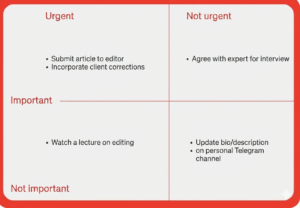
- Prioritizing tasks. Setting priorities helps you distinguish urgent and important tasks from unimportant ones. You can use the Eisenhower Matrix to determine which tasks need immediate attention and which can be postponed or eliminated.
- Time management. To avoid overload or looming deadlines, it’s best to keep a schedule and use task lists.
- Understanding performance criteria. It’s important to determine in advance how performance will be measured. This could be the number of tasks completed or meetings held per day, contracts signed, or sales volume.
- Regularly evaluate your progress. Analyzing your actions helps you understand what’s working and what’s not. You can delegate tasks that are reducing your efficiency.
Methods and tools to improve efficiency
Here are some methods and tools that will help you work and manage resources more efficiently.
Stages of organizing a workplace
The workspace also helps make the process more efficient. Here are four steps to organizing your workspace:
- Analyzing tasks and needs. Before you begin organizing, it’s important to analyze your workflow. What are its specific features? For example, while computer work requires a comfortable desk and an ergonomic chair, creative work may require more space.
- Organize your workspace. It’s best to remove unnecessary items from your desk and place frequently used items nearby. Divide the area into functional sections: work, storage, and relaxation areas. Use desk organizers for office supplies and document stands. If possible, position your workstation near a window: this reduces eye strain.
- Personalize your workspace. You can add details to the space that will inspire work and create a sense of comfort, such as bright stationery, flowers, a blanket, or a favorite mug.
- Maintain order. Clutter hinders the workflow. It’s important to periodically review and organize your files, both on your desktop and on your computer.
Recommendations for improving workflow organization
Here are some tips to help you improve your productivity.
- Planning. Write down daily, weekly, and monthly tasks. This helps you see the big picture and avoid missing important tasks.
- Prioritization. Sort tasks by importance and urgency. Use the Eisenhower Matrix to focus on what matters most.
- Break large tasks into stages. Break large projects into small, concrete steps. This will reduce the workload and make goals more realistic.
- Avoid multitasking. Focus on one task at a time. Multitasking reduces productivity and increases the likelihood of errors.
- Optimize with various tools. Use task planning apps, time trackers, and calendars.
- Breaks and rest. Every 1-2 hours, get up, stretch, or simply switch from work to something else. For example, make a coffee or read your private messages.
- Maintain a tidy workspace. Keep your desk clear and set up a storage system.
- Productivity analysis. Summarize your daily activities, and at the end of the week, evaluate what you accomplished and what you can improve.
Expert advice
Explore More IT Terms
#
- Using an integrating factor
- Equations in total differentials
- Bernoulli's equation
- Linear differential equations of the first order
- 10 Mixed C++ Challenges to Test Your Skills
- 11 Tricky Non-Technical Questions to Ask in a Recruiting Interview
- 50 Terms Every Programmer Should Know
- 52 Java Thread Interview Questions
- 7 Levels of Using the Zip Function in Python
- 7 Python Code Bugs You Need to Fix
- 70+ Free Resources for Learning Programming
A
- A Comprehensive Guide to HTML and CSS
- A Comprehensive Guide to MODX CMS
- A computer science question tests your ability to work with IP addresses and network masks
- A Guide to SQL Query Formatting for Beginners
- A/B testing
- Abstract Data Type (ADT)
- AES Encryption Algorithm: How It Works and Where It's Used
- Agile
- Algorithm
- Algorithm Analysis
- Algorithm Complexity-Key Points
- Algorithm complexity: deep parsing O(log n)
- Algorithm vs. Program
- Algorithms and Data Structures in C#
- An overview of the C # programming language
- An overview of the Python programming language
- Anaconda Python
- Analysis of graphs and adjacency matrices question
- Android
- Android App Bundle
- Android SDK
- Angular
- Ansible
- Apache
- Apache Airflow
- Apache Kafka
- Apache Tomcat
- App Store
- AppCode
- Applications of microcontrollers: From simple circuits in electronics to complex systems
- Applications of the derivative
- Arduino: How to Program It: Basics for Beginners
- Array-based stack
- ArrayList
- ASCII
- ASP.NET
- Assembly Language Lessons
B
C
- C++ Lessons
- Cache
- Calculating Memory Capacity
- Character sets and encodings
- Characteristics of a good Algorithm
- Circular singly linked list
- Coding Tests with Answers
- Combinational Circuits Solved Questions
- Compiler
- Complexity of algorithms-Tutorial
- Computer Science Fundamentals Test with Answers (47 questions)
- Computer science tests with answers (More than 100 Questions)
- Constants
- Creating a Table in HTML
- Creating Forms in HTML
- Creating Lists
- Cybernetics and informatics
- Cycles
D
- Data Analytics: applications of data analysis in companies
- Data Engineer - Who is it, what does a data engineer do, and an overview of the profession
- Data modeling: what it is, types, and process steps.
- Data preprocessing: a complete guide for beginners and professionals.
- Data structure
- Data Structures and Algorithms (DSA)
- Data types vs. Data structures
- Database Tests with Answers
- Deep Learning
- Defining Aliases
- Defining Arrays
- Deque
- Detailed articles and tutorials on PHP
- Developing a Website from Scratch
- Differential Equations
- Differentiation of functions
- Digital data: understand the importance of this asset for businesses.
- Double integrals
- Doubly linked lists
- DSA Tutorial
E
F
G
H
- Handling errors and exceptions
- Heads or Tails? How Probability Theory Is Used in IT
- History of the development of computer science
- Homogeneous equations
- Homogeneous vs. non-homogeneous structures
- How to effectively organize your workflow
- How to Learn Java: Tips for Beginner Developers
- How to Learn PHP: A Beginner's Guide
- How to Use S3 Storage in Kubernetes with CSI
- HTML
- HTML and CSS: Definition, Application, and Operating Principles
- HTML and CSS. Layout from Scratch: What to Learn, Where to Learn, and How Long Will It Take?
- HTML Frame Structure
- HTML Link Formatting
- HTML Quizzes with Answers
I
- if..else construction
- Infinite sequences and series
- Information properties
- Inheritance in Java: A Complete Guide to Principles and Implementation
- Inserting an Image
- Integration of functions
- Interactive Python Tutorial – Learn Programming from Scratch
- Interpreter
- Interview Problem: Finding a Deleted Element in O(N)
- Interview Scare: The FizzBuzz Challenge
- Introduction to C++
- Introduction to Machine Learning
- Introduction to Networking | Network Fundamentals Part 1
- Introduction to Number Systems (Binary, Octal, Hexadecimal) | Math for CS Foundations #1
- IT Specialist Resume (CV)
J
K
L
M
- Machine Learning
- Machine Learning Basic Tool: NumPy
- Machine Learning Basic Tool: Pandas
- Machine Learning Mathematics
- Mathematics for programmers: what is really needed?
- MD5 encryption algorithm: What is it and why is it needed?
- Microcontroller and Microprocessor - what's the difference?
- ML Engineer: Who They Are, What They Do, How Much They Earn, and How to Become a Neural Network Specialist
- Monte Carlo Simulation: How It Works and What It's For
O
P
- PHP lessons
- Private DNS server and its configuration
- Program code
- Programmer's Dictionary
- Programming
- Programming with pseudocode
- Python Code Formatting Guide: PEP8
- Python for data analysis: how to do it and main libraries
- Python Lessons
- Python Superstar: 5 Ways to Use the * Operator
- Python vs. Julia: Should You Replace Python with Julia?
R
S
- SFML Graphics Library Tutorials
- Sorting Algorithms in Programming: Types, Descriptions, and Comparisons
- SQL commands: see what they are, what the main ones are + examples
- SQL Interview Questions and Tasks
- SQL Lessons
- SQL Stored Procedures
- SQL Syntactic Sugar: The COALESCE Function
- Stack
- Start in analytics: Python or R
- Static vs. dynamic data structures
- Statistical analysis: importance for decision making.
- String formatting in Python
- Structure of computer science
- Swift Lessons
- switch/match construct
- Syntax
T
- Terms in programming
- Text and paragraph formatting tags
- The Complete Guide to Bootstrap
- The Complete Guide to JavaScript
- The concept of information and its transmission
- The Future of Python: Key Trends and Insights from Global Researc
- The Infrastructure of Code: A Complete Guide to Repositories for Languages, Frameworks, and Compilers
- The pip package manager in Python
- The role of informatization in the development of society
- Transfers
- Tricky Java Questions Often Asked in Interviews
- Tutorials / Articles
- TypeScript: What It Is and Why Developers Need It
W
- What are databases, and why do they need DBMS and SQL?
- What do Linux distributions consist of?
- What is .NET and what is it used for?
- What is a data structure?
- What is a GPU in a computer, in simple terms?
- What is a quantum computer: 100,500 problems in one second
- What Is an Algorithm?
- What is Arduino: How it Works and the Platform's Capabilities
- What is Big Data? Introduction, Types, Characteristics, and Examples
- What is FizzBuzz Challenge?
- What is Golang and what is it used for?
- What is Haskell and what is it used for?
- What is Kotlin and what is it used for?
- What is Linux? The History of Linux
- What is machine learning, and how does it work?
- What is Power BI: everything about the data analytics software
- What is recursion, recursive and iterative process in programming?
- What is the C++ programming language?
- What is the OSI Model: A Complete Explanation of the Seven Layers and Their Role in Networking
- What's the difference between x86 and ARM processors?
- Where to start learning the C programming language?
- Which Linux distribution should you choose? A Linux distribution overview