Algorithm
An algorithm is a clear sequence of actions whose execution yields a predetermined result. Simply put, it’s a set of instructions for a specific task. This term is most commonly used in computer science, where it refers to instructions for solving a problem efficiently.
Nowadays, this word refers to any sequence of actions that can be clearly described and broken down into simple steps and that lead to the achievement of a goal. For example, going to the kitchen, pouring water, and adding a tea bag is an algorithm for completing the task “Brew tea.”
In computer science, algorithms are instructions for computers, a set of steps described by program code. There are specific algorithms for certain actions, some of which are quite complex. One of the purposes of using algorithms is to make code more efficient and optimize it.
Who uses algorithms?
In a general sense, this applies to absolutely all living and some non-living creatures, because any sequence of actions leading to a goal can be considered an algorithm. An animal’s search for food is an algorithm, and a robot’s movements are also described by an algorithm.
In the narrow sense in which the concept is used in computer science, algorithms are used by developers, some engineers and analysts, as well as machine learning specialists, testers, and many others. It is one of the key concepts in IT.
What are algorithms for?
Algorithms in computer science are needed to effectively solve various problems, including those whose brute-force approach is highly complex or even impossible. In practice, algorithms exist for virtually everything: sorting, traversing data structures, searching for elements, filtering information, performing mathematical operations, and so on.
For example, you can sort an array using brute-force sorting—that’s the most obvious solution. Alternatively, you can use quicksort: it’s more complex and less obvious, but it’s much faster and less computationally intensive. Strictly speaking, brute-force sorting is also an algorithm, albeit a very simple one.
There are algorithmically unsolvable problems for which no algorithm exists or can ever be used. However, most IT problems are solvable algorithmically, and algorithms are actively used to solve them.
Algorithmization
Algorithmization is the process of developing and describing a sequence of steps that must be performed to solve a given problem or achieve a specific goal. Algorithmization is a key stage in programming and software development.
When a task is algorithmized, clear instructions are created that a computer can understand and execute. Algorithms can be written as a text description, flowchart, pseudocode, or other formalized representations. They serve as the basis for writing program code, which allows the computer to automatically solve problems according to predefined instructions.
Algorithmization plays an important role in computer science and programming, as well-designed algorithms ensure the efficient and correct execution of tasks and also simplify the process of debugging and maintaining program code.
Basic properties of algorithms
Discreteness. An algorithm is not a single, indivisible structure; it consists of individual small steps or actions. These actions occur in a specific order, with one beginning after the other has completed.
Efficiency. Executing an algorithm must lead to some result and leave no uncertainty. The result may even be unsuccessful—for example, the algorithm may report that there is no solution—but it must exist.
Determinism. There should be no misunderstandings or disagreements at every step; instructions should be clearly defined.
Massivity. An algorithm can usually be extrapolated to similar problems with different input data—simply change the initial conditions. For example, a standard algorithm for solving a quadratic equation will remain unchanged regardless of the numbers used in that equation.
Clarity. The algorithm should include only actions known and understood by the performer.
Finiteness. Algorithms are finite; they must terminate and produce a result, in some definitions, within a predetermined number of steps.
Types of algorithms and examples
Despite the word “sequence,” an algorithm doesn’t always describe actions in a strictly defined order. This is especially true now, with the rise of asynchrony in programming. Algorithms have room for conditions, loops, and other nonlinear constructs. Let’s list the main types of algorithms.
Linear
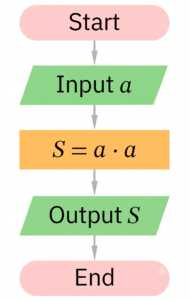
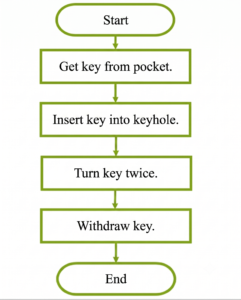
This is the simplest type of algorithm: actions follow one another, each beginning after the previous one has completed. They are not rearranged, are not repeated, and are executed under any conditions.
Example: Processing a request on the server before logging
- Accept an HTTP request from the client.
- Extract data from the request body.
- Validate the data (for example, check that it
emailis not empty). - Create an object for logging.
- Write this object to the log file.
- Return a 200 OK response to the client
The same in code:
Branching
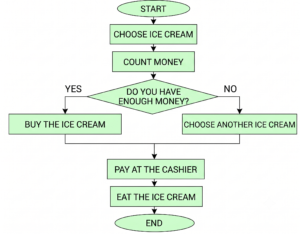
This type of algorithm introduces branching: certain actions are performed only if certain conditions are true. For example, if a number is less than zero, it should be removed from the data structure. A second branch can also be added: what to do if the condition is false—for example, if the number is greater than or equal to zero. There can be multiple conditions, and they can be combined with each other.
Example: user authorization
- The user enters the login and password.
- The system searches for the user in the database.
- If the user is found:
– Compare the entered password with the hash.
– If the password matches: log in.
– Otherwise: show an “incorrect password” error. - If the user is not found:
– offer to register or restore access.
Example in pseudo-code:
Cyclic
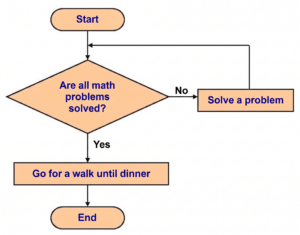
Such algorithms execute in a loop. When a block of actions completes, these actions begin again and repeat a certain number of times. The loop can include a single action or a sequence, and the number of repetitions can be fixed or conditional: for example, repeating this block of code until there are no empty cells left in the data structure. In some cases, the loop can be infinite.
Example: Processing a task queue in a background service
- The service accesses a queue (e.g., RabbitMQ or Kafka).
- While there are messages in the queue:
– take the first message;
– parse the data;
– act (for example, send an email or update an order status);
– write the result to the log; - Go back to the beginning of the loop and check the queue again.
In the code:
Recursive
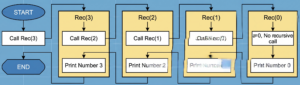
Recursion is a phenomenon where an algorithm calls itself, but with different input data. This isn’t a loop: the input data is different, but there are multiple “instances” of running programs, not just one. A well-known example of a recursive algorithm is calculating Fibonacci numbers.
Recursion can be an elegant way to solve some problems, but it should be used with caution: such algorithms can be very resource-intensive and slower than others.
Example: traversing a directory tree
The system must go through all files and folders in the directory.
- Let’s take the folder.
- For each element inside:
– if it is a file → process the file;
– If it is a folder → call the algorithm again for this subfolder. - Continue until you reach folders that do not contain other directories.
In the code:
Probabilistic
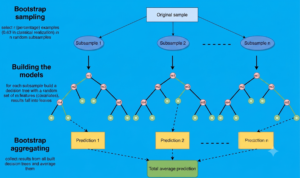
These algorithms are less frequently mentioned, but they are quite an interesting type: their operation depends not only on the input data but also on random variables. Examples of these include the well-known Las Vegas and Monte Carlo algorithms.
Example: Selecting the closest server using Randomized Load Balancing
Let’s say you have multiple servers and need to distribute requests so the system is resilient to load. One approach is randomized load balancing :
- The balancer selects two random servers from the pool.
- Of these two, it selects the one with the lower current load.
- Sends a request there.
Why is this a probabilistic algorithm?
“The first step uses random selection, so the algorithm’s behavior is unpredictable in advance.
But on average, this approach significantly reduces the system load—and is faster than a detailed analysis of all servers.”
In the code:
Main and auxiliary
This is another type of classification. The main algorithm solves the immediate problem, while the auxiliary algorithm solves a subproblem and can be used within the main algorithm—for this, its name and input data are simply specified. An example of an auxiliary algorithm is any software function.
Example: Uploading a user avatar in a web application
Basic algorithm: file loading
- Accept an image from the user.
- Check size and format.
- Pass the image to the helper processing function.
- Save the processed image to storage.
- Return link to avatar.
Auxiliary algorithm: image resizing
- Open image.
- Reduce to the required dimensions (for example, 256×256).
- Compress to the desired quality.
- Return the optimized file.
In the code:
Advanced algorithms
For those who want to delve deeper into algorithms, we share advanced and complex examples for intermediate learners.
Euclidean Algorithm: A Simple Way to Find the GCD
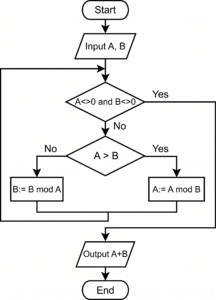
The Euclidean algorithm is one of the most famous and elegant methods for calculating the greatest common divisor (GCD) of two integers. It is named after Euclid, who described it in his Elements over two thousand years ago. Despite its age, the algorithm is still used in cryptography, optimization, and number-crunching in programming.
There are two main versions of the algorithm: division and subtraction. In development practice, the division version is more commonly used—it’s faster and shorter.
How does the Euclidean division algorithm work?
- Take two numbers and divide the larger by the smaller.
- If there is no remainder, the smaller number is the GCD.
- If there is a remainder, the larger number is replaced by this remainder.
- Return to step one and repeat the process until the remainder is zero.
The idea is simple: at each step, we reduce the problem until we arrive at a number that divides both original numbers without a remainder. This is the greatest common divisor.
Example: Key generation in cryptography (RSA)
When creating RSA keys, you need to choose a number e that is relatively prime to φ(n), the Euler function. To check this, use the Euclidean algorithm or its extended version.
How to use the algorithm:
- Two large prime numbers p and q are generated.
- It is assumed that φ(n) = (p−1)(q−1).
- We need to make sure that the chosen number e and φ(n) have no common divisors, that is, GCD(e, φ(n)) = 1.
- To check the GCD, the Euclidean algorithm is called.
- If the GCD is not equal to 1, another e is chosen.
In the code:
Enumeration of divisors (“prime testing”)
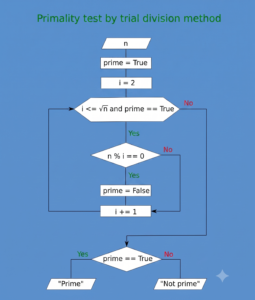
The brute-force divisor algorithm is one of the most basic ways to check whether a number is prime. It enumerates possible divisors and checks whether the number is divisible without a remainder. The method seems primitive, but it is the basis of many more complex algorithms and is useful where a simple and reliable check is required.
How the algorithm works
- Take a number n that needs to be checked.
- All integers d from 2 to √n are iterated over.
- If for some d n mod d = 0, then the number is composite.
- If no divisors are found, the number is prime.
Why do they only check up to the square root?
If n has a divisor greater than √n, then the second divisor is necessarily less than √n—we would have found it by now. This greatly reduces the number of checks.
The algorithm is suitable for small numbers and is often used:
- In backend checks, when you need to quickly and easily test a number;
- as an auxiliary step in factorization and cryptography algorithms;
- When working with random prime number generation for tests.
Example: Checking prime candidates when generating test data
Many projects (especially those related to cryptography, analytics, or modeling) require generating large volumes of test data. For example, a service might require a list of random prime numbers for load testing encryption algorithms. For simplicity and speed of development, the most reliable basic method is chosen— brute-force divisor guessing.
How does this work
- The application generates a random number in the required range.
- Before adding it to the test set, you need to check whether it is simple or not.
- To do this, call the algorithm for enumerating divisors:
– numbers from 2 to √n are enumerated;
– if none divides n, the number is considered prime;
– otherwise, a new number is generated. - The finished simple ones are written into a test set or used for load modeling.
In the code:
Sieve of Eratosthenes
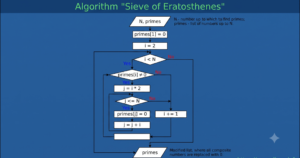
The Sieve of Eratosthenes algorithm is a classic method for finding all prime numbers up to a given number n. The algorithm is convenient because it is easy to implement and quickly finds all prime numbers up to n—without complex constructions, using only an array and sequential iterations.
It works well for tasks that require a pre-prepared table of prime numbers, from factorization and sequence analysis to basic cryptographic procedures. It’s suitable for cases where the upper bound on n is small enough to accommodate the array in memory; for larger values, segmented versions are used.
How the algorithm works
- Let’s write down all integers from 2 to n inclusive.
- We start with p = 2, the first prime number.
- We cross out (mark as composite) all numbers that are multiples of p: 2p, 3p, 4p, … up to n.
- We find the next uncrossed number > p and assign a new value to p.
- Repeat steps 3–4 until p² ≤ n.
- After this, all remaining uncrossed numbers are prime.
Example: Speeding up cryptographic operations when generating keys
Many cryptographic algorithms (for example, RSA) use prime numbers. To quickly generate prime candidates or check divisors of large numbers, systems prepare a table of all prime numbers up to a certain limit—using the Sieve of Eratosthenes.
How is it used in the process?
- The system specifies a range, for example, up to 1,000,000.
- Runs the Sieve of Eratosthenes and obtains a list of all prime numbers.
- This list is further used:
– for fast divisibility checking in primality tests;
– in selecting cryptographic parameters;
– to speed up probabilistic factorization algorithms.
In the code:
Graphical representation of algorithms
Algorithms can be written in text, code, pseudocode, or graphically—as flowcharts. These are special diagrams consisting of geometric shapes that describe specific actions. For example, the start and end points on a flowchart represent the beginning and end of the algorithm, a parallelogram represents the input or output of data, and a diamond represents a condition. Simple actions are represented by rectangles, and the shapes are connected using arrows, which indicate sequences and cycles.
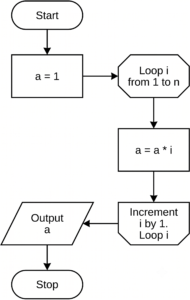
The diagrams contain labels for specific actions, conditions, the number of cycle repetitions, and other details. This allows for a clearer understanding of the algorithms.
Algorithm complexity
The concept of “complexity” is a key one in the study of algorithms. It doesn’t refer to how difficult a particular method is to understand, but to the computational resources required. If the complexity is high, the algorithm will execute more slowly and possibly consume more hardware resources; this is something we want to avoid.
Complexity is usually described with a capital O, followed by a value in parentheses that determines the execution time. This is a mathematical notation that describes the behavior of various functions.
What kinds of complexity exist? We won’t fully explore the mathematical O-notation, as it’s called—we’ll simply list the main notations for complexity in algorithm theory.
- O(1) means that the algorithm runs in a fixed constant time. These are the most efficient algorithms.
- O(n) is the complexity of linear algorithms. Here and below, n denotes the size of the input data: the larger n, the longer the algorithm takes to execute.
- O(n²) also means that the larger n, the higher the complexity. However, the dependence here is not linear, but quadratic, meaning the speed increases much faster. These are inefficient algorithms, for example, those with nested loops.
- O(log n) is a more efficient algorithm. Its execution speed is calculated logarithmically, meaning it depends on the logarithm of n.
- O(√n) is an algorithm whose speed depends on the square root of n. It is less efficient than the logarithmic algorithm, but more efficient than the linear algorithm.
There are also O(n³), O(nn), and other inefficient algorithms with high degrees. Their complexity grows very quickly and is best avoided.
Graphical description of complexity. A graph can help better understand complexity in O-notation. It shows how the algorithm’s execution time varies depending on the input data size. The flatter the graph, the more efficient the algorithm.
O-notation is used to evaluate the efficiency of a particular sequence of actions. If the data is large or numerous, more efficient algorithms are sought to speed up the program.
Using algorithms in IT
We’ll provide a few examples of how various algorithms are used in programming fields. There are actually many more—we’ve selected only a few to help you understand the practical significance of algorithms.
Software and website development. Algorithms are used for parsing, or “deconstructing,” data structures such as JSON. Parsing is a fundamental task, for example, on the web. Algorithms are also needed for rendering dynamic structures, displaying notifications, customizing application behavior, and much more.
Working with data. Algorithms are widely used when working with databases, files storing information, and structures such as arrays or lists. Data can be very large, and choosing the right algorithm can speed up processing. Algorithms solve problems such as sorting, modifying, and deleting elements, and adding new data. They are used to populate and traverse structures such as trees and graphs.
Algorithms are particularly important in Big Data and data analysis: they allow for the processing of vast amounts of information, including raw data, without requiring too many resources.
Search problems. Search algorithms are a complex field in their own right. They are classified into a separate group, which currently includes dozens of different algorithms. Search is important in data science, artificial intelligence methods, analytics, and much more. The most obvious example is search engines like Google or Yandex. Incidentally, search engines typically keep details about their algorithms secret.
Machine learning. Machine learning and artificial intelligence approach algorithms slightly differently. While a typical program follows a predetermined sequence of actions, a “smart machine”—a neural network or trained model—generates its own algorithm during training. The developer describes the model and trains it: they provide it with initial data and show it examples of what the final result should look like. During training, the model itself develops an algorithm for achieving this result.
Such AI algorithms can be even more powerful than conventional ones and are used to solve problems that a developer cannot consciously break down into simple actions. For example, recognizing objects requires engaging a huge number of processes in the nervous system: a human being is simply physically incapable of describing them all and reproducing them programmatically.
During model creation and training, the developer can also employ algorithms. For example, the error propagation algorithm allows for training neural networks.
Algorithms: A Brief Overview
So, what can be considered an algorithm?
An algorithm is a clear sequence of steps whose execution produces a predetermined result. It is a set of instructions for solving a specific problem, often used in computer science and programming.
Key properties of algorithms:
- Discreteness – the algorithm consists of separate steps performed one by one;
- Effectiveness – the algorithm must necessarily lead to a result and not leave a state of uncertainty;
- Determinism – each step is described unambiguously and does not allow for ambiguity;
- Mass character – the algorithm applies to a variety of input data and does not depend on a specific case;
- Finiteness – execution must be completed in a finite number of steps.
The main types of algorithms include:
- Linear algorithms – sequential execution of steps without branching or repetition;
- Branching algorithms – include conditions by which one of the execution paths is selected;
- Cyclic algorithms involve repeating a block of actions until the exit condition is met;
- Recursive algorithms – call themselves with different input data;
- Probabilistic algorithms – the result or execution path also depends on random variables.
Algorithms are used in all areas of IT: software development, data and database management, search engines, machine learning, and big data analysis.
Explore More IT Terms
#
- Using an integrating factor
- Equations in total differentials
- Bernoulli's equation
- Linear differential equations of the first order
- 10 Mixed C++ Challenges to Test Your Skills
- 11 Tricky Non-Technical Questions to Ask in a Recruiting Interview
- 50 Terms Every Programmer Should Know
- 52 Java Thread Interview Questions
- 7 Levels of Using the Zip Function in Python
- 7 Python Code Bugs You Need to Fix
- 70+ Free Resources for Learning Programming
A
- A Comprehensive Guide to HTML and CSS
- A Comprehensive Guide to MODX CMS
- A computer science question tests your ability to work with IP addresses and network masks
- A Guide to SQL Query Formatting for Beginners
- A/B testing
- Abstract Data Type (ADT)
- AES Encryption Algorithm: How It Works and Where It's Used
- Agile
- Algorithm
- Algorithm Analysis
- Algorithm Complexity-Key Points
- Algorithm complexity: deep parsing O(log n)
- Algorithm vs. Program
- Algorithms and Data Structures in C#
- An overview of the C # programming language
- An overview of the Python programming language
- Anaconda Python
- Analysis of graphs and adjacency matrices question
- Android
- Android App Bundle
- Android SDK
- Angular
- Ansible
- Apache
- Apache Airflow
- Apache Kafka
- Apache Tomcat
- App Store
- AppCode
- Applications of microcontrollers: From simple circuits in electronics to complex systems
- Applications of the derivative
- Arduino: How to Program It: Basics for Beginners
- Array-based stack
- ArrayList
- ASCII
- ASP.NET
- Assembly Language Lessons
B
C
- C++ Lessons
- Cache
- Calculating Memory Capacity
- Character sets and encodings
- Characteristics of a good Algorithm
- Circular singly linked list
- Coding Tests with Answers
- Combinational Circuits Solved Questions
- Compiler
- Complexity of algorithms-Tutorial
- Computer Science Fundamentals Test with Answers (47 questions)
- Computer science tests with answers (More than 100 Questions)
- Constants
- Creating a Table in HTML
- Creating Forms in HTML
- Creating Lists
- Cybernetics and informatics
- Cycles
D
- Data Analytics: applications of data analysis in companies
- Data Engineer - Who is it, what does a data engineer do, and an overview of the profession
- Data modeling: what it is, types, and process steps.
- Data preprocessing: a complete guide for beginners and professionals.
- Data structure
- Data Structures and Algorithms (DSA)
- Data types vs. Data structures
- Database Tests with Answers
- Deep Learning
- Defining Aliases
- Defining Arrays
- Deque
- Detailed articles and tutorials on PHP
- Developing a Website from Scratch
- Differential Equations
- Differentiation of functions
- Digital data: understand the importance of this asset for businesses.
- Double integrals
- Doubly linked lists
- DSA Tutorial
E
F
G
H
- Handling errors and exceptions
- Heads or Tails? How Probability Theory Is Used in IT
- History of the development of computer science
- Homogeneous equations
- Homogeneous vs. non-homogeneous structures
- How to effectively organize your workflow
- How to Learn Java: Tips for Beginner Developers
- How to Learn PHP: A Beginner's Guide
- How to Use S3 Storage in Kubernetes with CSI
- HTML
- HTML and CSS: Definition, Application, and Operating Principles
- HTML and CSS. Layout from Scratch: What to Learn, Where to Learn, and How Long Will It Take?
- HTML Frame Structure
- HTML Link Formatting
- HTML Quizzes with Answers
I
- if..else construction
- Infinite sequences and series
- Information properties
- Inheritance in Java: A Complete Guide to Principles and Implementation
- Inserting an Image
- Integration of functions
- Interactive Python Tutorial – Learn Programming from Scratch
- Interpreter
- Interview Problem: Finding a Deleted Element in O(N)
- Interview Scare: The FizzBuzz Challenge
- Introduction to C++
- Introduction to Machine Learning
- Introduction to Networking | Network Fundamentals Part 1
- Introduction to Number Systems (Binary, Octal, Hexadecimal) | Math for CS Foundations #1
- IT Specialist Resume (CV)
J
K
L
M
- Machine Learning
- Machine Learning Basic Tool: NumPy
- Machine Learning Basic Tool: Pandas
- Machine Learning Mathematics
- Mathematics for programmers: what is really needed?
- MD5 encryption algorithm: What is it and why is it needed?
- Microcontroller and Microprocessor - what's the difference?
- ML Engineer: Who They Are, What They Do, How Much They Earn, and How to Become a Neural Network Specialist
- Monte Carlo Simulation: How It Works and What It's For
O
P
- PHP lessons
- Private DNS server and its configuration
- Program code
- Programmer's Dictionary
- Programming
- Programming with pseudocode
- Python Code Formatting Guide: PEP8
- Python for data analysis: how to do it and main libraries
- Python Lessons
- Python Superstar: 5 Ways to Use the * Operator
- Python vs. Julia: Should You Replace Python with Julia?
R
S
- SFML Graphics Library Tutorials
- Sorting Algorithms in Programming: Types, Descriptions, and Comparisons
- SQL commands: see what they are, what the main ones are + examples
- SQL Interview Questions and Tasks
- SQL Lessons
- SQL Stored Procedures
- SQL Syntactic Sugar: The COALESCE Function
- Stack
- Start in analytics: Python or R
- Static vs. dynamic data structures
- Statistical analysis: importance for decision making.
- String formatting in Python
- Structure of computer science
- Swift Lessons
- switch/match construct
- Syntax
T
- Terms in programming
- Text and paragraph formatting tags
- The Complete Guide to Bootstrap
- The Complete Guide to JavaScript
- The concept of information and its transmission
- The Future of Python: Key Trends and Insights from Global Researc
- The Infrastructure of Code: A Complete Guide to Repositories for Languages, Frameworks, and Compilers
- The pip package manager in Python
- The role of informatization in the development of society
- Transfers
- Tricky Java Questions Often Asked in Interviews
- Tutorials / Articles
- TypeScript: What It Is and Why Developers Need It
W
- What are databases, and why do they need DBMS and SQL?
- What do Linux distributions consist of?
- What is .NET and what is it used for?
- What is a data structure?
- What is a GPU in a computer, in simple terms?
- What is a quantum computer: 100,500 problems in one second
- What Is an Algorithm?
- What is Arduino: How it Works and the Platform's Capabilities
- What is Big Data? Introduction, Types, Characteristics, and Examples
- What is FizzBuzz Challenge?
- What is Golang and what is it used for?
- What is Haskell and what is it used for?
- What is Kotlin and what is it used for?
- What is Linux? The History of Linux
- What is machine learning, and how does it work?
- What is Power BI: everything about the data analytics software
- What is recursion, recursive and iterative process in programming?
- What is the C++ programming language?
- What is the OSI Model: A Complete Explanation of the Seven Layers and Their Role in Networking
- What's the difference between x86 and ARM processors?
- Where to start learning the C programming language?
- Which Linux distribution should you choose? A Linux distribution overview