
Apache Tomcat
Apache Tomcat is a server suite from the Apache Software Foundation designed for testing, debugging, and running Java-based web applications. It is commonly referred to as a servlet container—a set of additional components that extend the web server’s functionality and enable it to run Java applications.
The name Tomcat was chosen by James Duncan Davidson, the software’s architect. The choice stems from O’Reilly’s tradition of featuring animals on book covers. Knowing that he would be publishing the first Tomcat textbook, Davidson decided to name the software after a special animal—independent, resourceful, and capable of fending for itself.

Apache Tomcat should not be confused with the Apache HTTP Server —the two products offer different functionality. The Apache HTTP Server delivers static and dynamic web pages to the browser, typically generated by PHP applications, such as WordPress. However, the Apache HTTP Server does not support Java servlets or JSP pages. The Tomcat container, on the other hand, was originally designed to handle content generated by Java applications.
Like other servlet containers, Tomcat has three distinctive features:
- Processes client HTTP requests. For this purpose, a dedicated HTTP server is included.
- Delivers pages to another web server. Tomcat is typically used in conjunction with Nginx or Apache.
- It is part of the WildFly and GlassFish application servers, platforms on which web applications are run.
Servlet container functions
Apache Tomcat simplifies the development and deployment of web applications. It scans project folders to instantly detect and deploy new servlets. If a servlet is updated during application execution, Tomcat updates all dependent components. If a servlet is deleted, the server stops processing requests and removes the component. As a servlet container, Tomcat performs several important functions:
- creates an environment for running servlets;
- sets session parameters;
- provides data exchange between servlets and clients;
- carries out identification and authorization of clients;
- Manages metadata.
Tomcat Components
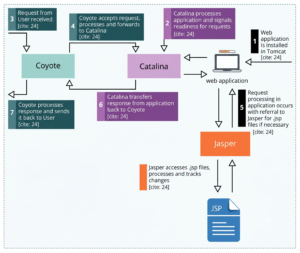
Apache Tomcat consists of three main components: Catalina, Jasper, and Coyote.
Catalina is a servlet container that provides a command-line interface and implements the servlet specifications, known as the Servlet API. These specifications form the foundation of Java web technologies. Catalina enables interaction with Java libraries, enabling the dynamic creation of any web content.
Jasper. Processes JSP pages. They can contain both static ( HTML, XML, WML) and dynamic components (scripts, directives, actions).
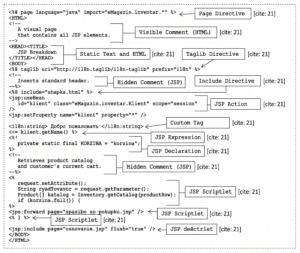
Using the Jasper component, the Tomcat container acts as a template engine, automatically generating the required HTML code using JSP components. Jasper monitors all changes in dynamic page fragments and compiles the JSP elements. This converts the JSP page into a static one, which can then be sent to the HTTP server for further processing.
Coyote. An embedded web server for handling HTTP requests. It listens on TCP ports, responds to client requests directly, or passes the request to Catalina for processing JSP elements.
Installing Tomcat
Install the latest version of the JRE virtual machine or JDK. This is required for Apache Tomcat to run. You can download the version for Linux, macOS, or Windows from the official website.
Checking the correctness of environment variables. After installing the Java JDK, you should check the correctness of your environment variables. To do this on Windows:
- Press the key combination Win + R.
- Enter cmd in the line.
- Run the command echo %JAVA_HOME% in the terminal.
If the variable is set correctly, the package version will appear as a response, for example, C:\Program Files\Java\jdk-17.0.2. The same string should appear at the end of the response to the echo %PATH% prompt in cmd.
If the variables aren’t set automatically, add them manually. To do this:
- Go to Control Panel.
- Select System – Advanced system settings.
- Click Environment Variables.
- Find PATH and click Edit.
- Enter the path to the JDK package in the Program Files directory.
Downloading and installing Tomcat. After configuring the variables, download the latest version of Tomcat. On Windows, the server is installed like any other application. During installation, you can select “Install as a Windows service,” which will cause the server to start automatically when the OS boots. For optimal security, it’s best to run it under a different user account with limited privileges.
After installation, the server’s start page will be available at http://localhost:8080.
How to create your first web application
For this purpose, you can use the IntelliJ IDEA integrated development environment, which automatically creates the necessary Java project structure: source code files are placed in the src folder, and the completed web.xml and index.JSP files are uploaded to the web folder. The web.xml file lists instructions for the Tomcat server, and index.jsp is the main page of the web application, accessible at http://localhost:8080.
Traditionally, the first program in any language should display the greeting “Hello, world!”To output this phrase, you need to edit the index.JSP file as shown below:
<@ page contentType="text/html;charset=UTF-8" language="java">; My first application Hello, world! The application runs on an Apache Tomcat server.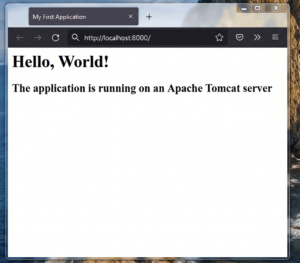
Building war files to run on Tomcat
Tomcat processes Java web applications with the .war extension, which contain servlets, JSP files, static resources, and other data. When working in IntelliJ IDEA, the required .war file structure is created automatically. To create the project structure, follow these steps:
- Go from Project Structure to Artifacts.
- Click Web Application: Archive.
- Click the Create manifest button below the web application name entry field.
- Specify the path to the project directory – a META-INF folder with a manifest file inside will be created in it.
- Click the Apply and OK buttons.
To pack a project into a war file, you need to:
- Go to the Build tab.
- Select Build Artifact.
- Click on the project name.
During the build process, the environment will create an out directory with a subfolder called artifacts and place in it a file of the finished web application with the war extension, which can be run on the Tomcat server.
Tomcat is an indispensable tool for Java web application developers. It can operate as a standalone server or serve as a servlet container within a larger web server.
Explore More IT Terms
#
- Using an integrating factor
- Equations in total differentials
- Bernoulli's equation
- Linear differential equations of the first order
- 10 Mixed C++ Challenges to Test Your Skills
- 11 Tricky Non-Technical Questions to Ask in a Recruiting Interview
- 50 Terms Every Programmer Should Know
- 52 Java Thread Interview Questions
- 7 Levels of Using the Zip Function in Python
- 7 Python Code Bugs You Need to Fix
- 70+ Free Resources for Learning Programming
A
- A Comprehensive Guide to HTML and CSS
- A Comprehensive Guide to MODX CMS
- A computer science question tests your ability to work with IP addresses and network masks
- A Guide to SQL Query Formatting for Beginners
- A/B testing
- Abstract Data Type (ADT)
- AES Encryption Algorithm: How It Works and Where It's Used
- Agile
- Algorithm
- Algorithm Analysis
- Algorithm Complexity-Key Points
- Algorithm complexity: deep parsing O(log n)
- Algorithm vs. Program
- Algorithms and Data Structures in C#
- An overview of the C # programming language
- An overview of the Python programming language
- Anaconda Python
- Analysis of graphs and adjacency matrices question
- Android
- Android App Bundle
- Android SDK
- Angular
- Ansible
- Apache
- Apache Airflow
- Apache Kafka
- Apache Tomcat
- App Store
- AppCode
- Applications of microcontrollers: From simple circuits in electronics to complex systems
- Applications of the derivative
- Arduino: How to Program It: Basics for Beginners
- Array-based stack
- ArrayList
- ASCII
- ASP.NET
- Assembly Language Lessons
B
C
- C++ Lessons
- Cache
- Calculating Memory Capacity
- Character sets and encodings
- Characteristics of a good Algorithm
- Circular singly linked list
- Coding Tests with Answers
- Combinational Circuits Solved Questions
- Compiler
- Complexity of algorithms-Tutorial
- Computer Science Fundamentals Test with Answers (47 questions)
- Computer science tests with answers (More than 100 Questions)
- Constants
- Creating a Table in HTML
- Creating Forms in HTML
- Creating Lists
- Cybernetics and informatics
- Cycles
D
- Data Analytics: applications of data analysis in companies
- Data Engineer - Who is it, what does a data engineer do, and an overview of the profession
- Data modeling: what it is, types, and process steps.
- Data preprocessing: a complete guide for beginners and professionals.
- Data structure
- Data Structures and Algorithms (DSA)
- Data types vs. Data structures
- Database Tests with Answers
- Deep Learning
- Defining Aliases
- Defining Arrays
- Deque
- Detailed articles and tutorials on PHP
- Developing a Website from Scratch
- Differential Equations
- Differentiation of functions
- Digital data: understand the importance of this asset for businesses.
- Double integrals
- Doubly linked lists
- DSA Tutorial
E
F
G
H
- Handling errors and exceptions
- Heads or Tails? How Probability Theory Is Used in IT
- History of the development of computer science
- Homogeneous equations
- Homogeneous vs. non-homogeneous structures
- How to convert numbers between binary, octal, and hexadecimal number systems
- How to effectively organize your workflow
- How to Learn Java: Tips for Beginner Developers
- How to Learn PHP: A Beginner's Guide
- How to Use S3 Storage in Kubernetes with CSI
- HTML
- HTML and CSS: Definition, Application, and Operating Principles
- HTML and CSS. Layout from Scratch: What to Learn, Where to Learn, and How Long Will It Take?
- HTML Frame Structure
- HTML Link Formatting
- HTML Quizzes with Answers
I
- if..else construction
- Infinite sequences and series
- Information properties
- Inheritance in Java: A Complete Guide to Principles and Implementation
- Inserting an Image
- Integration of functions
- Interactive Python Tutorial – Learn Programming from Scratch
- Interpreter
- Interview Problem: Finding a Deleted Element in O(N)
- Interview Scare: The FizzBuzz Challenge
- Introduction to C++
- Introduction to Machine Learning
- Introduction to Machine Learning with Python
- Introduction to Networking | Network Fundamentals Part 1
- Introduction to Number Systems (Binary, Octal, Hexadecimal) | Math for CS Foundations #1
- IT Specialist Resume (CV)
J
K
L
M
- Machine Learning
- Machine Learning Basic Tool: NumPy
- Machine Learning Basic Tool: Pandas
- Machine Learning Basics
- Machine Learning Mathematics
- Machine Learning with Python
- Mathematics for programmers: what is really needed?
- MD5 encryption algorithm: What is it and why is it needed?
- Microcontroller and Microprocessor - what's the difference?
- ML Engineer: Who They Are, What They Do, How Much They Earn, and How to Become a Neural Network Specialist
- Monte Carlo Simulation: How It Works and What It's For
O
P
- PHP lessons
- Private DNS server and its configuration
- Program code
- Programmer's Dictionary
- Programming
- Programming with pseudocode
- Python Code Formatting Guide: PEP8
- Python for data analysis: how to do it and main libraries
- Python Lessons
- Python Superstar: 5 Ways to Use the * Operator
- Python vs. Julia: Should You Replace Python with Julia?
Q
R
S
- Setting up model parameters
- SFML Graphics Library Tutorials
- Sorting Algorithms in Programming: Types, Descriptions, and Comparisons
- SQL commands: see what they are, what the main ones are + examples
- SQL Interview Questions and Tasks
- SQL Lessons
- SQL Stored Procedures
- SQL Syntactic Sugar: The COALESCE Function
- Stack
- Start in analytics: Python or R
- Static vs. dynamic data structures
- Statistical analysis: importance for decision making.
- String formatting in Python
- Structure of computer science
- Supervised learning
- Swift Lessons
- switch/match construct
- Syntax
T
- Terms in programming
- Text and paragraph formatting tags
- The Complete Guide to Bootstrap
- The Complete Guide to JavaScript
- The concept of information and its transmission
- The Future of Python: Key Trends and Insights from Global Researc
- The Infrastructure of Code: A Complete Guide to Repositories for Languages, Frameworks, and Compilers
- The pip package manager in Python
- The role of informatization in the development of society
- Transfers
- Tricky Java Questions Often Asked in Interviews
- Tutorials / Articles
- TypeScript: What It Is and Why Developers Need It
W
- What are databases, and why do they need DBMS and SQL?
- What do Linux distributions consist of?
- What is .NET and what is it used for?
- What is a data structure?
- What is a GPU in a computer, in simple terms?
- What is a quantum computer: 100,500 problems in one second
- What Is an Algorithm?
- What is Arduino: How it Works and the Platform's Capabilities
- What is Big Data? Introduction, Types, Characteristics, and Examples
- What is FizzBuzz Challenge?
- What is Golang and what is it used for?
- What is Haskell and what is it used for?
- What is Kotlin and what is it used for?
- What is Linux? The History of Linux
- What is machine learning, and how does it work?
- What is Power BI: everything about the data analytics software
- What is recursion, recursive and iterative process in programming?
- What is the C++ programming language?
- What is the OSI Model: A Complete Explanation of the Seven Layers and Their Role in Networking
- What's the difference between x86 and ARM processors?
- Where to start learning the C programming language?
- Which Linux distribution should you choose? A Linux distribution overview