
Laravel
Laravel is a free, open-source PHP framework specifically designed for building complex websites and web applications. It simplifies authentication, routing, sessions, caching, application architecture, and database management.

Who uses Laravel and why?
Laravel is used by backend developers who write code in PHP. PHP helps define the structure of a web application and serves as its framework. The framework is written in PHP and extends its capabilities. It is distributed freely under the MIT license.
Laravel is designed for building web applications and websites based on MVC (model-view-controller). This architecture divides program components into three parts:
- The model provides data and methods for working with it: database queries and correctness checking.
- The view shows this data to the user and changes if the model changes.
- The controller directs data from the user to the system and vice versa.
When a user interacts with an MVC application, they interact with a view and a controller. The view is what the user sees, such as the information displayed in the visual interface. The controller is where the user issues commands.
For example, clicking a button in an app will trigger a call to the controller. It will modify the model. Then the view will update: it will receive the new data from the model and change its state. This is how the user sees the result of the button click.
The interaction is clearly shown in the diagram.
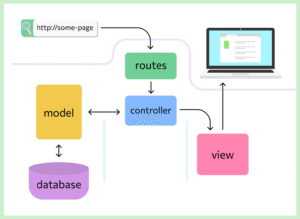
The MVC architecture allows you to write more readable code and make the development process comfortable by separating the work of frontend and backend developers.
Laravel framework capabilities
Artisan Console
Artisan is a command-line interface included with Laravel. It allows you to generate models, new tests, controllers, and notifications from the command line. This is much more convenient than copying a class template from somewhere or writing it manually. To view commands, you can use the list command :
list: php artisan listThe console is used for working with databases, managing the controller, and other tasks. The developer can write custom commands for it.
Eloquent ORM
ORM is a programming technology that connects a database and a programming language. Using an ORM speeds up development. There are many ORM implementations for PHP, but Laravel uses its own. It’s called Eloquent and uses the ActiveRecord model, which assigns a single class to each database table. Eloquent is popular for its convenience and ability to write clear, maintainable code, as well as protection against SQL injection attacks—a common way to hack websites and programs. The ORM can be downloaded separately from the other Laravel components.
Fluent Designer
This is a builder for quickly building database queries that is fully compatible with the Eloquent ORM core. Fluent is a powerful tool that makes it easy to modify database records. All queries use prepared statements and are protected from SQL injection attacks.
Template engine Blade
Template engines are used to transform HTML templates into finished pages. Templates are blanks for future web pages, containing HTML markup without content and PHP code. The job of a template engine is to execute the PHP code and insert the content into the template to transform it into a finished page. The final web page should not contain PHP.
Blade is the Laravel framework’s templating engine. It has no restrictions on using pure PHP in templates, making it more convenient for backend developers. This lack of restrictions doesn’t create additional load on the application.
Validation
Validation is the verification of incoming data. It’s necessary to ensure that any errors are detected and processed promptly. You can write your own validation logic. If the user enters incorrect data, they’ll be redirected to the previous page. The site won’t crash and will remain functional.
Database version control system
This allows for migrations—modifications to the database structure. The framework allows for flexible migration management directly through Artisan: running, rolling back individual or complete migrations, and modifying them.
Unit testing
Also known as unit testing, it’s the “basic level” of testing. Individual code modules are tested for functionality. This is necessary to avoid errors later on at higher levels.
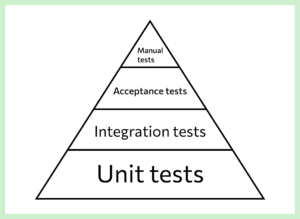
Laravel comes with PHPUnit built in by default—a tool that allows you to create and run tests. PHPUnit makes this easier than doing it manually.
Authentication
With Laravel, you can implement site login using a username and password or through social networks.
The Laravel Sanctum package handles authentication for simple applications and single-page websites. It’s more lightweight than Passport and authorizes users using a token system—physical devices.
Features and benefits of Laravel
Developed ecosystem
The community includes several websites: https://laravel.su/, https://laravel.com/) with articles about Laravel’s features and additional software for convenient work with the framework.
There are global conferences called Laracon that have been held since 2013.
The ecosystem is constantly evolving. This helps maintain interest in the project among sponsors and facilitates Laravel’s development.
High performance
Laravel supports NoSQL databases. These are faster than traditional databases. Data is stored in the server’s RAM, allowing for fast access.
Laravel allows for managed caching and has its own process queuing mechanism. This improves performance, speeds up data access, and reduces the load on computing power.
Safety
Laravel has built-in protection against SQL injection and XSS attacks. Its native ORM prevents SQL injections by preventing the processing of unauthorized SQL queries. And the ability to escape tags protects against XSS attacks.
Open source
Laravel is open-source software. This means any developer can make changes to their own copy of the software. The source code is available on GitHub. In practice, this feature is rarely used. Frameworks are typically not rewritten to avoid conflicts with updates. The benefit is another: you can review the software code and understand how each module works.
Clear syntax
Laravel has a clear syntax, which promotes code readability. It lacks long and complex constructs and is rich in “syntactic sugar.” This refers to commands and features that don’t add anything new to the software but make coding easier.
Flexible routing
Routing is the creation of a path through which information flows from one point to another. In web programming, this involves analyzing a URL and a user’s request and executing code based on that request. Routes can be grouped, various validation methods can be used, namespaces can be managed, and regular expressions can be applied.
Easy migration
Thanks to the database structure version control system, developers can easily modify and roll back the database if necessary. This minimizes the risk of critical database failure—an important consideration when several people are working on a project simultaneously.
Multilingualism
Laravel can be used to create websites with multiple language zones. This includes, for example, websites for Russian-speaking and English-speaking users. The framework supports many languages, and setting up multilingual support is very quick.
An abundance of packages and libraries
Libraries are designed to solve specific problems and allow you to perform actions in a single line that would take dozens of lines if written manually. These are collections of functions designed to simplify the programmer’s work. They can be downloaded and used during development.
Packages are software modules that plug into the framework and extend its capabilities. They are more functional than individual libraries and are needed to implement specific solutions. For example, Laravel Sanctum is a package for fast token-based authentication.
Despite its functionality, the framework requires a lot of manual work from the developer. This provides flexibility when creating software solutions, but also significantly slows down work. Laravel is also more difficult to learn than its competitors.
Flaws
Despite its many advantages, the Laravel framework also has some disadvantages. Here are a few:
- Complexity for beginners: Laravel offers a rich set of features and tools, which can be challenging for beginners. Mastering all its capabilities can take time and effort.
- Performance: Compared to some other, more lightweight frameworks, such as Lumen or Slim, Laravel can have a higher performance overhead. This may be a problem for some projects.
- Updates and Compatibility: When upgrading Laravel to new versions, especially for large projects, compatibility issues with existing code may arise. This may require additional effort to adapt the application to new versions.
- Feature-Richness: For some projects, Laravel can provide too much functionality that isn’t fully utilized. This can lead to code redundancy and difficult maintenance.
- Code Size: Applications developed using Laravel can have a large code base due to the numerous built-in functions and libraries. This can complicate maintenance and debugging.
- Changeability: Like any framework, Laravel may undergo changes over time, which may impact existing code and require updates.
- Training and retraining the team: Using Laravel requires training, and if the development team already has experience with other frameworks, it will take time to retrain them to use Laravel.
- Dependency on third-party packages: Laravel makes heavy use of third-party packages (composer packages), and if one of these packages becomes unsupported or has compatibility issues, it may impact your project.
How to install and start using
To install and get started with the Laravel framework, you’ll need to complete several steps. Below are the main steps:
- Installing Composer
Laravel uses Composer to manage dependencies. If you don’t have it yet, install it by visiting the official website and following the instructions for your operating system.
- Installing Laravel
After installing Composer, run the following command in the command line to create a new Laravel project:
composer create-project --prefer-dist laravel/laravel имя-проектаReplace “project-name” with your project name. Composer will download all the necessary files and dependencies.
- Database configuration
Go to your project directory and edit the file
.envto configure the connection settings for your database (e.g., MySQL or PostgreSQL). - Generating an application key
Run the following command to generate a unique key for your application:
php artisan key:generate
- Starting a local server
You can start a local development server by running the following command:
php artisan serve - Creating routes and controllers
Laravel uses route files
routes/web.phpto define URLs and handle them in controllers. Create routes and controllers for your application. - Database creation and migration
You can create and modify database tables using migrations. Create migrations using the command
php artisan make:migration, then apply them usingphp artisan migrate. - Creating views
Create views (templates) in the folder
resources/viewsto display your application data. - Development
Now you can start developing your application by adding routes, controllers, views, and other Laravel components.
These are the basic steps for getting started with Laravel. The framework also provides many additional features and tools for developing web applications, such as authorization, database interaction, routing, and much more.
Explore More IT Terms
#
- Using an integrating factor
- Equations in total differentials
- Bernoulli's equation
- Linear differential equations of the first order
- 10 Mixed C++ Challenges to Test Your Skills
- 50 Terms Every Programmer Should Know
- 7 Levels of Using the Zip Function in Python
- 7 Python Code Bugs You Need to Fix
- 70+ Free Resources for Learning Programming
A
- A Guide to SQL Query Formatting for Beginners
- A/B testing
- Abstract Data Type (ADT)
- AES Encryption Algorithm: How It Works and Where It's Used
- Agile
- Algorithm
- Algorithm Analysis
- Algorithm Complexity-Key Points
- Algorithm complexity: deep parsing O(log n)
- Algorithm vs. Program
- Algorithms and Data Structures in C#
- An overview of the C # programming language
- An overview of the Python programming language
- Anaconda Python
- Android
- Android App Bundle
- Android SDK
- Angular
- Ansible
- Apache
- Apache Airflow
- Apache Kafka
- Apache Tomcat
- App Store
- AppCode
- Applications of microcontrollers: From simple circuits in electronics to complex systems
- Applications of the derivative
- Arduino: How to Program It: Basics for Beginners
- Array-based stack
- ArrayList
- ASCII
- ASP.NET
- Assembly Language Lessons
B
C
D
- Data Analytics: applications of data analysis in companies
- Data Engineer - Who is it, what does a data engineer do, and an overview of the profession
- Data modeling: what it is, types, and process steps.
- Data preprocessing: a complete guide for beginners and professionals.
- Data structure
- Data Structures and Algorithms (DSA)
- Data types vs. Data structures
- Database Tests with Answers
- Deep Learning
- Defining Aliases
- Defining Arrays
- Deque
- Developing a Website from Scratch
- Differential Equations
- Differentiation of functions
- Digital data: understand the importance of this asset for businesses.
- Double integrals
- Doubly linked lists
- DSA Tutorial
E
F
G
H
- Handling errors and exceptions
- Heads or Tails? How Probability Theory Is Used in IT
- History of the development of computer science
- Homogeneous equations
- Homogeneous vs. non-homogeneous structures
- How to effectively organize your workflow
- How to Learn Java: Tips for Beginner Developers
- How to Learn PHP: A Beginner's Guide
- How to Use S3 Storage in Kubernetes with CSI
- HTML
- HTML and CSS: Definition, Application, and Operating Principles
- HTML and CSS. Layout from Scratch: What to Learn, Where to Learn, and How Long Will It Take?
- HTML Frame Structure
- HTML Link Formatting
I
- if..else construction
- Infinite sequences and series
- Information properties
- Inheritance in Java: A Complete Guide to Principles and Implementation
- Inserting an Image
- Integration of functions
- Interactive Python Tutorial – Learn Programming from Scratch
- Interpreter
- Interview Problem: Finding a Deleted Element in O(N)
- Interview Scare: The FizzBuzz Challenge
- Introduction to C++
- Introduction to Machine Learning
- Introduction to Networking | Network Fundamentals Part 1
- Introduction to Number Systems (Binary, Octal, Hexadecimal) | Math for CS Foundations #1
- IT Specialist Resume (CV)
J
K
L
M
- Machine Learning
- Machine Learning Basic Tool: NumPy
- Machine Learning Basic Tool: Pandas
- Machine Learning Mathematics
- Mathematics for programmers: what is really needed?
- MD5 encryption algorithm: What is it and why is it needed?
- Microcontroller and Microprocessor - what's the difference?
- ML Engineer: Who They Are, What They Do, How Much They Earn, and How to Become a Neural Network Specialist
- Monte Carlo Simulation: How It Works and What It's For
O
P
- PHP lessons
- Private DNS server and its configuration
- Program code
- Programmer's Dictionary
- Programming
- Programming with pseudocode
- Python Code Formatting Guide: PEP8
- Python for data analysis: how to do it and main libraries
- Python Lessons
- Python Superstar: 5 Ways to Use the * Operator
- Python vs. Julia: Should You Replace Python with Julia?
R
S
- SFML Graphics Library Tutorials
- Sorting Algorithms in Programming: Types, Descriptions, and Comparisons
- SQL commands: see what they are, what the main ones are + examples
- SQL Interview Questions and Tasks
- SQL Lessons
- SQL Stored Procedures
- SQL Syntactic Sugar: The COALESCE Function
- Stack
- Start in analytics: Python or R
- Static vs. dynamic data structures
- Statistical analysis: importance for decision making.
- String formatting in Python
- Structure of computer science
- Swift Lessons
- switch/match construct
- Syntax
T
- Terms in programming
- Text and paragraph formatting tags
- The concept of information and its transmission
- The Future of Python: Key Trends and Insights from Global Researc
- The Infrastructure of Code: A Complete Guide to Repositories for Languages, Frameworks, and Compilers
- The pip package manager in Python
- The role of informatization in the development of society
- Transfers
- Tutorials / Articles
- TypeScript: What It Is and Why Developers Need It
W
- What are databases, and why do they need DBMS and SQL?
- What do Linux distributions consist of?
- What is .NET and what is it used for?
- What is a data structure?
- What is a GPU in a computer, in simple terms?
- What is a quantum computer: 100,500 problems in one second
- What Is an Algorithm?
- What is Arduino: How it Works and the Platform's Capabilities
- What is Big Data? Introduction, Types, Characteristics, and Examples
- What is FizzBuzz Challenge?
- What is Golang and what is it used for?
- What is Haskell and what is it used for?
- What is Kotlin and what is it used for?
- What is Linux? The History of Linux
- What is machine learning, and how does it work?
- What is Power BI: everything about the data analytics software
- What is recursion, recursive and iterative process in programming?
- What is the C++ programming language?
- What is the OSI Model: A Complete Explanation of the Seven Layers and Their Role in Networking
- What's the difference between x86 and ARM processors?
- Where to start learning the C programming language?
- Which Linux distribution should you choose? A Linux distribution overview