What is Arduino: How it Works and the Platform’s Capabilities
If you’ve ever dreamed of building a robotic arm, an automatic watering system for your seedlings, or a special sensor that can detect the noise level coming from your neighbors, then you need to know what Arduino is. Arduino is an open-source electronics platform for creating interactive projects. It’s designed for hobbyists, artists, designers, and anyone interested in electronics. Learn more in our article.
What can Arduino do?
This platform gives talented and capable developers scope for self-expression. Arduino is used to create interactive projects in the fields of smart home, robotics, industrial automation, media installations, measuring instruments, games, and much more. Let’s explore Arduino’s capabilities with specific examples:
- Smart home. Arduino can be used to automate lighting and security systems. It can be used to create custom devices to control home appliances and integrate them with smart home platforms.
- Robotics. Using Arduino, you can build robots, from simple mobile ones to complex manipulators. The platform is programmable for motion control, sensor reading, and data processing.
- Measuring instruments. Collect data from temperature, humidity, light, pressure, and other sensors.
- Games. Arduino is used to create simple consoles. Connect buttons, joysticks, motion sensors, and other components.
- Automation and control. Seedling care and even agriculture, industry, or the automotive sector can be automated using Arduino. Create control and management systems for a variety of tasks, from automatic plant watering to industrial process control.
Furthermore, the platform supports the connection of numerous additional modules and sensors, expanding its functionality and allowing for adaptation for a wide range of projects. It is an open platform: schematics and board designs are freely available for use and modification.
Arduino: Description
Components
The platform consists of a physical board with a microcontroller and software (IDE) used to write and load programs onto the board.
The microcontroller on the board is the main component. It controls various external devices: LEDs, sensors, and motors. The Arduino platform supports a simple and intuitive programming language based on C/C++.
Let’s start by looking at how Arduino works. Creating a project can be boiled down to five steps:
- Writing a program in the Arduino programming language within the integrated development environment. This step determines what actions the microcontroller should perform.
- Loading the program after writing. The completed code is uploaded to the on-board microcontroller via USB. The program is saved in the microcontroller’s internal memory.
- Program interpretation and execution. The microcontroller executes the instructions from the loaded program one by one. It reads input data from connected sensors or other devices, processes this information according to the program, and controls connected devices (LEDs, motors, or displays) based on the specified instructions.
- Interacting with External Devices. If external devices (such as sensors, displays, and other components) are connected via the I/O connectors, the Arduino interacts with them at this stage.
- Looping program execution. After executing all program instructions, the Arduino returns to the beginning and repeats the loop, continuing to read data, process it, and control connected devices according to the program.
These are the basic steps performed by the Arduino system. Depending on the complexity of the project, additional steps may be added.
Now let’s look at the main components of an Arduino. Let’s start with what an Arduino board is.
Arduino boards
Arduino boards are physical electronic circuit boards that contain a microcontroller and other components essential to the platform’s operation. Without them, creating an electronic project is simply impossible. There are many Arduino models, each with unique features and functionality. Let’s look at the board’s structure using the most popular example: the Arduino Uno, one of the most common and widely used models. Equipped with a sufficient number of digital and analog inputs and outputs, as well as a USB port, it’s considered an excellent choice for beginners.

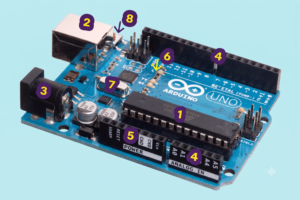
The Arduino Uno board measures 68.6 x 53.4 mm and weighs 25 g. Despite the Made in Italy label (the platform was invented in Italy at the beginning of the 21st century), such a board can be made anywhere, and that’s okay.
Its main elements are:
- Microcontroller (pictured above – 1): The Arduino Uno is equipped with an ATmega328P microcontroller. This is a dedicated integrated circuit that executes programs, controls external devices, and processes data.
- USB port (2): required for connection to a computer to download the program to the microcontroller.
- Power connector (3): The board can be powered via a computer’s USB port or an external power source via this connector. The board supports a wide voltage range and has a ground connection.
- Inputs/Outputs (4): Digital and analog inputs/outputs (or I/O). Digital pins can be configured to act as either inputs or outputs, while analog pins can read analog values, such as voltage.
- Connectors for supplying power to external components (5) – sensors, displays, motors, etc.
- LED indicators (6): Several LED indicators that display the board’s operating status and program debugging; one of them is customizable.
- Quartz Crystal (7): Used to generate the precise clock signal required for the microcontroller to operate.
- Reset button (8), used to stop the program and reset.
Besides the Arduino Uno, there are other boards, such as:
- The Arduino Due is based on the more powerful ARM Cortex-M3 microcontroller. It features high performance, large memory capacity, and support for more complex calculations. It is suitable for projects requiring high performance and data processing.
- The Arduino Mega has more inputs and outputs, including additional serial ports, analog inputs and outputs, and expanded memory. It’s suitable for more complex projects requiring more ports.
- The Arduino Leonardo features a microcontroller with virtual keyboard and mouse functionality. It’s suitable for projects that require emulating keyboard or mouse input.
- The Arduino Nano is a compact version with a smaller footprint, yet powerful enough for a wide range of projects. Its small size and low power consumption make it ideal for embedded systems or projects with limited space.

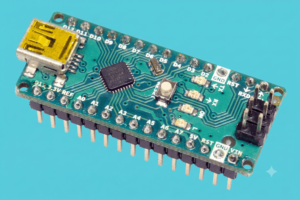
The Arduino Nano measures 45.0 x 18.0 mm and weighs 7 g.
The platform’s unique features include its flexibility, accessibility, and openness. This allows other manufacturers to release their own Arduino boards. For example, developers use:
- The Adafruit Feather is a series of compact boards featuring wireless modules (such as Wi-Fi or Bluetooth), built-in batteries, and sensors. Feather boards are compact and ideal for mobile and embedded projects.
- The SparkFun RedBoard is an alternative version of the Arduino Uno with similar specifications but a modified design and additional features. The RedBoard is often used for educational purposes and electronics projects.
- Seeeduino – These boards have additional interfaces such as Ethernet, LoRa, or GSM, making them suitable for developing communications and IoT projects.
- ESP32 Dev Board – This board is based on the ESP32 microcontroller and offers Wi-Fi and Bluetooth support. It is often used in projects related to the Internet of Things and wireless communications.
Modules
Arduino modules are add-on components that can be connected to the board to expand its functionality and capabilities. These are small electronic devices that typically have their own microcontrollers and are designed to perform specific tasks, such as:
- Wireless communication – Wi-Fi, Bluetooth, Zigbee or LoRa. These sensors allow the Arduino board to interact with other devices or connect to the internet.
- Sensors—temperature, humidity, light, gas, and many others— allow the Arduino board to obtain data from its physical environment.
- Actuators (servos, motors, relays, or LEDs) allow Arduino to control physical actions and change the environment. For example, a robotic arm can grasp an object.
- Data storage – SD cards or EEPROM modules, which can be used to save and read information for long-term storage or to exchange data with other devices.
- Displays – these allow you to display information on a screen, such as text, graphics, or numbers. These can be text-only LCD, OLED, or even touchscreen displays.
- Other modules – for example, sound, GPS, or voice recognition.

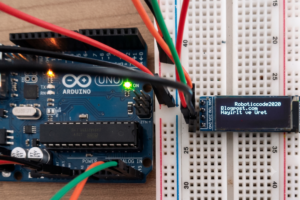
Arduino Uno with an attached LCD screen
As with boards, Arduino modules are produced by official developers and third parties. Examples of official modules:
- The Arduino Ethernet Shield allows your Arduino board to connect to Ethernet over a twisted-pair cable and exchange data over the network.
- The Arduino WiFi Shield allows you to connect to Wi-Fi.
- The Arduino Motor Shield is designed to control motors and allows the Arduino board to control the speed and direction of rotation of motors.
- The Arduino LCD Shield contains an LCD and buttons for easy information display and user interaction.
- The Arduino Proto Shield provides a breadboard for prototyping projects, allowing you to easily connect and test various components and sensors.
There are also many third-party modules available, such as DFRobot Gravity, Adafruit FeatherWing, Grove, and SparkFun.
Software capabilities
Arduino is considered a simple construction kit, capable of building anything from a simple electronic device (such as a switch) to something more complex (a robotic arm or an automatic watering system). At the same time, the platform offers ample opportunities to develop programming skills. This can be achieved using:
- The Arduino IDE is a simple and intuitive interface for creating and uploading software code. It supports code editing, compilation, uploading, and serial port monitoring.
- The Arduino programming language is based on a simplified version of the C/C++ language, which contains libraries and functions specifically designed for working with Arduino boards.
- Standard libraries that simplify working with various components and modules—more on these below.
Arduino supports interaction with peripheral devices via various interfaces: digital and analog pins, the I2C bus, the SPI bus, UART (serial) , and more. This allows you to connect and control various components (sensors, actuators, displays, and more). It’s also worth noting other software capabilities, such as configuring network protocols for internet communication, using GPS data, and more.
Libraries
Arduino libraries are sets of predefined functions and methods that facilitate the development and programming of Arduino boards. They allow users to create projects without extensive programming knowledge. Libraries significantly simplify development by allowing users to use ready-made functions and methods rather than writing everything from scratch.
The standard libraries included with the Arduino kit provide basic functionality for working with digital and analog pins, timing, serial communication, math operations, and more.
Libraries for working with peripheral devices are specially designed for interacting with, for example, displays and motors, reading data from sensors, and working with communication interfaces (I2C and SPI).
Libraries for advanced functions, such as those for working with Wi-Fi or Bluetooth, touch screens, and sound modules are also worth mentioning.
Each library has its own name and intended use. For example, the Wire (I2C) Library provides functions for sending and receiving data over the I2C bus and exchanging messages between the master and slave devices using the I2C protocol. The Adafruit GFX Library provides basic functionality for drawing on graphic displays. It serves as the foundation for other specialized libraries for working with specific displays.
You can find libraries in the Arduino Library Manager or on the Arduino.cc platform. Also, don’t forget about various resources and forums dedicated to Arduino. Third-party libraries can be found and downloaded using the library manager in the Arduino IDE or installed manually.
Advantages and disadvantages
Advantages of Arduino
+ Ease of use: Arduino is ideal for beginners in programming and electronics – it has a user-friendly interface and a simple programming language, and assembly does not require special skills and tools.
+ Scalability and flexibility – Arduino allows you to create both simple and complex projects; it supports various board sizes and form factors, as well as various communication interfaces.
+ Wide selection of boards and modules (the ones mentioned above are just a drop in the ocean).
+ Extensive documentation: Official guides, code samples, and reference materials help developers understand the platform and its capabilities.
+ Large community and support: There are forums, blogs, online courses, and other resources where you can find information and solutions for your projects.
Disadvantages of Arduino
− Limited computing resources – this concerns both memory capacity and processor power.
– Limited support for some peripherals: Sometimes a specialized driver or additional setup may be required, which can be a challenge for novice users.
− Limited expansion options compared to more powerful and specialized platforms such as Raspberry Pi, BeagleBone, Teensy, ESP32, and others.
Application examples
Arduino isn’t just for learning programming and electronics; it’s also for practical use. For example, the American company Blipcare has developed medical devices for measuring blood pressure using Arduino as the base platform. And California-based Printrbot makes 3D printers for home use—in many models, Arduino serves as the motion controller.


FarmBot creates automation systems for vertical farming and gardening. They use Arduino to control and manage irrigation systems, lighting, and other aspects of plant growing.
These types of enterprises can be divided into the following groups (the list is far from complete – these are just examples) depending on the industry and purpose:
- Arduino-based 3D Printer: Arduino is widely used in the DIY community to create homemade 3D printers. With Arduino, you can control the axes, temperature, and other printing parameters.
- Arduino Home Automation System: Smart home systems can control lighting, temperature, security, and other systems using sensors, relays, and wireless modules.
- Arduino-based Weather Station: Using an Arduino and sensors, you can create a weather station that measures temperature, humidity, barometric pressure, and other weather parameters, then displays the data on an LCD screen or transmits it over the internet.
- Arduino-based Quadcopter: Arduino is used in DIY quadcopter projects to control motors, stabilize flight, and receive data from sensors.
- Arduino MIDI Controller: The board can be used to create MIDI controllers that allow musicians to control sounds and effects in music production software.
- Arduino-based Gaming Console: Using Arduino, you can create simple gaming consoles that run a variety of video games and are controlled using buttons and joysticks.
So, if you’re interested, welcome to the world of Arduino.
Explore More IT Terms
#
- Using an integrating factor
- Equations in total differentials
- Bernoulli's equation
- Linear differential equations of the first order
- 10 Mixed C++ Challenges to Test Your Skills
- 11 Tricky Non-Technical Questions to Ask in a Recruiting Interview
- 50 Terms Every Programmer Should Know
- 52 Java Thread Interview Questions
- 7 Levels of Using the Zip Function in Python
- 7 Python Code Bugs You Need to Fix
- 70+ Free Resources for Learning Programming
A
- A Comprehensive Guide to HTML and CSS
- A Comprehensive Guide to MODX CMS
- A computer science question tests your ability to work with IP addresses and network masks
- A Guide to SQL Query Formatting for Beginners
- A/B testing
- Abstract Data Type (ADT)
- AES Encryption Algorithm: How It Works and Where It's Used
- Agile
- Algorithm
- Algorithm Analysis
- Algorithm Complexity-Key Points
- Algorithm complexity: deep parsing O(log n)
- Algorithm vs. Program
- Algorithms and Data Structures in C#
- An overview of the C # programming language
- An overview of the Python programming language
- Anaconda Python
- Analysis of graphs and adjacency matrices question
- Android
- Android App Bundle
- Android SDK
- Angular
- Ansible
- Apache
- Apache Airflow
- Apache Kafka
- Apache Tomcat
- App Store
- AppCode
- Applications of microcontrollers: From simple circuits in electronics to complex systems
- Applications of the derivative
- Arduino: How to Program It: Basics for Beginners
- Array-based stack
- ArrayList
- ASCII
- ASP.NET
- Assembly Language Lessons
B
C
- C++ Lessons
- Cache
- Calculating Memory Capacity
- Character sets and encodings
- Characteristics of a good Algorithm
- Circular singly linked list
- Coding Tests with Answers
- Combinational Circuits Solved Questions
- Compiler
- Complexity of algorithms-Tutorial
- Computer Science Fundamentals Test with Answers (47 questions)
- Computer science tests with answers (More than 100 Questions)
- Constants
- Creating a Table in HTML
- Creating Forms in HTML
- Creating Lists
- Cybernetics and informatics
- Cycles
D
- Data Analytics: applications of data analysis in companies
- Data Engineer - Who is it, what does a data engineer do, and an overview of the profession
- Data modeling: what it is, types, and process steps.
- Data preprocessing: a complete guide for beginners and professionals.
- Data structure
- Data Structures and Algorithms (DSA)
- Data types vs. Data structures
- Database Tests with Answers
- Deep Learning
- Defining Aliases
- Defining Arrays
- Deque
- Detailed articles and tutorials on PHP
- Developing a Website from Scratch
- Differential Equations
- Differentiation of functions
- Digital data: understand the importance of this asset for businesses.
- Double integrals
- Doubly linked lists
- DSA Tutorial
E
F
G
H
- Handling errors and exceptions
- Heads or Tails? How Probability Theory Is Used in IT
- History of the development of computer science
- Homogeneous equations
- Homogeneous vs. non-homogeneous structures
- How to effectively organize your workflow
- How to Learn Java: Tips for Beginner Developers
- How to Learn PHP: A Beginner's Guide
- How to Use S3 Storage in Kubernetes with CSI
- HTML
- HTML and CSS: Definition, Application, and Operating Principles
- HTML and CSS. Layout from Scratch: What to Learn, Where to Learn, and How Long Will It Take?
- HTML Frame Structure
- HTML Link Formatting
- HTML Quizzes with Answers
I
- if..else construction
- Infinite sequences and series
- Information properties
- Inheritance in Java: A Complete Guide to Principles and Implementation
- Inserting an Image
- Integration of functions
- Interactive Python Tutorial – Learn Programming from Scratch
- Interpreter
- Interview Problem: Finding a Deleted Element in O(N)
- Interview Scare: The FizzBuzz Challenge
- Introduction to C++
- Introduction to Machine Learning
- Introduction to Networking | Network Fundamentals Part 1
- Introduction to Number Systems (Binary, Octal, Hexadecimal) | Math for CS Foundations #1
- IT Specialist Resume (CV)
J
K
L
M
- Machine Learning
- Machine Learning Basic Tool: NumPy
- Machine Learning Basic Tool: Pandas
- Machine Learning Mathematics
- Mathematics for programmers: what is really needed?
- MD5 encryption algorithm: What is it and why is it needed?
- Microcontroller and Microprocessor - what's the difference?
- ML Engineer: Who They Are, What They Do, How Much They Earn, and How to Become a Neural Network Specialist
- Monte Carlo Simulation: How It Works and What It's For
O
P
- PHP lessons
- Private DNS server and its configuration
- Program code
- Programmer's Dictionary
- Programming
- Programming with pseudocode
- Python Code Formatting Guide: PEP8
- Python for data analysis: how to do it and main libraries
- Python Lessons
- Python Superstar: 5 Ways to Use the * Operator
- Python vs. Julia: Should You Replace Python with Julia?
R
S
- SFML Graphics Library Tutorials
- Sorting Algorithms in Programming: Types, Descriptions, and Comparisons
- SQL commands: see what they are, what the main ones are + examples
- SQL Interview Questions and Tasks
- SQL Lessons
- SQL Stored Procedures
- SQL Syntactic Sugar: The COALESCE Function
- Stack
- Start in analytics: Python or R
- Static vs. dynamic data structures
- Statistical analysis: importance for decision making.
- String formatting in Python
- Structure of computer science
- Swift Lessons
- switch/match construct
- Syntax
T
- Terms in programming
- Text and paragraph formatting tags
- The Complete Guide to Bootstrap
- The Complete Guide to JavaScript
- The concept of information and its transmission
- The Future of Python: Key Trends and Insights from Global Researc
- The Infrastructure of Code: A Complete Guide to Repositories for Languages, Frameworks, and Compilers
- The pip package manager in Python
- The role of informatization in the development of society
- Transfers
- Tricky Java Questions Often Asked in Interviews
- Tutorials / Articles
- TypeScript: What It Is and Why Developers Need It
W
- What are databases, and why do they need DBMS and SQL?
- What do Linux distributions consist of?
- What is .NET and what is it used for?
- What is a data structure?
- What is a GPU in a computer, in simple terms?
- What is a quantum computer: 100,500 problems in one second
- What Is an Algorithm?
- What is Arduino: How it Works and the Platform's Capabilities
- What is Big Data? Introduction, Types, Characteristics, and Examples
- What is FizzBuzz Challenge?
- What is Golang and what is it used for?
- What is Haskell and what is it used for?
- What is Kotlin and what is it used for?
- What is Linux? The History of Linux
- What is machine learning, and how does it work?
- What is Power BI: everything about the data analytics software
- What is recursion, recursive and iterative process in programming?
- What is the C++ programming language?
- What is the OSI Model: A Complete Explanation of the Seven Layers and Their Role in Networking
- What's the difference between x86 and ARM processors?
- Where to start learning the C programming language?
- Which Linux distribution should you choose? A Linux distribution overview