
What do Linux distributions consist of?
To provide you with a convenient and functional operating system, various Linux distributions combine hundreds and thousands of programs and system components. Each distribution has its own set of components, which allows them to be both very different and very similar.
The software mentioned is developed by various, often unrelated, groups of developers. For example, the Linux kernel is created by Linus Torvalds and members of the Linux community; GNU utilities are written by the GNU project developers and the Free Software Foundation (FSF); the KDE desktop environment is developed by the KDE community; the Firefox browser is developed by Mozilla; and so on.
In this lesson, we will examine the main components that make up any Linux distribution.
Linux distribution components
Linux kernel
The heart of any operating system is its kernel. In 1991, Linus Torvalds announced the first public release of the Linux kernel. Since then, it has evolved greatly, and today thousands of volunteers (both companies and individual software developers) work on its development and support. It’s safe to say that the Linux kernel is found in almost every smart device you encounter in your life, from Android phones to the cars you drive.
The Linux kernel is responsible for connecting the device’s software and hardware, distributing system resources among various applications, initiating input/output processes, and transferring them to the central processor for execution. No operating system can function without a kernel.
Note: The Linux kernel currently contains over 20 million lines of code.
GNU utilities
GNU is a project started in the 1980s by Richard Stallman, founder of the Free Software Foundation (FSF). The project’s goal was to create a completely free operating system that would serve as an alternative to the UNIX operating system. While the GNU developers created all the necessary tools and programs, they were unable to write the kernel itself. Therefore, in 1991, Linus Torvalds created the Linux kernel and then used GNU software and utilities to create a working operating system.
The GNU project includes many different utilities: the bash command shell, the GNU Compiler Collection, the GRUB bootloader, the GTK+ framework, the gzip archiver, the Nano text editor, and other software.
One of the main projects within GNU is the GRUB bootloader:
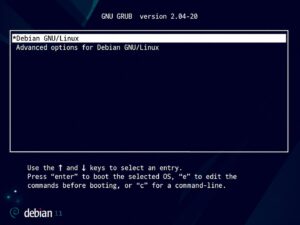
GRUB bootloader
GRUB is the first program that loads after you press your computer’s power button. GRUB loads the operating system kernel and other components necessary for system operation. Nearly 99% of Linux distributions use the GRUB bootloader. If you have multiple operating systems installed, GRUB provides a menu that allows you to choose which system to boot (e.g., Windows or Linux ).
Note: There are other bootloaders, such as LILO and BURG, but they are not very popular.
Another important utility of the GNU project is the bash shell :
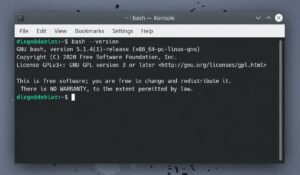
Bash shell
Most Linux systems use the bash shell by default, which provides a command-line interface that allows you to control your computer by entering commands in a terminal window. Shells can also run scripts, which are a set of commands and operations that are executed in the order specified in the script body.
Demons
Daemons are background utility programs (or processes ) whose purpose is to monitor specific OS subsystems and ensure their proper operation. For example, a printer daemon controls printing capabilities, a network daemon monitors and maintains network communications, and so on.
Note: Windows calls such processes “services”, while UNIX-like systems call them “daemons”.
The most well-known daemon is systemd, which manages all other operating system processes. It is the first process executed after the Linux kernel boots. Its job is to manage other daemons and start them as needed, either during boot or at any other time. It controls all services available in the operating system and can enable or disable them as needed.
Package manager
A package manager (or “package manager” ) is a set of software that allows you to manage the process of installing, removing, configuring, and updating various software components.
In Linux, software is packaged. If you want to install an app, library, game, or anything else, you don’t need to search for an installation file online. All you need to do is open the package management system, find, and install the applications you need.
Pay attention to the package format used. Red Hat and many other Linux distribution families use the RPM package format, which has the .rpm extension (similar to .exe in Windows). Debian Linux systems, on the other hand, use the dpkg package management system, which works with .deb packages.
Note: It is not allowed (with some exceptions) to install DEB files on Linux distributions that use RPM packages. However, you can try converting the package from.DEB to.RPM format using a utility called Alien, or search for the corresponding package in your system’s official repositories.
There are many different package managers in Linux, and they vary from distribution to distribution. For example, Ubuntu uses the apt package manager, while Fedora uses dnf, openSUSE uses zypper, and Arch Linux uses pacman.
If you want, for example, to install the Firefox browser on your system, you should run the following command:
For Ubuntu users:
sudo apt install firefox
For Fedora users:
sudo dnf install firefox
For openSUSE users:
sudo zypper install firefox
For Arch Linux users:
sudo pacman install firefox
As you can see, the commands are very similar, but the underlying package management systems they run are very different; the differences lie in how they operate, their speed, and security.
Display server
The display server (or “window interface” ) is a vital part of the operating system, responsible for displaying the graphical user interface on your screen. Icons, windows, and menus—all the graphical objects you see on your screen—are rendered by the display server. Without a display server, you’re doomed to sit in front of a black command line interface, scaling the entire screen of your monitor.
There are many different display servers available. For UNIX-like systems and Linux distributions, the most well-known is X.Org Server, released in 1987 (before the Linux kernel) and still in use today.
Note: Since X.Org Server has been around for over 30 years, it is riddled with security issues. In response, some developers, supported by companies like Red Hat and Intel, have developed a new display protocol called Wayland.
Desktop environment
A desktop environment (or “desktop environment” ) is a type of graphical user interface based on the desktop metaphor, facilitating work with the operating system through a specific set of tools, including icons, windows, panels, menus, widgets, file and display managers, and much more. The most well-known desktop environments for Linux are GNOME and KDE.
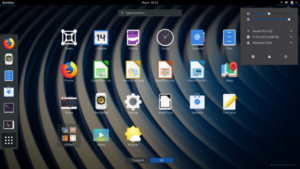
GNOME 3.32
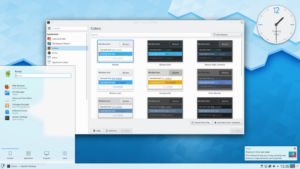
KDE Plasma 5
Display manager
Display managers are used to display the user’s welcome screen and launch desktop sessions: they prompt you for your username and password before allowing you to log into the desktop environment. If you use GNOME, the default display manager is GDM. If you choose KDE, your default display manager will be KDM (or SDDM).
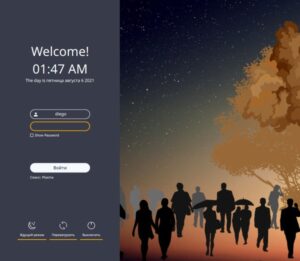
Display Manager SDDM
You can use any display manager you want. However, you cannot run more than one display manager at a time.
Custom applications
User applications are the regular apps you use every day, such as the Firefox browser, the LibreOffice office suite, the VLC media player, and so on. These apps can vary greatly from distribution to distribution.
It’s also worth noting that you can run any Linux program in any desktop environment, but programs designed for some desktop environments may display incorrectly or interfere with other processes in others. For example, if you try to run the GNOME Files file manager (formerly Nautilus ) in KDE, it will require the installation of various GNOME libraries and likely launch GNOME desktop processes in the background when you open it. However, the file manager will still be usable.
User applications (like all other packages) are downloaded from their respective repositories.
Conclusion
Linux distributions take the final step: they take all of the above software, combine it, and add their own necessary utilities to create a fully functional operating system.
Explore More IT Terms
#
- Using an integrating factor
- Equations in total differentials
- Bernoulli's equation
- Linear differential equations of the first order
- 10 Mixed C++ Challenges to Test Your Skills
- 11 Tricky Non-Technical Questions to Ask in a Recruiting Interview
- 50 Terms Every Programmer Should Know
- 52 Java Thread Interview Questions
- 7 Levels of Using the Zip Function in Python
- 7 Python Code Bugs You Need to Fix
- 70+ Free Resources for Learning Programming
A
- A Comprehensive Guide to HTML and CSS
- A Comprehensive Guide to MODX CMS
- A computer science question tests your ability to work with IP addresses and network masks
- A Guide to SQL Query Formatting for Beginners
- A/B testing
- Abstract Data Type (ADT)
- AES Encryption Algorithm: How It Works and Where It's Used
- Agile
- Algorithm
- Algorithm Analysis
- Algorithm Complexity-Key Points
- Algorithm complexity: deep parsing O(log n)
- Algorithm vs. Program
- Algorithms and Data Structures in C#
- An overview of the C # programming language
- An overview of the Python programming language
- Anaconda Python
- Analysis of graphs and adjacency matrices question
- Android
- Android App Bundle
- Android SDK
- Angular
- Ansible
- Apache
- Apache Airflow
- Apache Kafka
- Apache Tomcat
- App Store
- AppCode
- Applications of microcontrollers: From simple circuits in electronics to complex systems
- Applications of the derivative
- Arduino: How to Program It: Basics for Beginners
- Array-based stack
- ArrayList
- ASCII
- ASP.NET
- Assembly Language Lessons
B
C
- C++ Lessons
- Cache
- Calculating Memory Capacity
- Character sets and encodings
- Characteristics of a good Algorithm
- Circular singly linked list
- Coding Tests with Answers
- Combinational Circuits Solved Questions
- Compiler
- Complexity of algorithms-Tutorial
- Computer Science Fundamentals Test with Answers (47 questions)
- Computer science tests with answers (More than 100 Questions)
- Constants
- Creating a Table in HTML
- Creating Forms in HTML
- Creating Lists
- Cybernetics and informatics
- Cycles
D
- Data Analytics: applications of data analysis in companies
- Data Engineer - Who is it, what does a data engineer do, and an overview of the profession
- Data modeling: what it is, types, and process steps.
- Data preprocessing: a complete guide for beginners and professionals.
- Data structure
- Data Structures and Algorithms (DSA)
- Data types vs. Data structures
- Database Tests with Answers
- Deep Learning
- Defining Aliases
- Defining Arrays
- Deque
- Detailed articles and tutorials on PHP
- Developing a Website from Scratch
- Differential Equations
- Differentiation of functions
- Digital data: understand the importance of this asset for businesses.
- Double integrals
- Doubly linked lists
- DSA Tutorial
E
F
G
H
- Handling errors and exceptions
- Heads or Tails? How Probability Theory Is Used in IT
- History of the development of computer science
- Homogeneous equations
- Homogeneous vs. non-homogeneous structures
- How to effectively organize your workflow
- How to Learn Java: Tips for Beginner Developers
- How to Learn PHP: A Beginner's Guide
- How to Use S3 Storage in Kubernetes with CSI
- HTML
- HTML and CSS: Definition, Application, and Operating Principles
- HTML and CSS. Layout from Scratch: What to Learn, Where to Learn, and How Long Will It Take?
- HTML Frame Structure
- HTML Link Formatting
- HTML Quizzes with Answers
I
- if..else construction
- Infinite sequences and series
- Information properties
- Inheritance in Java: A Complete Guide to Principles and Implementation
- Inserting an Image
- Integration of functions
- Interactive Python Tutorial – Learn Programming from Scratch
- Interpreter
- Interview Problem: Finding a Deleted Element in O(N)
- Interview Scare: The FizzBuzz Challenge
- Introduction to C++
- Introduction to Machine Learning
- Introduction to Networking | Network Fundamentals Part 1
- Introduction to Number Systems (Binary, Octal, Hexadecimal) | Math for CS Foundations #1
- IT Specialist Resume (CV)
J
K
L
M
- Machine Learning
- Machine Learning Basic Tool: NumPy
- Machine Learning Basic Tool: Pandas
- Machine Learning Mathematics
- Mathematics for programmers: what is really needed?
- MD5 encryption algorithm: What is it and why is it needed?
- Microcontroller and Microprocessor - what's the difference?
- ML Engineer: Who They Are, What They Do, How Much They Earn, and How to Become a Neural Network Specialist
- Monte Carlo Simulation: How It Works and What It's For
O
P
- PHP lessons
- Private DNS server and its configuration
- Program code
- Programmer's Dictionary
- Programming
- Programming with pseudocode
- Python Code Formatting Guide: PEP8
- Python for data analysis: how to do it and main libraries
- Python Lessons
- Python Superstar: 5 Ways to Use the * Operator
- Python vs. Julia: Should You Replace Python with Julia?
R
S
- SFML Graphics Library Tutorials
- Sorting Algorithms in Programming: Types, Descriptions, and Comparisons
- SQL commands: see what they are, what the main ones are + examples
- SQL Interview Questions and Tasks
- SQL Lessons
- SQL Stored Procedures
- SQL Syntactic Sugar: The COALESCE Function
- Stack
- Start in analytics: Python or R
- Static vs. dynamic data structures
- Statistical analysis: importance for decision making.
- String formatting in Python
- Structure of computer science
- Swift Lessons
- switch/match construct
- Syntax
T
- Terms in programming
- Text and paragraph formatting tags
- The Complete Guide to Bootstrap
- The Complete Guide to JavaScript
- The concept of information and its transmission
- The Future of Python: Key Trends and Insights from Global Researc
- The Infrastructure of Code: A Complete Guide to Repositories for Languages, Frameworks, and Compilers
- The pip package manager in Python
- The role of informatization in the development of society
- Transfers
- Tricky Java Questions Often Asked in Interviews
- Tutorials / Articles
- TypeScript: What It Is and Why Developers Need It
W
- What are databases, and why do they need DBMS and SQL?
- What do Linux distributions consist of?
- What is .NET and what is it used for?
- What is a data structure?
- What is a GPU in a computer, in simple terms?
- What is a quantum computer: 100,500 problems in one second
- What Is an Algorithm?
- What is Arduino: How it Works and the Platform's Capabilities
- What is Big Data? Introduction, Types, Characteristics, and Examples
- What is FizzBuzz Challenge?
- What is Golang and what is it used for?
- What is Haskell and what is it used for?
- What is Kotlin and what is it used for?
- What is Linux? The History of Linux
- What is machine learning, and how does it work?
- What is Power BI: everything about the data analytics software
- What is recursion, recursive and iterative process in programming?
- What is the C++ programming language?
- What is the OSI Model: A Complete Explanation of the Seven Layers and Their Role in Networking
- What's the difference between x86 and ARM processors?
- Where to start learning the C programming language?
- Which Linux distribution should you choose? A Linux distribution overview