Creating Lists in HTML
HTML supports working with all types of lists. Let’s look at them
HTML unordered list
An HTML unordered list contains the following tags:
That is, each list item must begin with a tag li and end with its closing pair, instead of which a marker will be displayed (a disk, a circle, or a square – depending on the browser settings)
To set the marker type, you need to use the attribute type:
< ul type = "disk" > filled disk < ul type = "circle" > circle < ul type = "square" > square |
HTML ordered list
An ordered list in HTML, or numbered list, is almost the same as an unordered list, except for the first main tag:
Syntax:
There are also different numbering options for a numbered list:
< ol type = "a" > < ol type = "A" > < ol type = "I" > < ol type = "1" > |
Can also be applied to a single item:
< li type = "a" > |
To continue the list from a specific number:
< ol start = "5" > |
Multilevel HTML list
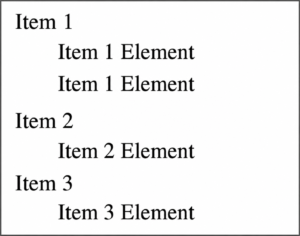
Definition lists or multi-level lists in HTML are created as follows:
Result:
Pretty HTML list or mixed list
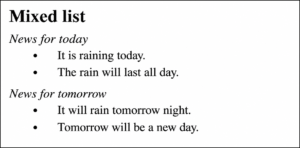
To make your list as beautiful as possible, you can use different list types in a single list. Let’s look at an example:
1 2 3 4 5 6 7 8 9 10 | < dl >< strong > Mixed list < / strong > < dt >< i > News for today < / i > < dd > < li > It is raining today < / li > < li > The rain will last all day < / li > < dt >< i > News for tomorrow night < / i > < dd > < li > It will rain tomorrow tonight < / li > < li > Tomorrow will be a new day < / li > < / dl > |
Result:
- Open the file
- Create a mixed list
- Use HTML numbered and unnumbered lists and definition lists so that:
-A marker was displayed instead of a sign- instead of ordinal numbers and letters (
1,2,3,a,b,c )The corresponding numbers and letters were displayed automatically
- remove the sign
-, ordinal numbers and letters from the text