Data Structures and Algorithms (DSA)
- 1. What Is a Data Structure?
- 2. What Is an Algorithm?
- 3. Characteristics of a Good Algorithm
- 3.1 Input
- 3.2 Output
- 3.3 Definiteness
- 3.4 Finiteness
- 3.5 Effectiveness
- 3.6 Correctness
- 3.7 Efficiency
- 3.8 Generality
- 4. Algorithm vs. Program
- 5. Data Types vs. Data Structures
- 5.1 Data Type
- 5.2 Data Structure
- 6. Abstract Data Types (ADTs)
- Example: Stack ADT
- 7. Linear vs. Non-Linear Data Structures
- 7.1 Linear Data Structure
- 7.2 Non-Linear Data Structure
- 8. Static vs. Dynamic Data Structures
- 8.1 Static Data Structure
- 8.2 Dynamic Data Structure
- 9. Homogeneous vs. Non-Homogeneous Data Structures
- 9.1 Homogeneous Data Structure
- 9.2 Non-Homogeneous Data Structure
- 10. Putting All the Classifications Together
- 11. Data Structure + Algorithm = Efficient Problem Solving
- 12. Essential Concepts to Remember
- The DSA Mental Model
1. What Is a Data Structure?
Definition
A data structure is a systematic way of organizing, storing, and managing data in computer memory so that the data can be accessed and modified efficiently.
In simple terms:
A data structure determines how data is arranged and how we can work with that data.
For example, suppose we have five student marks:
75, 82, 91, 68, 88We could store them in an array:
Index:    0    1    2    3    4
          ↓    ↓    ↓    ↓    ↓
Marks:   [75] [82] [91] [68] [88]
The structure tells the computer how the individual values are organized.
Why do we need data structures?
Consider a university with 100,000 students.
We may need to:
- store student information
- search for a particular student
- insert new students
- remove students
- sort students
- update records
- retrieve information quickly
Different data structures provide different efficiencies.
For example:
| Data structure | Particularly useful for |
|---|---|
| Array | Fast indexed access |
| Linked list | Frequent insertion/deletion |
| Stack | Last-in-first-out processing |
| Queue | First-in-first-out processing |
| Hash table | Fast key-based lookup |
| Tree | Hierarchical data |
| Graph | Networks and relationships |
Data structure and memory
Conceptually:
                 COMPUTER MEMORY
                       │
        ┌──────────────┴──────────────┐
        │                             │
     Data                        Organization
  10, 20, 30...                 Array/List/etc.
        │                             │
        └──────────────┬──────────────┘
                       ↓
              Efficient operations
A data structure is therefore not merely “data.” It includes the organization of that data and the operations used to manipulate it.
Example in C++
#include <iostream>
using namespace std;

int main() {
    int marks[5] = {75, 82, 91, 68, 88};

    cout << marks[2];

    return 0;
}
Output:
91Here:
75, 82, 91, 68, 88→ datamarks→ array- array → data structure
marks[2]→ accessing an element
2. What Is an Algorithm?
Definition
An algorithm is a finite, ordered sequence of precise instructions used to solve a problem or perform a computation.
In simple terms:
A data structure organizes the data; an algorithm tells us what to do with the data.
For example, suppose we want to find the largest number:
10, 25, 7, 40, 18An algorithm could be:
1. Assume the first number is the largest.
2. Compare it with the second number.
3. If the second is larger, make it the largest.
4. Continue comparing with every remaining number.
5. Return the largest number.
Result:
Largest = 40Algorithm flow
             START
               │
               ▼
       Read the numbers
               │
               ▼
    Assume first = largest
               │
               ▼
       Compare next number
               │
          ┌────┴────┐
          │         │
       Larger?      No
          │         │
         Yes        │
          │         │
          ▼         │
    Update largest  │
          │         │
          └────┬────┘
               ▼
        More numbers?
          │       │
         Yes      No
          │       │
          └───────┤
                  ▼
          Output largest
                  │
                  ▼
                 END
Example in C++
int numbers[] = {10, 25, 7, 40, 18};

int largest = numbers[0];

for (int i = 1; i < 5; i++) {
    if (numbers[i] > largest) {
        largest = numbers[i];
    }
}

cout << largest;
Output:
40The array is the data structure.
The loop and comparison logic implement the algorithm.
3. Characteristics of a Good Algorithm
Definition
The characteristics of a good algorithm are the properties that make an algorithm correct, understandable, efficient, and practical.
A good algorithm should satisfy several important requirements.
3.1 Input
Definition
Input is the data supplied to an algorithm.
An algorithm may have:
- zero inputs
- one input
- multiple inputs
Example:
Input:
A = 10
B = 20
Algorithm:
Add A and B3.2 Output
Definition
Output is the result produced by an algorithm.
Example:
Input:
10, 20

Process:
10 + 20

Output:
30
3.3 Definiteness
Definition
Definiteness means every step of the algorithm must be clear, precise, and unambiguous.
Bad instruction:
1. Process the numbers somehow.Good instruction:
1. Compare A and B.
2. If A > B, output A.
3. Otherwise, output B.
Every operation should have a clear meaning.
3.4 Finiteness
Definition
Finiteness means an algorithm must eventually terminate after a finite number of steps.
Bad:
1. Print "Hello".
2. Repeat forever.
Good:
1. Set i = 1.
2. Print i.
3. Increase i by 1.
4. Repeat while i <= 10.
5. Stop.
3.5 Effectiveness
Definition
Effectiveness means each operation should be sufficiently basic that it can actually be executed by a computer or a person following the algorithm.
For example:
Read A
Read B
Add A and B
Display result
These are executable operations.
3.6 Correctness
Definition
Correctness means the algorithm produces the right result for every valid input.
For example, an algorithm designed to calculate:
Area = length × widthmust correctly calculate the area for all valid lengths and widths.
3.7 Efficiency
Definition
Efficiency measures how effectively an algorithm uses computational resources.
The two major resources are:
Time
  ↓
How long does it take?

Space
  ↓
How much memory does it use?
This leads to:
- Time complexity
- Space complexity
For example:
For large datasets, the difference can be substantial.
3.8 Generality
Definition
Generality means an algorithm should solve a class of problems rather than only one specific example.
For example, this is not very general:
Add 10 + 20A general algorithm is:
Read A
Read B
Result = A + B
Display Result
It can solve:
10 + 20
50 + 80
125 + 375
...
Summary
             GOOD ALGORITHM
                   │
     ┌─────────────┼─────────────┐
     ↓             ↓             ↓
   Input         Output       Definiteness
     │             │             │
     └─────────────┼─────────────┘
                   ↓
              Correctness
                   ↓
              Finiteness
                   ↓
              Effectiveness
                   ↓
               Efficiency
                   ↓
               Generality
4. Algorithm vs. Program
Definition: Algorithm
An algorithm is a logical, language-independent procedure for solving a problem.
Definition: Program
A program is a set of instructions written in a programming language that a computer can execute.
Therefore:
An algorithm is the solution strategy; a program is an implementation of that strategy.
Example problem
Problem: Find the sum of two numbers.
Algorithm
1. Start
2. Read A
3. Read B
4. Calculate S = A + B
5. Display S
6. Stop
Program
#include <iostream>
using namespace std;

int main() {
    int A, B;

    cin >> A >> B;

    int S = A + B;

    cout << S;

    return 0;
}
Relationship
             PROBLEM
                │
                ▼
             ALGORITHM
       "How should we solve it?"
                │
                ▼
       PROGRAMMING LANGUAGE
                │
                ▼
             PROGRAM
       "Executable implementation"
                │
                ▼
             COMPUTER
Key differences
| Algorithm | Program |
|---|---|
| Logical solution | Implementation |
| Language-independent | Language-dependent |
| Describes what/how to solve | Gives executable instructions |
| Can be written in pseudocode | Written in C++, Java, Python, etc. |
| May be expressed using diagrams | Must follow programming-language syntax |
5. Data Types vs. Data Structures
These two concepts are related but not the same.
5.1 Data Type
Definition
A data type specifies what kind of value a variable can store and what operations can be performed on that value.
Examples:
int
float
double
char
boolean
C++ example:
int age = 20;
float temperature = 25.5;
char grade = 'A';
bool passed = true;
Conceptually:
Variable
   │
   ├── Data type
   │      │
   │      └── int
   │
   └── Value
          │
          └── 20
5.2 Data Structure
Definition
A data structure organizes one or more pieces of data in memory so they can be efficiently stored and manipulated.
Example:
int marks[5] = {70, 80, 90, 75, 85};Here:
int
 ↓
Data type

int[]
 ↓
Array data structure
Comparison
| Data type | Data structure |
|---|---|
| Defines type of data | Defines organization of data |
| Usually represents individual values | Usually manages collections/relationships |
Examples: int, char, float | Array, stack, queue, tree, graph |
| Focuses on values and operations | Focuses on organization and operations |
Example: int x | Example: int arr[10] |
Important relationship
A data structure can be built using data types.
              DATA STRUCTURE
                    │
                    ▼
                 ARRAY
                    │
          ┌─────────┼─────────┐
          ↓         ↓         ↓
        int       int       int
         10        20        30
Think of it this way:
Data type = what the data is.
Data structure = how multiple pieces of data are organized.
6. Abstract Data Types (ADTs)
Definition
An Abstract Data Type (ADT) is a logical description of a data structure that specifies:
- what data is stored, and
- what operations can be performed
without specifying exactly how those operations are implemented.
The key idea is:
ADT describes WHAT; implementation describes HOW.
Example: Stack ADT
A stack follows:
LIFO — Last In, First Out
Imagine a stack of plates:
       ┌───────┐
       │ Plate │ ← Last added
       ├───────┤
       │ Plate │
       ├───────┤
       │ Plate │ ← First added
       └───────┘
The Stack ADT might define:
push(x)    → add x
pop()      → remove top item
peek()     → inspect top item
isEmpty()  → determine whether stack is empty
But the ADT does not require a particular implementation.
It could be implemented using:
             STACK ADT
                 │
        ┌────────┴────────┐
        ↓                 ↓
      Array           Linked List
        │                 │
        └────────┬────────┘
                 ↓
          Same logical behavior
Example
#include <stack>
using namespace std;

stack<int> s;

s.push(10);
s.push(20);
s.push(30);

cout << s.top();
Output:
30The user cares about the stack operations rather than the internal implementation.
ADT layers
┌─────────────────────────────┐
│        User / Program       │
└──────────────┬──────────────┘
               │
               ▼
┌─────────────────────────────┐
│            ADT              │
│  push, pop, peek, isEmpty   │
└──────────────┬──────────────┘
               │
               ▼
┌─────────────────────────────┐
│       Implementation        │
│     Array / Linked List     │
└──────────────┬──────────────┘
               │
               ▼
┌─────────────────────────────┐
│          Memory             │
└─────────────────────────────┘
Common ADTs
| ADT | Typical operations |
|---|---|
| List | Insert, delete, search |
| Stack | Push, pop, peek |
| Queue | Enqueue, dequeue |
| Deque | Insert/delete at both ends |
| Set | Add, remove, membership |
| Map/Dictionary | Insert, lookup, delete |
7. Linear vs. Non-Linear Data Structures
7.1 Linear Data Structure
Definition
A linear data structure organizes elements in a sequential order, where each element generally has a predecessor and/or successor.
Conceptually:
[10] → [20] → [30] → [40] → [50]The elements form a linear sequence.
Examples
- Array
- Linked list
- Stack
- Queue
- Deque
Array
Index:  0    1    2    3
        ↓    ↓    ↓    ↓
       [10] [20] [30] [40]
Linked list
┌────┐    ┌────┐    ┌────┐
│ 10 │───►│ 20 │───►│ 30 │───► NULL
└────┘    └────┘    └────┘
Stack
       TOP
        ↓
      ┌────┐
      │ 30 │
      ├────┤
      │ 20 │
      ├────┤
      │ 10 │
      └────┘
Queue
FRONT                              REAR
  ↓                                  ↓
[10] → [20] → [30] → [40]
Characteristics
Linear structures generally:
- arrange elements sequentially
- have a logical first-to-last order
- are relatively straightforward to traverse
- are useful when data has a sequential relationship
7.2 Non-Linear Data Structure
Definition
A non-linear data structure organizes data in a way where elements are not arranged in one simple sequential sequence.
Instead, one element may connect to multiple other elements.
Examples include:
- Trees
- Graphs
- Heaps
- Tries
Tree
                 A
              /     \
             B       C
           /   \       \
          D     E       F
Notice that A connects to both B and C.
Graph
       A ───── B
       │ \     │
       │  \    │
       │   \   │
       C ───── D
A graph can contain many relationships between nodes.
Linear vs non-linear
LINEAR

A → B → C → D → E


NON-LINEAR

        A
       / \
      B   C
     / \   \
    D   E   F
Comparison
| Linear | Non-linear |
|---|---|
| Sequential organization | Hierarchical/network organization |
| One logical sequence | Multiple relationships |
| Usually one-to-one progression | Often one-to-many or many-to-many |
| Array, list, stack, queue | Tree, graph, heap |
| Traversal is generally sequential | Multiple traversal strategies may exist |
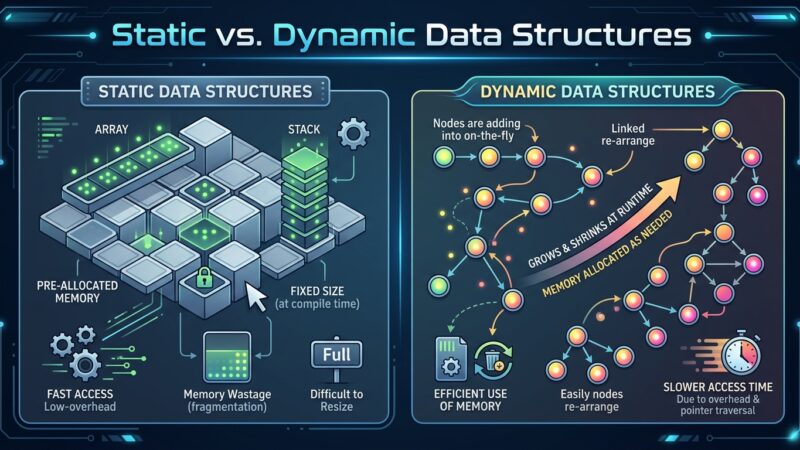
8. Static vs. Dynamic Data Structures
This classification concerns whether the size/storage organization can change during program execution.
8.1 Static Data Structure
Definition
A static data structure has a size that is fixed when it is created and generally cannot automatically grow or shrink during execution.
The classic example is a fixed-size array.
int numbers[5];The array has five positions:
[ ][ ][ ][ ][ ]You cannot simply make it:
[ ][ ][ ][ ][ ][ ][ ]without creating another structure or using a different mechanism.
Diagram
Creation
   │
   ▼
┌────┬────┬────┬────┬────┐
│    │    │    │    │    │
└────┴────┴────┴────┴────┘
        fixed size
Advantages
- Simple
- Fast indexing
- Predictable memory requirements
- Low management overhead
Disadvantages
- Fixed capacity
- May waste memory
- Difficult to accommodate unknown amounts of data
8.2 Dynamic Data Structure
Definition
A dynamic data structure can change its size or memory allocation during program execution.
A linked list is a common example.
Initially:

[10] → [20] → NULL


After inserting 30:

[10] → [20] → [30] → NULL
The structure grows as required.
Diagram
          Dynamic growth

[10] → [20]
          │
          ▼
[10] → [20] → [30]
                  │
                  ▼
[10] → [20] → [30] → [40]
C++ example
#include <iostream>
using namespace std;

int main() {
    int* p = new int[5];

    p[0] = 10;
    p[1] = 20;
    p[2] = 30;

    delete[] p;

    return 0;
}
Modern C++ generally favors containers such as vector for dynamically sized arrays:
#include <vector>
using namespace std;

vector<int> numbers;

numbers.push_back(10);
numbers.push_back(20);
numbers.push_back(30);
The vector can grow as elements are added.
Comparison
| Static | Dynamic |
|---|---|
| Fixed size | Can change size |
| Allocation generally determined beforehand | Allocation can occur during execution |
| Simple memory management | More flexible memory management |
| Example: fixed array | Example: linked list, dynamic array/vector |
| May waste allocated space | Can adapt to changing data |
Important: “Static” and “dynamic” can refer to different aspects of implementation. For example, a dynamic array has a changing logical size, while its underlying allocation may be resized in chunks.
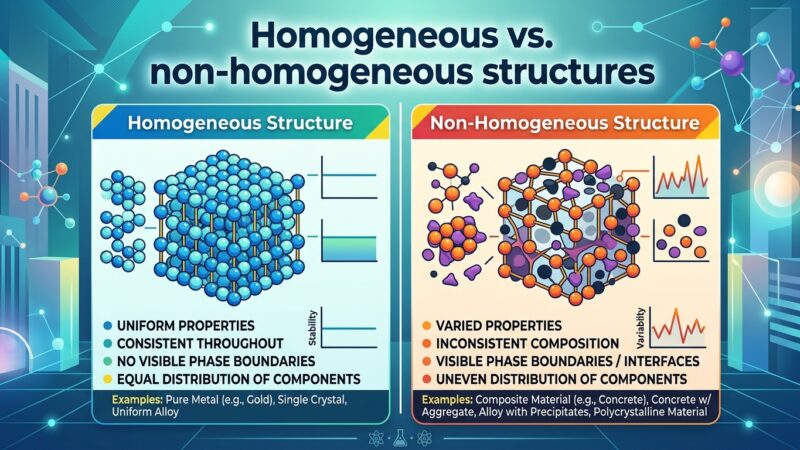
9. Homogeneous vs. Non-Homogeneous Data Structures
9.1 Homogeneous Data Structure
Definition
A homogeneous data structure stores elements that are all of the same data type.
Example:
10 20 30 40 50All elements are integers.
Array example
int marks[5] = {
    75,
    82,
    91,
    68,
    88
};
Every element is an int.
Diagram:
              int
               │
      ┌────────┼────────┐
      ↓        ↓        ↓
     [75]     [82]     [91] ...
Other examples
float temperatures[4];

char letters[5];

double prices[10];
Each collection contains elements of one type.
Advantages
- Simple organization
- Efficient memory representation
- Easy processing
- Convenient iteration
- Often supports efficient indexed access
9.2 Non-Homogeneous Data Structure
Definition
A non-homogeneous data structure can contain different types of related data within one logical structure.
A student record is a good example.
A student may have:
ID       → integer
Name     → string
Age      → integer
GPA      → floating-point number
Passed   → boolean
These are different data types.
C++ example using struct
#include <string>
using namespace std;

struct Student {
    int id;
    string name;
    int age;
    double gpa;
    bool passed;
};
We can create:
Student s1 = {
    101,
    "Moses",
    21,
    3.75,
    true
};
Conceptually:
Student
│
├── id      → 101
├── name    → "Moses"
├── age     → 21
├── gpa     → 3.75
└── passed  → true
Homogeneous vs non-homogeneous
HOMOGENEOUS

Array
│
├── int
├── int
├── int
├── int
└── int


NON-HOMOGENEOUS

Student
│
├── int
├── string
├── int
├── double
└── bool
Comparison
| Homogeneous | Non-homogeneous |
|---|---|
| Same data type | Different data types |
Example: int arr[5] | Example: struct Student |
| Good for collections of similar values | Good for records containing different attributes |
| Elements generally have the same representation | Fields can have different representations |
10. Putting All the Classifications Together
These classifications describe different properties of data structures. They should not be treated as mutually exclusive categories.
For example, an array can be:
Array
│
├── Linear
├── Homogeneous
└── Static or dynamic depending on implementation
A linked list can be:
Linked List
│
├── Linear
├── Usually dynamic
└── Can be homogeneous
A tree can be:
Tree
│
├── Non-linear
└── Can be static or dynamic depending on implementation
A struct can be:
Student record
│
└── Non-homogeneous
Big-picture classification
                    DATA STRUCTURES
                          │
          ┌───────────────┼────────────────┐
          │               │                │
          ▼               ▼                ▼
       LINEAR         NON-LINEAR       CLASSIFICATION
          │               │                │
    ┌─────┼─────┐      ┌──┴──┐       ┌────┴────┐
    │     │     │      │     │       │         │
  Array  List  Stack   Tree  Graph  Static   Dynamic
    │
    ▼
Queue
Another useful view:
                 DATA STRUCTURE
                       │
       ┌───────────────┼────────────────┐
       │               │                │
       ▼               ▼                ▼
    Structure       Storage          Element type
       │               │                │
       ▼               ▼                ▼
 Linear/            Static/       Homogeneous/
 Non-linear         Dynamic        Non-homogeneous
These dimensions answer different questions:
| Question | Classification |
|---|---|
| How are elements connected? | Linear / Non-linear |
| Can the structure change size? | Static / Dynamic |
| Are elements the same type? | Homogeneous / Non-homogeneous |
| What operations are exposed? | ADT |
| How do we solve a problem using it? | Algorithm |
11. Data Structure + Algorithm = Efficient Problem Solving
A fundamental DSA principle is:
The choice of data structure affects the efficiency of algorithms.
Suppose we need to search for a value.
With an unsorted array:
[15] [42] [7] [91] [23]
 ↓
Search sequentially
We may need to examine many elements.
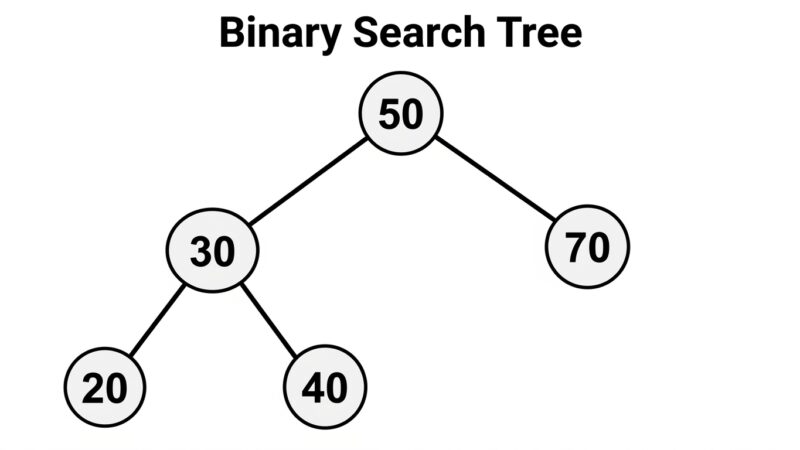
With a suitable search structure:
          50
        /    \
      25      75
     /  \    /  \
   10   30  60   90
The search strategy can exploit the structure.
Therefore:
             PROBLEM
                │
                ▼
       Choose Data Structure
                │
                ▼
       Design Algorithm
                │
                ▼
       Analyze Complexity
          ┌─────┴─────┐
          ▼           ▼
       Time          Space
      O(... )        O(...)
          │           │
          └─────┬─────┘
                ▼
        Efficient Solution
12. Essential Concepts to Remember
Data structure
A method of organizing and storing data so that it can be accessed and manipulated efficiently.
Algorithm
A finite sequence of precise steps for solving a problem or performing a computation.
Good algorithm
Should have:
Input
Output
Definiteness
Finiteness
Effectiveness
Correctness
Efficiency
Generality
Algorithm vs program
Algorithm = solution procedure
Program   = coded implementation
Data type vs data structure
Data type      → what kind of value?
Data structure → how is data organized?
ADT
ADT = WHAT operations are available
Implementation = HOW operations are performed
Linear
A → B → C → DSequential organization.
Non-linear
      A
     / \
    B   C
Hierarchical or network organization.
Static
Fixed capacityDynamic
Can change during executionHomogeneous
int → int → int → intSame type.
Non-homogeneous
int → string → double → boolDifferent types.
The DSA Mental Model
The most important relationship to internalize is:
                     COMPUTER PROBLEM
                           │
                           ▼
                    ┌──────────────┐
                    │     DATA     │
                    └──────┬───────┘
                           │
                           ▼
                  Choose a suitable
                  DATA STRUCTURE
                           │
                           ▼
                    Design an
                    ALGORITHM
                           │
                           ▼
                  IMPLEMENT in
               Python / C++ / Java
                           │
                           ▼
                 ANALYZE COMPLEXITY
                    ┌──────┴──────┐
                    ▼             ▼
                 TIME           SPACE
                O(... )         O(...)
                    │             │
                    └──────┬──────┘
                           ▼
                  EFFICIENT PROGRAM
The key distinction is: a data structure organizes information, while an algorithm processes that information.
Explore More IT Terms
#
- Using an integrating factor
- Equations in total differentials
- Bernoulli's equation
- Linear differential equations of the first order
- 10 Mixed C++ Challenges to Test Your Skills
- 11 Tricky Non-Technical Questions to Ask in a Recruiting Interview
- 50 Terms Every Programmer Should Know
- 52 Java Thread Interview Questions
- 7 Levels of Using the Zip Function in Python
- 7 Python Code Bugs You Need to Fix
- 70+ Free Resources for Learning Programming
A
- A Comprehensive Guide to HTML and CSS
- A Comprehensive Guide to MODX CMS
- A computer science question tests your ability to work with IP addresses and network masks
- A Guide to SQL Query Formatting for Beginners
- A/B testing
- Abstract Data Type (ADT)
- AES Encryption Algorithm: How It Works and Where It's Used
- Agile
- Algorithm
- Algorithm Analysis
- Algorithm Complexity-Key Points
- Algorithm complexity: deep parsing O(log n)
- Algorithm vs. Program
- Algorithms and Data Structures in C#
- An overview of the C # programming language
- An overview of the Python programming language
- Anaconda Python
- Analysis of graphs and adjacency matrices question
- Android
- Android App Bundle
- Android SDK
- Angular
- Ansible
- Apache
- Apache Airflow
- Apache Kafka
- Apache Tomcat
- App Store
- AppCode
- Applications of microcontrollers: From simple circuits in electronics to complex systems
- Applications of the derivative
- Arduino: How to Program It: Basics for Beginners
- Array-based stack
- ArrayList
- ASCII
- ASP.NET
- Assembly Language Lessons
B
C
- C++ Lessons
- Cache
- Calculating Memory Capacity
- Character sets and encodings
- Characteristics of a good Algorithm
- Circular singly linked list
- Coding Tests with Answers
- Combinational Circuits Solved Questions
- Compiler
- Complexity of algorithms-Tutorial
- Computer Science Fundamentals Test with Answers (47 questions)
- Computer science tests with answers (More than 100 Questions)
- Constants
- Creating a Table in HTML
- Creating Forms in HTML
- Creating Lists
- Cybernetics and informatics
- Cycles
D
- Data Analytics: applications of data analysis in companies
- Data Engineer - Who is it, what does a data engineer do, and an overview of the profession
- Data modeling: what it is, types, and process steps.
- Data preprocessing: a complete guide for beginners and professionals.
- Data structure
- Data Structures and Algorithms (DSA)
- Data types vs. Data structures
- Database Tests with Answers
- Deep Learning
- Defining Aliases
- Defining Arrays
- Deque
- Detailed articles and tutorials on PHP
- Developing a Website from Scratch
- Differential Equations
- Differentiation of functions
- Digital data: understand the importance of this asset for businesses.
- Double integrals
- Doubly linked lists
- DSA Tutorial
E
F
G
H
- Handling errors and exceptions
- Heads or Tails? How Probability Theory Is Used in IT
- History of the development of computer science
- Homogeneous equations
- Homogeneous vs. non-homogeneous structures
- How to convert numbers between binary, octal, and hexadecimal number systems
- How to effectively organize your workflow
- How to Learn Java: Tips for Beginner Developers
- How to Learn PHP: A Beginner's Guide
- How to Use S3 Storage in Kubernetes with CSI
- HTML
- HTML and CSS: Definition, Application, and Operating Principles
- HTML and CSS. Layout from Scratch: What to Learn, Where to Learn, and How Long Will It Take?
- HTML Frame Structure
- HTML Link Formatting
- HTML Quizzes with Answers
I
- if..else construction
- Infinite sequences and series
- Information properties
- Inheritance in Java: A Complete Guide to Principles and Implementation
- Inserting an Image
- Integration of functions
- Interactive Python Tutorial – Learn Programming from Scratch
- Interpreter
- Interview Problem: Finding a Deleted Element in O(N)
- Interview Scare: The FizzBuzz Challenge
- Introduction to C++
- Introduction to Machine Learning
- Introduction to Machine Learning with Python
- Introduction to Networking | Network Fundamentals Part 1
- Introduction to Number Systems (Binary, Octal, Hexadecimal) | Math for CS Foundations #1
- IT Specialist Resume (CV)
J
K
L
M
- Machine Learning
- Machine Learning Basic Tool: NumPy
- Machine Learning Basic Tool: Pandas
- Machine Learning Basics
- Machine Learning Mathematics
- Machine Learning with Python
- Mathematics for programmers: what is really needed?
- MD5 encryption algorithm: What is it and why is it needed?
- Microcontroller and Microprocessor - what's the difference?
- ML Engineer: Who They Are, What They Do, How Much They Earn, and How to Become a Neural Network Specialist
- Monte Carlo Simulation: How It Works and What It's For
O
P
- PHP lessons
- Private DNS server and its configuration
- Program code
- Programmer's Dictionary
- Programming
- Programming with pseudocode
- Python Code Formatting Guide: PEP8
- Python for data analysis: how to do it and main libraries
- Python Lessons
- Python Superstar: 5 Ways to Use the * Operator
- Python vs. Julia: Should You Replace Python with Julia?
Q
R
S
- Setting up model parameters
- SFML Graphics Library Tutorials
- Sorting Algorithms in Programming: Types, Descriptions, and Comparisons
- SQL commands: see what they are, what the main ones are + examples
- SQL Interview Questions and Tasks
- SQL Lessons
- SQL Stored Procedures
- SQL Syntactic Sugar: The COALESCE Function
- Stack
- Start in analytics: Python or R
- Static vs. dynamic data structures
- Statistical analysis: importance for decision making.
- String formatting in Python
- Structure of computer science
- Supervised learning
- Swift Lessons
- switch/match construct
- Syntax
T
- Terms in programming
- Text and paragraph formatting tags
- The Complete Guide to Bootstrap
- The Complete Guide to JavaScript
- The concept of information and its transmission
- The Future of Python: Key Trends and Insights from Global Researc
- The Infrastructure of Code: A Complete Guide to Repositories for Languages, Frameworks, and Compilers
- The pip package manager in Python
- The role of informatization in the development of society
- Transfers
- Tricky Java Questions Often Asked in Interviews
- Tutorials / Articles
- TypeScript: What It Is and Why Developers Need It
W
- What are databases, and why do they need DBMS and SQL?
- What do Linux distributions consist of?
- What is .NET and what is it used for?
- What is a data structure?
- What is a GPU in a computer, in simple terms?
- What is a quantum computer: 100,500 problems in one second
- What Is an Algorithm?
- What is Arduino: How it Works and the Platform's Capabilities
- What is Big Data? Introduction, Types, Characteristics, and Examples
- What is FizzBuzz Challenge?
- What is Golang and what is it used for?
- What is Haskell and what is it used for?
- What is Kotlin and what is it used for?
- What is Linux? The History of Linux
- What is machine learning, and how does it work?
- What is Power BI: everything about the data analytics software
- What is recursion, recursive and iterative process in programming?
- What is the C++ programming language?
- What is the OSI Model: A Complete Explanation of the Seven Layers and Their Role in Networking
- What's the difference between x86 and ARM processors?
- Where to start learning the C programming language?
- Which Linux distribution should you choose? A Linux distribution overview