Android SDK
The Android SDK is an additional set of tools for Android Studio that help you write code, run tests, debug, test your app on different operating system versions, and evaluate the results in real time. The package also allows users to obtain information about the operating system’s state, read logs, and identify errors. The Android SDK can be used to restore the operating system and install third-party firmware.
What is the Android SDK, and what is it for?
The set consists of packages necessary for creating applications. Here are the main ones available to Android developers.
Android SDK Platform Tools. This group includes tools for interacting with Android, such as the Android Debugging Bridge (ADB), Fastboot, Systrace, and others. ADB helps find app errors and install APKs on your smartphone. Fastboot enables fast booting for managing your mobile device from a computer, reflashing the device, and configuring access and operating system parameters. Systrace retrieves information about running processes and monitors activity and the amount of data sent over the network.
Android SDK Build Tools. Android SDK components are used to generate code. Zipalign optimizes the APK file, AAPT2 analyzes, indexes, and compiles resources into a binary format for the Android platform, and Apksigner signs the APK package with a private key.
Android emulator. This tool helps you test apps and try out features of the latest Android versions.
A detailed description of the Android SDK and the necessary documentation can be found on the official website in the User Guide section.
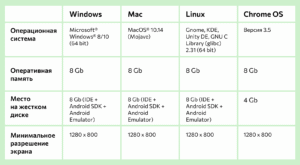
Installation is available on devices running Windows, Mac, Linux, and Chrome OS. Your computer must meet the minimum system requirements to run the app.
Where to download the Android SDK
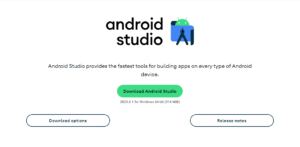
Users can choose their OS and download the solution from the developer’s official website. Clicking the Download Options button will open a list of available versions. If you don’t need Android Studio, you can download the basic Android command line tools (an equivalent of the Android SDK Tools package, which is now deprecated). The SDK Manager is used to view, remove packages, and install available Android SDK versions.
How to install Android Studio on Windows
The installation process takes 2-5 minutes, depending on your PC’s specifications. For proper installation, you must:
- Run the Android Studio Setup file as administrator.
- Agree to the security warning by clicking the “Run” button.
- Wait until the installation files are unpacked and installed.
- Allow new information to be entered for this computer.
- Click Next and select the Android SDK Platform-Tools components to be installed. It’s best to leave the checkboxes selected, as you can disable any unnecessary functionality in the program after installation.
- Specify the installation path and start the installation process.
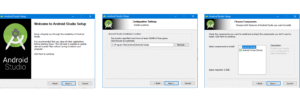
Once all files have been extracted, the screen will display “Completed.” Click Next and Finish to complete the installation.
Where to download and how to install the Java Development Kit
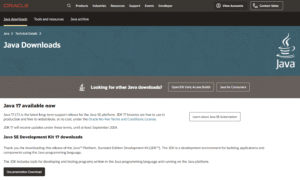
To use the Android SDK, you need to download the Java Development Kit. The Java Development Kit is responsible for the graphical display of source code. To see a list of Java versions, visit the official Oracle website. To install:
- Select a version. The latest versions of Java are only available for 64-bit systems. They can be downloaded either as a compressed archive or as an installation file.
- Register in the Oracle system. If the user has an account, complete the authorization process.
- Download Java Development Kit for Android on PC.
- Follow all the installation file requirements, specifying the location where the utility is stored.
- After installation is complete, close the program and restart your computer.
- Now you can start setting up and working with the Android SDK.
Interface and setup
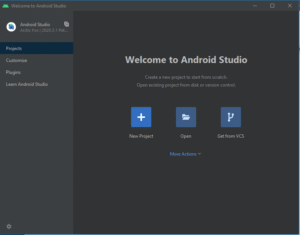
To perform the initial setup of the software, you need to:
- Run the installed SDK software as an administrator. Once launched, a welcome window will appear, allowing you to quickly create a project.
- Select the “Create New Project” heading and click the template (Activity) you like. You can start from scratch or edit an existing project. The Activity controls the app’s screen logic. It’s best to set either “No Activity” or “Empty Activity.”
- In the settings window that appears, specify the project and package name. If you plan to publish to Google Play, you’ll need to choose a unique name for the latter. In this window, you can change the project directory, programming language (Java or Kotlin), and specify the minimum supported Android SDK version. The lower the minimum supported version, the more devices the app will support.
To add additional Android SDK tools, you need to:
1. In the window that opens, go to the Tools tab and select SDK Manager. The Tools tab is located at the top of the installed application.
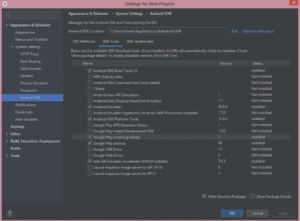
2. Then open the SDK Tools tab. It displays information about installation packages, allowing you to download the ones you need.
The introduction and basic setup of Android Studio are complete.
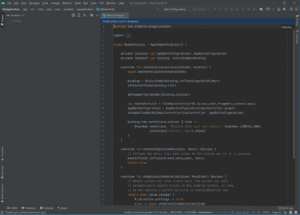
Possible errors during installation and launch
If your device meets the specifications but the program returns the “Skipping SDK Tools 11” error, it means you installed older Java components and then added the SDK software. You need to reinstall all components, from Java development packages to Android Studio. After uninstalling, we recommend cleaning up residual files with CCleaner (or similar software).
The Android SDK Tools are powerful software that help developers create optimized apps. Whether using Java, Kotlin, or C#, the SDK allows you to launch your product and access the operating system’s unique features. Google actively supports and promotes open source programming, so anyone can try their hand at coding for the Android OS .
Explore More IT Terms
#
A
- A Guide to SQL Query Formatting
- A/B testing
- Agile
- Algorithm
- Algorithm complexity in 5 minutes
- Algorithms and Data Structures in C#
- An overview of the C # programming language
- An overview of the Python programming language
- Anaconda Python
- Android
- Android App Bundle
- Android SDK
- Angular
- Ansible
- Apache
- Apache Airflow
- Apache Kafka
- Apache Tomcat
- App Store
- AppCode
- Applications of microcontrollers: From simple circuits in electronics to complex systems
- Applications of the derivative
- Arduino: How to Program It: Basics for Beginners
- Array-based stack
- ArrayList
- ASCII
- ASP.NET
- Assembly Language Lessons
B
C
D
- Data Analytics: applications of data analysis in companies
- Data Engineer - Who is it, what does a data engineer do, and an overview of the profession
- Data modeling: what it is, types, and process steps.
- Data preprocessing: a complete guide for beginners and professionals.
- Data structure
- Database Tests with Answers
- Deep Learning
- Defining Aliases
- Defining Arrays
- Deque
- Developing a Website from Scratch
- Differential Equations
- Differentiation of functions
- Digital data: understand the importance of this asset for businesses.
- Double integrals
- Doubly linked lists
E
F
H
- Handling errors and exceptions
- Heads or Tails? How Probability Theory Is Used in IT
- History of the development of computer science
- How to effectively organize your workflow
- How to Learn Java: Tips for Beginner Developers
- How to Learn PHP: A Beginner's Guide
- How to Use S3 Storage in Kubernetes with CSI
- HTML
- HTML and CSS: Definition, Application, and Operating Principles
- HTML and CSS. Layout from Scratch: What to Learn, Where to Learn, and How Long Will It Take?
- HTML Frame Structure
- HTML Link Formatting
I
- if..else construction
- Infinite sequences and series
- Information properties
- Inheritance in Java: A Complete Guide to Principles and Implementation
- Inserting an Image
- Integration of functions
- Interactive Python Tutorial – Learn Programming from Scratch
- Interpreter
- Interview Problem: Finding a Deleted Element in O(N)
- Interview Scare: The FizzBuzz Challenge
- Introduction to C++
- Introduction to Machine Learning
- IT Specialist Resume (CV)
J
K
M
- Machine Learning
- Machine Learning Basic Tool: NumPy
- Machine Learning Basic Tool: Pandas
- Machine Learning Mathematics
- Mathematics for programmers: what is really needed?
- Microcontroller and Microprocessor - what's the difference?
- ML Engineer: Who They Are, What They Do, How Much They Earn, and How to Become a Neural Network Specialist
- Monte Carlo Simulation: How It Works and What It's For
O
P
- PHP lessons
- Private DNS server and its configuration
- Program code
- Programmer's Dictionary
- Programming
- Programming with pseudocode
- Python Code Formatting Guide: PEP8
- Python for data analysis: how to do it and main libraries
- Python Lessons
- Python Superstar: 5 Ways to Use the * Operator
- Python vs. Julia: Should You Replace Python with Julia?
R
S
- SFML Graphics Library Tutorials
- Sorting Algorithms in Programming: Types, Descriptions, and Comparisons
- SQL commands: see what they are, what the main ones are + examples
- SQL Interview Questions and Tasks
- SQL Lessons
- SQL Stored Procedures
- SQL Syntactic Sugar: The COALESCE Function
- Stack
- Start in analytics: Python or R
- Statistical analysis: importance for decision making.
- String formatting in Python
- Structure of computer science
- Swift Lessons
- switch/match construct
- Syntax
T
- Terms in programming
- Text and paragraph formatting tags
- The concept of information and its transmission
- The Future of Python: Key Trends and Insights from Global Researc
- The Infrastructure of Code: A Complete Guide to Repositories for Languages, Frameworks, and Compilers
- The pip package manager in Python
- The role of informatization in the development of society
- Transfers
- Tutorials / Articles
- TypeScript: What It Is and Why Developers Need It
W
- What are databases, and why do they need DBMS and SQL?
- What do Linux distributions consist of?
- What is .NET and what is it used for?
- What is a GPU in a computer, in simple terms?
- What is Arduino: How it Works and the Platform's Capabilities
- What is Big Data? Introduction, Types, Characteristics, and Examples
- What is Golang and what is it used for?
- What is Haskell and what is it used for?
- What is Kotlin and what is it used for?
- What is Linux? The History of Linux
- What is machine learning, and how does it work?
- What is Power BI: everything about the data analytics software
- What is the C++ programming language?
- What is the OSI Model: A Complete Explanation of the Seven Layers and Their Role in Networking
- What's the difference between x86 and ARM processors?
- Where to start learning the C programming language?
- Which Linux distribution should you choose? A Linux distribution overview