
HTML Quizzes with Answers
HTML knowledge tests with answers
The correct answer is marked with a + sign.
1. What does the tag say ?
?
– Text enclosed in the tag will be centered on the page
– The text enclosed in the tag will be positioned along the left edge of the page.
+ Text enclosed in the tag will be centered on the page
2. What units of measurement can be used for the width attribute?
+ Pixels and %
– Millimeters and centimeters
– Pixels and millimeters
3. Using the … tag allows you to add one line of text without starting a new paragraph.
– <line/>
+ <br/>
– <td/>
4. Explain the meaning of the code below:
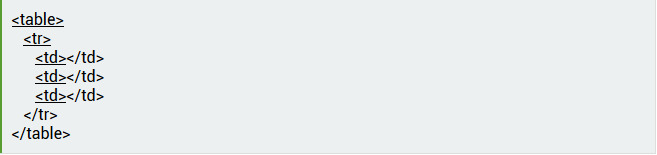
+ A table consisting of 1 row and 3 columns will be created
– A table consisting of 3 rows and 1 column will be created
– A table consisting of 2 rows and 3 columns will be created.
5. Write the HTML code that would create a button to submit the completed form. The button name is OK.
– <input type=”OK” value=”Submit”/>
– <p> input type=”submit” value=”OK”< /p>
+ <input type=”submit” value=”OK”/>
6. When creating a page, which tag adds the page name that will be displayed in the title bar of the user’s browser?
+ <title> … </title>
– <header> … </header>
– <body> … </body>
7. Fill in the fields to display the image “flower.jpg” with a height of 300 pixels and a width of 750 pixels:
– <img ref=”flower” format=.jpg
high=300 px
width=750 px />
– <src img=”flower.jpg”
height=”300%”
width=”750%”/>
+ <img src=”flower.jpg”
height=”300 px” alt=””
width=”750 px”/>
8. What does the href attribute contain?
+ URL of the page to which you will be redirected
– The name of the page to which you will be redirected
– Indicates whether the new page will open in the same window or a new one.
9. Which of the following tags are related to table creation?
– <header> <body> <footer>
+ <table> <tr> <td>
– <ul> <li> <tr> <td>
Test 10. Identify the tag that corresponds to the list item:
+ <li>
– <ul>
– <ol>
11. What does the following entry mean: <form action=”url” method=”POST”>?
– A form is created; when filled out, the entered data will be displayed
+ A form is created; when filled out, the entered data will not be displayed
– A form is created that will be used to enter information presented in the form of a link (URL)
12. What value should be set for the type attribute to make the input tag a form submission?
+ Submit
– Checkbox
– Radiobutton
13. To specify the dimensions of the <frameset> tag, the following attributes are required:
– Height and width
– Area and thickness of borders
+ Rows and columns
14. Choose the correct statement.
+ In HTML, colors are specified by a combination of hexadecimal values: 0, 1, 2, 3, 4, 5, 6, 7, 8, 9, 0, A, B, C, D, E, F
– In HTML, colors are specified by a combination of binary values: 0 or 1
– In HTML, colors are specified by a combination of octal values: 0, 1, 2, 3, 4, 5, 6, 7
15. What tags make text bold?
– <ins> and <del>
– <li> and <ul>
+ <b> and <strong>
16. What tags are used to define headings?
+ h1-h6
– Header
– Heading
17. Non-displayable comments in HTML are specified as follows:
– <! – Your comment -!>
+ <! – – Your comment – -!>
– <!p>Your comment</!p>
18. What does the code in the picture mean?

+ The link will be followed on a new page
– The link will be followed on the current page.
– The text “Learn Playing” will appear on the current page.
19. List the main content modules that exist in HTML 5.
– Image, Media, Metadata, Link, Heading, Color, Input Value
+ Metadata, Embedded, Interactive, Heading, Phrasing, Flow, Sectioning
– Flow, Static, Link, Header, Body, Footer, Processing, Chase
Test 20. Identify which HTML 5 element is responsible for video playback:
+ <video>
– <media>
– <movie>
21. The <canvas> element is used to:
– Attaching Excel tables
– Database data management
+ Graphics rendering
22. Which tag contains navigation?
+ <nav>
– <geo>
– <metanav>
23. SessionStorage is a client-side solution in HTML 5 that allows you to:
– Retrieve and use data from previous sessions, provided that cache and cookies have not been cleared
– Create a database of user decisions in the browser’s memory
+ Retrieve and use data from the current session only
24. What will be created when executing the following code:
<svg width=”75″ height=”75″>
<line x1=”50″ y1=”0″ x2=”50″ y2=”100″
style=”stroke: black” />
<line x1=”0″ y1=”50″ x2=”100″ y2=”50″
style=”stroke: black” />
</svg> ?
+ Plus sign
– Minus sign
– Equal sign
25. HTML 5 feature
– A world map integrated into the site’s core functionality
+ User location data
– Server location data
26. Fill in the blanks to create a valid HTML document. The “first paragraph” is a comment.
<___>
<body>
<! – – First paragraph ___>
<___> This is the first paragraph! </p>
<___>
</html>
– html/; – – ?; p; /body
– html v.5; – – !; /p; /body
+ html; – – !; p; /body
27. HTML is
+ Markup language
– Hypertext library
– Scripting language
28. Is it necessary to use the <html> … </html> tags?
+ Yes, without them, the browser will not recognize the HTML document
– Yes, if the HTML document is created in Notepad or another text editor. In a dedicated HTML compiler, you can omit these tags.
– Not necessarily.
29. Which attribute allows you to merge table cells vertically?
– Union
– Colspan
+ Rowspan
test_30. The permissible number of first-level headings in an HTML document is:
+ 1
– 3
– 7
31. The text in italics is presented in the following entry:
– <del> italic </del>
+ <i>italic </i>
– <hr> italic </hr>
32. There are no … tags in HTML.
– Singles
– Paired
+ Triple
33. When creating websites, the following encoding is used:
+ UTF8
– ASCII
– UTF-32
34. An HTML document can have extensions:
– .html
+.html or .htm
– .html or .txt
35. Specify deprecated tags for HTML 5.
+ <applet>, <blink>, <u>
– <ul>, <audio>, <pre>
– <code>, <s>, <embed>
36. A tag that connects scripts to an existing HTML document that are executed on the client side is:
– <object>
+ <script>
– <client>
37. What symbol marks the end of a tag?
– ^
– ;
+ /
38. A list in which the enumeration elements are marked with bullets allows you to create a tag:
+ <ul>
– <ol>
– <bl>
39. Specify the correct entry to create a checkbox:
– <input checkbox>
– <type input=”checkbox”>
+ <input type=”checkbox”>
Test*40. Specify the correct entry to create a drop-down list:
+ <input type=”dropdown”>
– <input dropdown list>
– <dropdown list>
41. Which HTML attribute specifies alternative text for an image if the image is not displayed?
– imgalt
– imgvar
+ alt
42. Which HTML tag is used to define the footer of a document or section?
+ <footer>
– <bottom>
– <section>
43. The HTML tag that allows you to play audio recordings is:
– <music>
+ <audio>
– <sound>
44. In HTML 5, onblur and onfocus are:
+ Event attributes
– Style attributes
– Database connection attributes
45. Graphics defined by SVG are displayed in the following format:
– CSS
– JSOM
+ XML
46. What does the <aside> tag define?
+ Additional content, i.e., what is not included in the main document
– Link to the connected document
– Document color scheme
Explore More IT Terms
#
- Using an integrating factor
- Equations in total differentials
- Bernoulli's equation
- Linear differential equations of the first order
- 10 Mixed C++ Challenges to Test Your Skills
- 11 Tricky Non-Technical Questions to Ask in a Recruiting Interview
- 50 Terms Every Programmer Should Know
- 52 Java Thread Interview Questions
- 7 Levels of Using the Zip Function in Python
- 7 Python Code Bugs You Need to Fix
- 70+ Free Resources for Learning Programming
A
- A Comprehensive Guide to HTML and CSS
- A Comprehensive Guide to MODX CMS
- A computer science question tests your ability to work with IP addresses and network masks
- A Guide to SQL Query Formatting for Beginners
- A/B testing
- Abstract Data Type (ADT)
- AES Encryption Algorithm: How It Works and Where It's Used
- Agile
- Algorithm
- Algorithm Analysis
- Algorithm Complexity-Key Points
- Algorithm complexity: deep parsing O(log n)
- Algorithm vs. Program
- Algorithms and Data Structures in C#
- An overview of the C # programming language
- An overview of the Python programming language
- Anaconda Python
- Analysis of graphs and adjacency matrices question
- Android
- Android App Bundle
- Android SDK
- Angular
- Ansible
- Apache
- Apache Airflow
- Apache Kafka
- Apache Tomcat
- App Store
- AppCode
- Applications of microcontrollers: From simple circuits in electronics to complex systems
- Applications of the derivative
- Arduino: How to Program It: Basics for Beginners
- Array-based stack
- ArrayList
- ASCII
- ASP.NET
- Assembly Language Lessons
B
C
- C++ Lessons
- Cache
- Calculating Memory Capacity
- Character sets and encodings
- Characteristics of a good Algorithm
- Circular singly linked list
- Coding Tests with Answers
- Combinational Circuits Solved Questions
- Compiler
- Complexity of algorithms-Tutorial
- Computer Science Fundamentals Test with Answers (47 questions)
- Computer science tests with answers (More than 100 Questions)
- Constants
- Creating a Table in HTML
- Creating Forms in HTML
- Creating Lists
- Cybernetics and informatics
- Cycles
D
- Data Analytics: applications of data analysis in companies
- Data Engineer - Who is it, what does a data engineer do, and an overview of the profession
- Data modeling: what it is, types, and process steps.
- Data preprocessing: a complete guide for beginners and professionals.
- Data structure
- Data Structures and Algorithms (DSA)
- Data types vs. Data structures
- Database Tests with Answers
- Deep Learning
- Defining Aliases
- Defining Arrays
- Deque
- Detailed articles and tutorials on PHP
- Developing a Website from Scratch
- Differential Equations
- Differentiation of functions
- Digital data: understand the importance of this asset for businesses.
- Double integrals
- Doubly linked lists
- DSA Tutorial
E
F
G
H
- Handling errors and exceptions
- Heads or Tails? How Probability Theory Is Used in IT
- History of the development of computer science
- Homogeneous equations
- Homogeneous vs. non-homogeneous structures
- How to effectively organize your workflow
- How to Learn Java: Tips for Beginner Developers
- How to Learn PHP: A Beginner's Guide
- How to Use S3 Storage in Kubernetes with CSI
- HTML
- HTML and CSS: Definition, Application, and Operating Principles
- HTML and CSS. Layout from Scratch: What to Learn, Where to Learn, and How Long Will It Take?
- HTML Frame Structure
- HTML Link Formatting
- HTML Quizzes with Answers
I
- if..else construction
- Infinite sequences and series
- Information properties
- Inheritance in Java: A Complete Guide to Principles and Implementation
- Inserting an Image
- Integration of functions
- Interactive Python Tutorial – Learn Programming from Scratch
- Interpreter
- Interview Problem: Finding a Deleted Element in O(N)
- Interview Scare: The FizzBuzz Challenge
- Introduction to C++
- Introduction to Machine Learning
- Introduction to Networking | Network Fundamentals Part 1
- Introduction to Number Systems (Binary, Octal, Hexadecimal) | Math for CS Foundations #1
- IT Specialist Resume (CV)
J
K
L
M
- Machine Learning
- Machine Learning Basic Tool: NumPy
- Machine Learning Basic Tool: Pandas
- Machine Learning Mathematics
- Mathematics for programmers: what is really needed?
- MD5 encryption algorithm: What is it and why is it needed?
- Microcontroller and Microprocessor - what's the difference?
- ML Engineer: Who They Are, What They Do, How Much They Earn, and How to Become a Neural Network Specialist
- Monte Carlo Simulation: How It Works and What It's For
O
P
- PHP lessons
- Private DNS server and its configuration
- Program code
- Programmer's Dictionary
- Programming
- Programming with pseudocode
- Python Code Formatting Guide: PEP8
- Python for data analysis: how to do it and main libraries
- Python Lessons
- Python Superstar: 5 Ways to Use the * Operator
- Python vs. Julia: Should You Replace Python with Julia?
R
S
- SFML Graphics Library Tutorials
- Sorting Algorithms in Programming: Types, Descriptions, and Comparisons
- SQL commands: see what they are, what the main ones are + examples
- SQL Interview Questions and Tasks
- SQL Lessons
- SQL Stored Procedures
- SQL Syntactic Sugar: The COALESCE Function
- Stack
- Start in analytics: Python or R
- Static vs. dynamic data structures
- Statistical analysis: importance for decision making.
- String formatting in Python
- Structure of computer science
- Swift Lessons
- switch/match construct
- Syntax
T
- Terms in programming
- Text and paragraph formatting tags
- The Complete Guide to Bootstrap
- The Complete Guide to JavaScript
- The concept of information and its transmission
- The Future of Python: Key Trends and Insights from Global Researc
- The Infrastructure of Code: A Complete Guide to Repositories for Languages, Frameworks, and Compilers
- The pip package manager in Python
- The role of informatization in the development of society
- Transfers
- Tricky Java Questions Often Asked in Interviews
- Tutorials / Articles
- TypeScript: What It Is and Why Developers Need It
W
- What are databases, and why do they need DBMS and SQL?
- What do Linux distributions consist of?
- What is .NET and what is it used for?
- What is a data structure?
- What is a GPU in a computer, in simple terms?
- What is a quantum computer: 100,500 problems in one second
- What Is an Algorithm?
- What is Arduino: How it Works and the Platform's Capabilities
- What is Big Data? Introduction, Types, Characteristics, and Examples
- What is FizzBuzz Challenge?
- What is Golang and what is it used for?
- What is Haskell and what is it used for?
- What is Kotlin and what is it used for?
- What is Linux? The History of Linux
- What is machine learning, and how does it work?
- What is Power BI: everything about the data analytics software
- What is recursion, recursive and iterative process in programming?
- What is the C++ programming language?
- What is the OSI Model: A Complete Explanation of the Seven Layers and Their Role in Networking
- What's the difference between x86 and ARM processors?
- Where to start learning the C programming language?
- Which Linux distribution should you choose? A Linux distribution overview