Characteristics of a good Algorithm
A good algorithm is a step-by-step procedure designed to solve a problem efficiently, reliably, and unambiguously. The core characteristics that define high-quality algorithms are listed below.
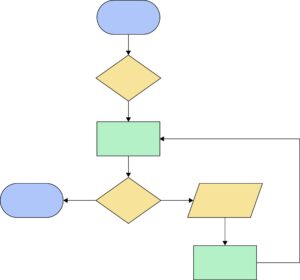
This flowchart contains unlabeled blank shapes representing standard flowchart conventions:
Blue Ovals (Terminators): Start and End/Stop symbols.
Yellow Diamonds (Decisions): Conditional checks (If/Else branches).
Green Rectangles (Processes): Execution steps/actions.
Yellow Parallelogram (Input/Output): Reading input or displaying output.
Because the diagram lacks text labels inside the shapes, I’ve constructed generic Algorithm steps and Pseudocode following the exact control flow shown.
If you’re working on a specific problem (e.g., searching an array, calculating a sum, or validating user input), let me know so I can tailor the variables and actions directly to your use case!
Algorithm
Start (Top blue oval)
Initial Decision: Evaluate Condition 1 (Top diamond).
Initial Process: Perform Action 1 (Top green rectangle).
Loop/Branch Decision: Check Condition 2 (Bottom diamond).
If Condition 2 leads to the left: Go to Step 8 (Stop).
If Condition 2 leads to the right: Proceed to Step 5.
Input/Output: Perform Input/Output operation (Parallelogram).
Process: Perform Action 2 (Bottom green rectangle).
Loop back: Return to Step 4 (Initial process block / Loop entry point).
End: Stop execution (Left blue oval).
Pseudocode
Plaintext
START

    IF Condition_1 THEN
        // Flow continues down to initial process
    ENDIF

    Action_1

    WHILE NOT (Exit_Condition_Met) DO

        Read Input / Display Output
        Action_2
        Action_1 // Repeated process block before re-evaluating loop condition

    ENDWHILE

END
Note: Since flowcharts can represent either a WHILE loop or a REPEAT-UNTIL loop depending on which branch exits the program, the pseudocode above reflects a standard conditional loop structured around the lower decision diamond.
The Following are Characteristics of a good Algorithm
1. Well-Defined Input and Output
Definition
An algorithm must take zero or more well-defined inputs and produce one or more expected, well-defined outputs.
Types
Input Types: Primitive (integers, strings), Complex (arrays, graphs, objects), Implicit (system state, environment variables).
Output Types: Boolean (success/fail flags), Data structures (sorted lists, transformed trees), Side-effect operations (writing to file, sending network packet).
Detail
Inputs must be explicitly constrained (e.g., “accepts an array of $n$ integers where $n \ge 0$“). Outputs must precisely fulfill the algorithm’s functional contract. Uncontrolled inputs lead to undefined behavior or security vulnerabilities.
| Pros | Cons |
| Ensures predictability and testability | Tight constraints reduce algorithm flexibility |
| Enables clear unit test writing | Requires rigid input validation overhead |
Real-World Applications
Payment processing gateways (taking currency, amount, and credentials as inputs and returning transaction status codes as outputs).
2. Unambiguousness (Definiteness)
Definition
Every step in the algorithm must be clear, precise, and leave no room for multiple interpretations.
Types
Deterministic Steps: The same input always produces the same execution path and outcome.
Nondeterministic Steps: Involve randomness or probabilistic models (e.g., Monte Carlo algorithms, QuickSelect pivot choices).
Detail
Each instruction must be executable without ambiguity. Statements like “multiply x by a small number” are ambiguous; “multiply x by 2″ is unambiguous.
| Pros | Cons |
| Eliminates execution errors and unexpected side effects | Harder to implement adaptive/heuristic logic |
| Simplifies debugging and code maintenance | Can lead to overly rigid implementations |
Real-World Applications
Compilers and interpreters parse source code into machine instructions where every keyword has a single defined syntax rule.
3. Finiteness
Definition
An algorithm must always terminate after a finite number of steps for all valid input cases.
Types
Guaranteed Finite: Algorithms with strict lower and upper loop bounds (e.g., binary search).
Eventually Finite: Algorithms depending on probabilistic convergence (e.g., randomized algorithms).
Detail
Infinite loops or unbounded recursive calls are fatal flaws in algorithm design. Finiteness ensures system resources like memory and execution time are bounded.
| Pros | Cons |
| Prevents system freezes and memory leaks | Hard to prove for complex recursive or dynamic inputs |
| Ensures predictable task completion | Bounds can limit handling of infinite stream processing |
Real-World Applications
Operating system schedulers allocating CPU time slices to ensure process execution halts or yields control back to the core manager.
4. Feasibility (Effectiveness)
Definition
Every step of the algorithm must be simple enough that it can be carried out using available hardware resources in a reasonable amount of time.
Types
Hardware-Feasible: Fits within available hardware constraints (RAM, CPU cycles, cache size).
Theoretical-Only: Algorithms that work on paper but require impractical memory or time (e.g., brute-force traveling salesperson for n=100).
Detail
Feasibility bridges mathematical theory and practical software engineering. An algorithm requiring O(n2) time is theoretically correct for small inputs but infeasible for large production datasets.
| Pros | Cons |
| Maximizes real-world usability | Often requires trading optimal precision for heuristic approximations |
| Keeps computational infrastructure costs manageable | Code optimizations can reduce readability |
Real-World Applications
GPS navigation systems estimating optimal routes in real-time using A* search instead of exhaustive path evaluation.
5. Correctness and Efficiency
Definition
The algorithm must produce the correct result for all edge cases and optimize computational resources—specifically Time Complexity (speed) and Space Complexity (memory usage).
Types
Time Complexity: O(1), O(log n), O(n), O(n log n), O(n2).
Space Complexity: Auxiliary memory usage vs. In-place modification.
Detail
A good algorithm optimizes both time and space constraints using Big-O notation evaluation.
Binary Search Efficiency: O(log n)
Step 1: Check mid element
Step 2: Halve the search space
Step 3: Repeat until target found or space exhausted
| Pros | Cons |
| Maximizes application throughput and user experience | Highly optimized algorithms are complex to read/maintain |
| Minimizes hardware costs at scale | Premature optimization can introduce subtle edge-case bugs |
Real-World Applications
High-frequency trading platforms processing thousands of orders per millisecond using optimized data structures like ring buffers and lock-free queues.
Code Examples: Binary Search (Fulfilling all characteristics)
Here is an implementation of Binary Search across three languages demonstrating input validation, clear step progression, finiteness, and O(log n) efficiency.
Python
def binary_search(arr: list[int], target: int) -> int:
    """Returns index of target in sorted arr, or -1 if not found."""
    low, high = 0, len(arr) - 1

    while low <= high:
        mid = (low + high) // 2
        if arr[mid] == target:
            return mid
        elif arr[mid] < target:
            low = mid + 1
        else:
            high = mid - 1

    return -1
C++
#include <iostream>
#include <vector>

int binarySearch(const std::vector<int>& arr, int target) {
    int low = 0;
    int high = static_cast<int>(arr.size()) - 1;

    while (low <= high) {
        int mid = low + (high - low) / 2; // Prevents overflow
        if (arr[mid] == target) return mid;
        if (arr[mid] < target) low = mid + 1;
        else high = mid - 1;
    }
    return -1;
}
Java
public class Search{
    public static int binarySearch(int[] arr, int target){
        int low = 0;
        int high = arr.length - 1;

        while (low <= high) {
            int mid = low + (high - low) / 2;
            if (arr[mid] == target) return mid;
            if (arr[mid] < target) low = mid + 1;
            else high = mid - 1;
        }
        return -1;
    }
}
Explore More IT Terms
#
A
- A Guide to SQL Query Formatting
- A/B testing
- AES Encryption Algorithm: How It Works and Where It's Used
- Agile
- Algorithm
- Algorithm Complexity
- Algorithm vs. Program
- Algorithms and Data Structures in C#
- An overview of the C # programming language
- An overview of the Python programming language
- Anaconda Python
- Android
- Android App Bundle
- Android SDK
- Angular
- Ansible
- Apache
- Apache Airflow
- Apache Kafka
- Apache Tomcat
- App Store
- AppCode
- Applications of microcontrollers: From simple circuits in electronics to complex systems
- Applications of the derivative
- Arduino: How to Program It: Basics for Beginners
- Array-based stack
- ArrayList
- ASCII
- ASP.NET
- Assembly Language Lessons
B
C
D
- Data Analytics: applications of data analysis in companies
- Data Engineer - Who is it, what does a data engineer do, and an overview of the profession
- Data modeling: what it is, types, and process steps.
- Data preprocessing: a complete guide for beginners and professionals.
- Data structure
- Data Structures and Algorithms (DSA)
- Database Tests with Answers
- Deep Learning
- Defining Aliases
- Defining Arrays
- Deque
- Developing a Website from Scratch
- Differential Equations
- Differentiation of functions
- Digital data: understand the importance of this asset for businesses.
- Double integrals
- Doubly linked lists
- DSA Tutorial
E
F
H
- Handling errors and exceptions
- Heads or Tails? How Probability Theory Is Used in IT
- History of the development of computer science
- Homogeneous equations
- How to effectively organize your workflow
- How to Learn Java: Tips for Beginner Developers
- How to Learn PHP: A Beginner's Guide
- How to Use S3 Storage in Kubernetes with CSI
- HTML
- HTML and CSS: Definition, Application, and Operating Principles
- HTML and CSS. Layout from Scratch: What to Learn, Where to Learn, and How Long Will It Take?
- HTML Frame Structure
- HTML Link Formatting
I
- if..else construction
- Infinite sequences and series
- Information properties
- Inheritance in Java: A Complete Guide to Principles and Implementation
- Inserting an Image
- Integration of functions
- Interactive Python Tutorial – Learn Programming from Scratch
- Interpreter
- Interview Problem: Finding a Deleted Element in O(N)
- Interview Scare: The FizzBuzz Challenge
- Introduction to C++
- Introduction to Machine Learning
- Introduction to Networking | Network Fundamentals Part 1
- Introduction to Number Systems (Binary, Octal, Hexadecimal) | Math for CS Foundations #1
- IT Specialist Resume (CV)
J
K
L
M
- Machine Learning
- Machine Learning Basic Tool: NumPy
- Machine Learning Basic Tool: Pandas
- Machine Learning Mathematics
- Mathematics for programmers: what is really needed?
- MD5 encryption algorithm: What is it and why is it needed?
- Microcontroller and Microprocessor - what's the difference?
- ML Engineer: Who They Are, What They Do, How Much They Earn, and How to Become a Neural Network Specialist
- Monte Carlo Simulation: How It Works and What It's For
O
P
- PHP lessons
- Private DNS server and its configuration
- Program code
- Programmer's Dictionary
- Programming
- Programming with pseudocode
- Python Code Formatting Guide: PEP8
- Python for data analysis: how to do it and main libraries
- Python Lessons
- Python Superstar: 5 Ways to Use the * Operator
- Python vs. Julia: Should You Replace Python with Julia?
R
S
- SFML Graphics Library Tutorials
- Sorting Algorithms in Programming: Types, Descriptions, and Comparisons
- SQL commands: see what they are, what the main ones are + examples
- SQL Interview Questions and Tasks
- SQL Lessons
- SQL Stored Procedures
- SQL Syntactic Sugar: The COALESCE Function
- Stack
- Start in analytics: Python or R
- Statistical analysis: importance for decision making.
- String formatting in Python
- Structure of computer science
- Swift Lessons
- switch/match construct
- Syntax
T
- Terms in programming
- Text and paragraph formatting tags
- The concept of information and its transmission
- The Future of Python: Key Trends and Insights from Global Researc
- The Infrastructure of Code: A Complete Guide to Repositories for Languages, Frameworks, and Compilers
- The pip package manager in Python
- The role of informatization in the development of society
- Transfers
- Tutorials / Articles
- TypeScript: What It Is and Why Developers Need It
W
- What are databases, and why do they need DBMS and SQL?
- What do Linux distributions consist of?
- What is .NET and what is it used for?
- What is a data structure?
- What is a GPU in a computer, in simple terms?
- What is a quantum computer: 100,500 problems in one second
- What Is an Algorithm?
- What is Arduino: How it Works and the Platform's Capabilities
- What is Big Data? Introduction, Types, Characteristics, and Examples
- What is Golang and what is it used for?
- What is Haskell and what is it used for?
- What is Kotlin and what is it used for?
- What is Linux? The History of Linux
- What is machine learning, and how does it work?
- What is Power BI: everything about the data analytics software
- What is the C++ programming language?
- What is the OSI Model: A Complete Explanation of the Seven Layers and Their Role in Networking
- What's the difference between x86 and ARM processors?
- Where to start learning the C programming language?
- Which Linux distribution should you choose? A Linux distribution overview