Bug report
A bug report is a technical document that describes in detail an error in a program, application, or other software. It is compiled by a tester so that developers can understand what is wrong, how critical the defect is, and what needs to be fixed.
Bug reports are part of the workflow. They document the existence of a bug and assign responsibility for fixing it. If you report a bug in a team chat, it will likely be forgotten. Each team member will assume the other will fix it, and ultimately, it will remain in the code.
Types of bugs
- Functional. These occur when the actual results of work do not meet expectations: you can’t post a comment on the site, add an item to your cart, or open a page.
- Visual issues. These are cases where the app looks different than intended: a button overlaps text, images don’t display, or text extends beyond the window.
- Logical. A bug where something doesn’t work logically—for example, when you can enter a nonexistent date (February 31) or a birth date from the future (2077).
- UX defects. The app or program is difficult to use: when browsing the news feed, the user is constantly thrown back to the beginning, buttons are too close together, and they are constantly being pressed instead of one.
- Security flaws. Cases where, due to a coding error, user data (email addresses, passwords, photos, payment information) may be accessible to third parties.
Bug report structure
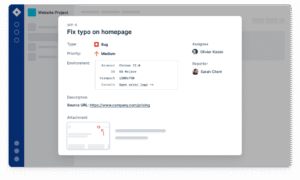
The fields vary depending on the specific company’s policies, but most often each document contains the following items:
| ID | An identification number assigned to a specific bug. |
|---|---|
| Brief Description (may also be called Title or Summary) | A section that briefly describes the bug in one sentence. Answers the question “What?” “Where?”, and “Under what circumstances?” Incorrect: “Problems with the button.” Correct: “Clicking the ‘Register’ button on the main page doesn’t open the registration form.” |
| Project | The name of the project, program, or application in which the bug was identified |
| Version | The exact software version containing the bug. For example, the latest version of iOS (iPhone operating system ) is V 14.7.1. |
| Bug severity | A parameter that determines the impact of a bug on the program’s operation on a scale from S0 to S4 |
| Priority | A parameter that determines the urgency of fixing a bug on a scale from P1 to P3 |
| Status | Determined depending on the stage the bug is at: open, in progress, fixed, rejected, deferred , etc. |
| Author | Creator of the bug report |
| Executor | The developer who will fix the bug |
| Steps to Reproduce | The exact sequence of steps that lead to reproducing the bug |
| Actual result | What does reproducing steps lead to, and how Does the program work now? |
| Expected result | How the program should actually work and what the results of the actions described in the “Steps to Reproduce” section should be |
| Additions | Links, screenshots, videos, and other materials that will help the performer better understand the essence of the problem |
Severity and priority of bugs
Severity is an indicator of a bug’s impact on a program’s operation, whether it can function without a fix or whether the bug breaks the entire system. There are five levels of bug severity:
- S0 Trivial (Trivial) — the bug doesn’t affect the program’s operation, so fixing it may not require a separate task, but rather be addressed alongside other, similar bugs. For example, when filling out a form, the “Date of Birth” field displays 1999 by default, not the current year.
- S1 Minor — the bug barely disrupts the logic of processes, so the program can function normally with it. For example, navigation in the interface is difficult.
- S2 Major (Serious) – the bug creates inconvenience in use, but does not yet impair the functionality of the program.
- S3 Critical — a bug prevents the app from performing basic functions: the expense calculator incorrectly calculates the budget, or text cannot be entered in the text editor.
- S4 Blocker (Blocking) is a situation where a program does not work at all: the site returns a “404 error” or the application does not launch.
Priority is the urgency of a task’s completion. There are three priority levels:
- P1 High – fixed first, as the bug breaks the application’s operation.
- P2 Medium – a bug that must be fixed after a critical one.
- P3 Low – does not require immediate action.
The life cycle of a bug
The status of a bug in a report is determined by its “life cycle,” which consists of four main stages:
- Open — a tester has identified a bug and added it to the report.
- In Progress — the bug has been reported to the performer and is being fixed.
- Fixed (Ready for check) — the performer has finished fixing the bug and has handed the project over to the tester for re-checking.
- Closed – the bug has been fixed and is no longer reproducible.
In addition to the main ones, there are several more statuses:
- Rejected — an error in the report prevented the bug from being fixed, such as an incorrect algorithm in the “Steps to Reproduce” section.
- Deferred – the bug is considered a low priority, and the fix is postponed.
- Reopened – the bug was deferred or rejected, but now the performer has taken it on.
How to write a bug report correctly
A bug report is technical documentation, so it shouldn’t contain unnecessary phrases—just the facts, presented in simple language.
What should you pay attention to when describing a defect?
Identify the root cause. For example, if a website’s password recovery fails, the issue could be in either the backend or the frontend. The tester’s job is to figure this out, as this will determine which developer should handle the bug.
Test on different devices. If the issue occurs on the desktop version, it may also occur on mobile devices, so it’s worth checking.
Test the bug in different software versions. The bug may not be reproducible in the older version, but will appear in the newer version.
Describe the discrepancy with the expected result. To compare the current program performance with the expected result, new developers should consult the technical documentation and requirements specifications, which detail how everything works ideally.
Explore More IT Terms
#
A
- A Guide to SQL Query Formatting
- A/B testing
- Agile
- Algorithm
- Algorithm complexity in 5 minutes
- Algorithms and Data Structures in C#
- An overview of the C # programming language
- An overview of the Python programming language
- Anaconda Python
- Android
- Android App Bundle
- Android SDK
- Angular
- Ansible
- Apache
- Apache Airflow
- Apache Kafka
- Apache Tomcat
- App Store
- AppCode
- Applications of microcontrollers: From simple circuits in electronics to complex systems
- Applications of the derivative
- Arduino: How to Program It: Basics for Beginners
- Array-based stack
- ArrayList
- ASCII
- ASP.NET
- Assembly Language Lessons
B
C
D
- Data Analytics: applications of data analysis in companies
- Data Engineer - Who is it, what does a data engineer do, and an overview of the profession
- Data modeling: what it is, types, and process steps.
- Data preprocessing: a complete guide for beginners and professionals.
- Data structure
- Database Tests with Answers
- Deep Learning
- Defining Aliases
- Defining Arrays
- Deque
- Developing a Website from Scratch
- Differential Equations
- Differentiation of functions
- Digital data: understand the importance of this asset for businesses.
- Double integrals
- Doubly linked lists
E
F
H
- Handling errors and exceptions
- Heads or Tails? How Probability Theory Is Used in IT
- History of the development of computer science
- How to effectively organize your workflow
- How to Learn Java: Tips for Beginner Developers
- How to Learn PHP: A Beginner's Guide
- How to Use S3 Storage in Kubernetes with CSI
- HTML
- HTML and CSS: Definition, Application, and Operating Principles
- HTML and CSS. Layout from Scratch: What to Learn, Where to Learn, and How Long Will It Take?
- HTML Frame Structure
- HTML Link Formatting
I
- if..else construction
- Infinite sequences and series
- Information properties
- Inheritance in Java: A Complete Guide to Principles and Implementation
- Inserting an Image
- Integration of functions
- Interactive Python Tutorial – Learn Programming from Scratch
- Interpreter
- Interview Problem: Finding a Deleted Element in O(N)
- Interview Scare: The FizzBuzz Challenge
- Introduction to C++
- Introduction to Machine Learning
- IT Specialist Resume (CV)
J
K
M
- Machine Learning
- Machine Learning Basic Tool: NumPy
- Machine Learning Basic Tool: Pandas
- Machine Learning Mathematics
- Mathematics for programmers: what is really needed?
- Microcontroller and Microprocessor - what's the difference?
- ML Engineer: Who They Are, What They Do, How Much They Earn, and How to Become a Neural Network Specialist
- Monte Carlo Simulation: How It Works and What It's For
O
P
- PHP lessons
- Private DNS server and its configuration
- Program code
- Programmer's Dictionary
- Programming
- Programming with pseudocode
- Python Code Formatting Guide: PEP8
- Python for data analysis: how to do it and main libraries
- Python Lessons
- Python Superstar: 5 Ways to Use the * Operator
- Python vs. Julia: Should You Replace Python with Julia?
R
S
- SFML Graphics Library Tutorials
- Sorting Algorithms in Programming: Types, Descriptions, and Comparisons
- SQL commands: see what they are, what the main ones are + examples
- SQL Interview Questions and Tasks
- SQL Lessons
- SQL Stored Procedures
- SQL Syntactic Sugar: The COALESCE Function
- Stack
- Start in analytics: Python or R
- Statistical analysis: importance for decision making.
- String formatting in Python
- Structure of computer science
- Swift Lessons
- switch/match construct
- Syntax
T
- Terms in programming
- Text and paragraph formatting tags
- The concept of information and its transmission
- The Future of Python: Key Trends and Insights from Global Researc
- The Infrastructure of Code: A Complete Guide to Repositories for Languages, Frameworks, and Compilers
- The pip package manager in Python
- The role of informatization in the development of society
- Transfers
- Tutorials / Articles
- TypeScript: What It Is and Why Developers Need It
W
- What are databases, and why do they need DBMS and SQL?
- What do Linux distributions consist of?
- What is .NET and what is it used for?
- What is a GPU in a computer, in simple terms?
- What is Arduino: How it Works and the Platform's Capabilities
- What is Big Data? Introduction, Types, Characteristics, and Examples
- What is Golang and what is it used for?
- What is Haskell and what is it used for?
- What is Kotlin and what is it used for?
- What is Linux? The History of Linux
- What is machine learning, and how does it work?
- What is Power BI: everything about the data analytics software
- What is the C++ programming language?
- What is the OSI Model: A Complete Explanation of the Seven Layers and Their Role in Networking
- What's the difference between x86 and ARM processors?
- Where to start learning the C programming language?
- Which Linux distribution should you choose? A Linux distribution overview