
What is Linux? The History of Linux
Computers used to be so large that they could take up an entire room or even a house. Just imagine how difficult it was to operate them. Moreover, each computer had its own operating system, making them incredibly difficult to use. The software on these computers was highly specialized and couldn’t run on any other computer. Not to mention, such technology was so incredibly expensive that ordinary people couldn’t afford it.
To solve the operating system problem, AT&T created the Unix operating system, which gave rise to open source software and the creation of Linux. But let’s take things one step at a time.
The history of Unix
In 1969, a team of developers consisting of Ken Thompson, Dennis Ritchie, and Douglas McIlroy from AT&T‘s Bell Labs research center began a project to create a unified operating system (abbreviated “OS” ) for all computers, calling it “Unix .” The first version of the system was written in Assembly language. In 1972, to rewrite the system in a simpler language, Dennis Ritchie created the C programming language. As a result, on October 15, 1973, a new version of Unix (the fourth) was released, the kernel of which was rewritten in C. Two years later (in 1975), the fifth edition of Unix, written entirely in C, appeared.

For a long time, the operating system remained a research project, but in 1973, the Association for Computing Machinery (ACM) held a conference at which the creators of Unix presented their system, and people immediately began contacting them asking for copies. It’s worth noting one very important historical detail that played a role in the subsequent developments. In 1956, AT&T (then a monopoly in the American local and long-distance phone market) concluded another legal battle with federal authorities and the Antitrust Committee over its monopoly position. The result was an agreement that imposed restrictions on AT&T’s sales of products and services not directly related to telephones and telecommunications. This meant that Unix couldn’t be sold to everyone who wanted it. Due to this fact, the distribution of the source code of the Unix system was absolutely free.
Initially, Unix was used primarily in universities and large financial corporations. By 1978, approximately 600 machines were running Unix.
The emergence of the GNU Project
In the 1980s, many companies, including IBM and HP, began creating their own (including commercial) versions of Unix. This led to a welter of Unix distributions. Furthermore, the companies selling their distributions explicitly prohibited the distribution of their source code. Because of this, other programmers couldn’t use the new system components already implemented, and they had to write them from scratch.
In 1982, Richard Stallman, a programmer at the Massachusetts Institute of Technology (MIT), was faced with the problem that the existing commercial license for the software he was forced to work with limited his freedom of use and did not allow Stallman to share the software’s source code, even within the walls of the institute.
So, in 1983, intending to create an accessible, full-featured, open-source Unix-like operating system that anyone could share, he began developing the GNU project (short for ” GNU is Not Unix “ ).

GNU logo
The GNU Project created the components necessary for developing the operating system kernel: the Emacs text editor, the gcc compiler suite, the bash interpreter, the gzip archiver, the sed, gawk, and Autoconf utilities, among many others. Furthermore, in 1988, in order to legally secure users’ rights to copy, modify, and distribute GNU programs and source code, Stallman published the GNU GPL ( short for ” GNU General Public License “ ). However, despite all his successes, even eight years after the project’s launch, the most crucial component of the operating system—its kernel — was missing.
The History of Linux
In January 1991, Finnish student Linus Torvalds, inspired by the book ” Design and Implementation of Operating Systems” by Andrew S. Tanenbaum, decided to buy a new computer based on the Intel 80386 processor, on which he installed the educational Minix operating system developed by Tanenbaum, to study in detail the concepts and structure of the Unix operating system.
But a training system—that’s what it’s for—has a number of shortcomings. In particular, Minix not only had poor terminal emulation, but also had no way to run a program in the background when it’s not in use.
Then, in August 1991, Torvalds announced on Usenet that he was creating his own (free) open-source operating system— Linux. It’s worth noting that at that point, it wasn’t yet a fully-fledged system, but rather a prototype in the form of a kernel.
On September 17th of the same year, 1991, without any particularly public announcements, Linux version 0.01 was released.
Shortly after, on October 5, Torvalds released version 0.02, which became the first “official” version of his OS.
And already on April 16, 1994, when, in Linus’s opinion, the system became fully operational, the first major release of the system, Linux 1.0, was released after more than two years of development.
Note: The OS was originally called Freax, a portmanteau of the English words “freak” and “free ” with the ending X, as a nod to the Unix operating system. However, the name “Linux” was given to the system by Ari Lemmke, who, at Torvald’s request, placed the OS on the university’s FTP server in the directorylinux.freax.
Opening the operating system’s source code played a decisive role in the further development of Linux. However, it’s important to remember that technically, Linux is just a kernel, without any accompanying applications. It’s the accompanying software that makes it a fully functional operating system. For now, components of Tanenbaum’s educational system have played this role.
Later, when Linux had become a little more established, applications from the GNU project replaced the corresponding programs from Minix, since the license (GNU GPL) for the source code of the GNU project programs was more convenient for use on the young operating system.
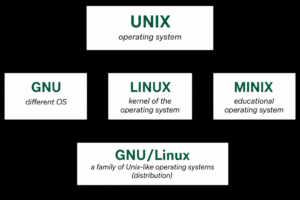
Thus, the world was given a fully functioning operating system called “GNU/Linux,” which we are accustomed to calling simply “Linux,” consisting of the Linux kernel written by Torvalds and the surrounding software created by Stallman’s GNU project.
What is Linux?
Linux is a family of Unix-like operating systems that use the Linux kernel, developed by Finnish-American programmer Linus Torvalds. Operating systems that use the Linux kernel are called Linux distributions, and they are operating systems like Microsoft Windows or Apple macOS, but with one important distinction: their source code is open, as it is distributed under the GNU General Public License (GPL ), which promotes the creation of free and open source software. This means that any user has the right to study and modify the source code.
Note: It is worth noting that there are also paid Linux distributions, such as Red Hat Enterprise Linux, Astra Linux Special Edition, etc.
The official Linux mascot has been Tux the penguin (short for ” Torvalds Unix “ ) since 1996. The idea of using a penguin as the Linux mascot was put forward by the kernel’s creator, Linus Torvalds.
Tux the Penguin – Linux’s Mascot
GNU/Linux or Linux?
There’s a debate in the programming community about the naming of operating systems that use the Linux kernel and software developed under the GNU General Public License. Since the Linux kernel itself isn’t a functioning operating system, many prefer to use the term “GNU/Linux. “
Note: Since the articles in the Linux Lessons series are intended to convey simple terms about Linux systems and their use for beginners, to maintain simplicity and conciseness, we will use the term “Linux”, which refers to operating systems running on the Linux kernel.
You can use both the term “Linux” and the term “GNU/Linux”.
Linux system architecture
The following figure shows the architecture of Linux systems:
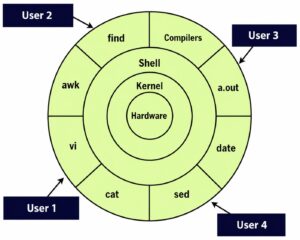
Let’s take a closer look:
“Hardware” is the computer’s hardware (processor, video card, RAM, etc.) with all its peripheral devices.
The kernel is the main component of the operating system, interacting directly with the hardware, acting as an intermediary between the low-level hardware and the higher-level components.
A shell (or ” command interpreter” ) is an interface between system users and the OS kernel, abstracting the system’s internal structure. It accepts commands from users and executes the corresponding functions.
Utilities ( vi, cat, sed, date, compilers, etc.) are utility programs that provide the user with most of the operating system’s functionality.
Linux kernel
The kernel is a kind of main program, the core of the operating system. It acts as an intermediary between the computer’s devices (processor, graphics card, RAM, etc.) and its software, abstracting complex, low-level hardware interactions from ordinary programs and users, providing a simple, clear, and easy-to-use interface in return. To achieve this, device drivers were included in the kernel code. These drivers can be loaded into memory along with the OS kernel or connected to the system as the device’s resources are needed.
Note: The Linux kernel was developed in 1991 by programmer Linus Torvalds. This was the subject of the documentary film “Revolution OS” (2001).
As you probably know, several programs can be running on a computer at once: some run in the background, others may wait for specific user actions, and still others need to receive information from another running program. In such a situation, the kernel is responsible for optimally distributing the computer’s resources among running programs and organizing the parallel operation of multiple processes. It is the first to load into the computer’s RAM and always remains running, constantly interacting with the computer’s hardware and installed programs.
Generally, most kernels are divided into three types:
microkernels;
monolithic;
hybrid.
A microkernel is a kernel consisting of several independent modules loaded into memory as needed, running in separate address spaces. In essence, in this implementation, it is not much different from regular application programs. The advantages of this kernel include theoretically greater reliability compared to other architectures (in reality, however, not everything is so rosy and smooth) and its modularity (easy connection of additional kernel components). The disadvantage of a microkernel architecture is that a kernel built using this scheme is very slow (since it must constantly switch between individual components).
A monolithic kernel is the complete opposite of a microkernel, since the entire (or almost entire) kernel code is always in the computer’s memory, which is why its operating speed is higher compared to a microkernel.
A hybrid kernel is a kernel that combines elements of both monolithic and microkernel architectures.
The Linux kernel, although a monolithic kernel, also borrows some ideas from microkernel architecture, meaning that the entire operating system runs in kernel space, and device drivers (in the form of modules) can be easily loaded (or unloaded) while the operating system is running.
Conclusion
Linux supports a wide range of hardware devices, from phones to supercomputers. Every Linux-based operating system includes a Linux kernel and a suite of software for managing the computer’s hardware resources.
In the following lessons, we’ll take a closer look at the GNU GPL license, compare Linux and Windows, review Linux distributions, and continue our dive into Linux.
Explore More IT Terms
#
- Using an integrating factor
- Equations in total differentials
- Bernoulli's equation
- Linear differential equations of the first order
- 10 Mixed C++ Challenges to Test Your Skills
- 11 Tricky Non-Technical Questions to Ask in a Recruiting Interview
- 50 Terms Every Programmer Should Know
- 52 Java Thread Interview Questions
- 7 Levels of Using the Zip Function in Python
- 7 Python Code Bugs You Need to Fix
- 70+ Free Resources for Learning Programming
A
- A Comprehensive Guide to HTML and CSS
- A Comprehensive Guide to MODX CMS
- A computer science question tests your ability to work with IP addresses and network masks
- A Guide to SQL Query Formatting for Beginners
- A/B testing
- Abstract Data Type (ADT)
- AES Encryption Algorithm: How It Works and Where It's Used
- Agile
- Algorithm
- Algorithm Analysis
- Algorithm Complexity-Key Points
- Algorithm complexity: deep parsing O(log n)
- Algorithm vs. Program
- Algorithms and Data Structures in C#
- An overview of the C # programming language
- An overview of the Python programming language
- Anaconda Python
- Analysis of graphs and adjacency matrices question
- Android
- Android App Bundle
- Android SDK
- Angular
- Ansible
- Apache
- Apache Airflow
- Apache Kafka
- Apache Tomcat
- App Store
- AppCode
- Applications of microcontrollers: From simple circuits in electronics to complex systems
- Applications of the derivative
- Arduino: How to Program It: Basics for Beginners
- Array-based stack
- ArrayList
- ASCII
- ASP.NET
- Assembly Language Lessons
B
C
- C++ Lessons
- Cache
- Calculating Memory Capacity
- Character sets and encodings
- Characteristics of a good Algorithm
- Circular singly linked list
- Coding Tests with Answers
- Combinational Circuits Solved Questions
- Compiler
- Complexity of algorithms-Tutorial
- Computer Science Fundamentals Test with Answers (47 questions)
- Computer science tests with answers (More than 100 Questions)
- Constants
- Creating a Table in HTML
- Creating Forms in HTML
- Creating Lists
- Cybernetics and informatics
- Cycles
D
- Data Analytics: applications of data analysis in companies
- Data Engineer - Who is it, what does a data engineer do, and an overview of the profession
- Data modeling: what it is, types, and process steps.
- Data preprocessing: a complete guide for beginners and professionals.
- Data structure
- Data Structures and Algorithms (DSA)
- Data types vs. Data structures
- Database Tests with Answers
- Deep Learning
- Defining Aliases
- Defining Arrays
- Deque
- Detailed articles and tutorials on PHP
- Developing a Website from Scratch
- Differential Equations
- Differentiation of functions
- Digital data: understand the importance of this asset for businesses.
- Double integrals
- Doubly linked lists
- DSA Tutorial
E
F
G
H
- Handling errors and exceptions
- Heads or Tails? How Probability Theory Is Used in IT
- History of the development of computer science
- Homogeneous equations
- Homogeneous vs. non-homogeneous structures
- How to effectively organize your workflow
- How to Learn Java: Tips for Beginner Developers
- How to Learn PHP: A Beginner's Guide
- How to Use S3 Storage in Kubernetes with CSI
- HTML
- HTML and CSS: Definition, Application, and Operating Principles
- HTML and CSS. Layout from Scratch: What to Learn, Where to Learn, and How Long Will It Take?
- HTML Frame Structure
- HTML Link Formatting
- HTML Quizzes with Answers
I
- if..else construction
- Infinite sequences and series
- Information properties
- Inheritance in Java: A Complete Guide to Principles and Implementation
- Inserting an Image
- Integration of functions
- Interactive Python Tutorial – Learn Programming from Scratch
- Interpreter
- Interview Problem: Finding a Deleted Element in O(N)
- Interview Scare: The FizzBuzz Challenge
- Introduction to C++
- Introduction to Machine Learning
- Introduction to Networking | Network Fundamentals Part 1
- Introduction to Number Systems (Binary, Octal, Hexadecimal) | Math for CS Foundations #1
- IT Specialist Resume (CV)
J
K
L
M
- Machine Learning
- Machine Learning Basic Tool: NumPy
- Machine Learning Basic Tool: Pandas
- Machine Learning Mathematics
- Mathematics for programmers: what is really needed?
- MD5 encryption algorithm: What is it and why is it needed?
- Microcontroller and Microprocessor - what's the difference?
- ML Engineer: Who They Are, What They Do, How Much They Earn, and How to Become a Neural Network Specialist
- Monte Carlo Simulation: How It Works and What It's For
O
P
- PHP lessons
- Private DNS server and its configuration
- Program code
- Programmer's Dictionary
- Programming
- Programming with pseudocode
- Python Code Formatting Guide: PEP8
- Python for data analysis: how to do it and main libraries
- Python Lessons
- Python Superstar: 5 Ways to Use the * Operator
- Python vs. Julia: Should You Replace Python with Julia?
R
S
- SFML Graphics Library Tutorials
- Sorting Algorithms in Programming: Types, Descriptions, and Comparisons
- SQL commands: see what they are, what the main ones are + examples
- SQL Interview Questions and Tasks
- SQL Lessons
- SQL Stored Procedures
- SQL Syntactic Sugar: The COALESCE Function
- Stack
- Start in analytics: Python or R
- Static vs. dynamic data structures
- Statistical analysis: importance for decision making.
- String formatting in Python
- Structure of computer science
- Swift Lessons
- switch/match construct
- Syntax
T
- Terms in programming
- Text and paragraph formatting tags
- The Complete Guide to Bootstrap
- The Complete Guide to JavaScript
- The concept of information and its transmission
- The Future of Python: Key Trends and Insights from Global Researc
- The Infrastructure of Code: A Complete Guide to Repositories for Languages, Frameworks, and Compilers
- The pip package manager in Python
- The role of informatization in the development of society
- Transfers
- Tricky Java Questions Often Asked in Interviews
- Tutorials / Articles
- TypeScript: What It Is and Why Developers Need It
W
- What are databases, and why do they need DBMS and SQL?
- What do Linux distributions consist of?
- What is .NET and what is it used for?
- What is a data structure?
- What is a GPU in a computer, in simple terms?
- What is a quantum computer: 100,500 problems in one second
- What Is an Algorithm?
- What is Arduino: How it Works and the Platform's Capabilities
- What is Big Data? Introduction, Types, Characteristics, and Examples
- What is FizzBuzz Challenge?
- What is Golang and what is it used for?
- What is Haskell and what is it used for?
- What is Kotlin and what is it used for?
- What is Linux? The History of Linux
- What is machine learning, and how does it work?
- What is Power BI: everything about the data analytics software
- What is recursion, recursive and iterative process in programming?
- What is the C++ programming language?
- What is the OSI Model: A Complete Explanation of the Seven Layers and Their Role in Networking
- What's the difference between x86 and ARM processors?
- Where to start learning the C programming language?
- Which Linux distribution should you choose? A Linux distribution overview